---
title: What Is DMARC rua? The Report Tag, With Examples | SendHQ
description: DMARC rua is the tag that tells mailbox providers where to send daily aggregate reports. See rua vs ruf, fo values and third-party report setup.
canonical: https://sendhq.cc/blog/dmarc-rua
last-updated: 2026-11-22
author: Dhrumil Barot
author_bio: Dhrumil is an email marketing expert. Dhrumil built SendHQ so developers and AI agents can send, receive and track email without fighting deliverability on their own.
published: 2026-11-22
updated: 2026-11-22
---
# What Is DMARC rua? The Aggregate Report Tag, rua vs ruf and fo Explained
By [Dhrumil Barot](https://sendhq.cc/about.md#founder), Founder
DMARC rua is the tag that tells mailbox providers where to send daily aggregate reports. See rua vs ruf, fo values and third-party report setup.
Published November 22, 2026 · Updated November 22, 2026
**TL;DR:** `rua` is the DMARC tag that lists where mailbox providers send aggregate reports: a daily XML summary of every IP that sent mail as your domain and whether it passed SPF, DKIM and alignment. `ruf` asks for per-message failure reports, which Gmail and many others never send. If your rua address is on another domain, that domain must publish a `_report._dmarc` verification record or the reports silently stop. SendHQ publishes the SPF, DKIM and DMARC records for the domains you send from, so the mail you send yourself shows up in those reports as aligned.
> Sending product or agent email from your own domain? [Create a SendHQ workspace](https://sendhq.cc/index.md) and get DKIM, SPF and DMARC records generated at domain setup.
DMARC rua is the "reporting URI for aggregate data" tag in a DMARC record, a comma-separated list of `mailto:` addresses that receivers send aggregate feedback to ([RFC 7489, section 6.3](https://www.rfc-editor.org/rfc/rfc7489)). A record such as `v=DMARC1; p=none; rua=mailto:dmarc@example.com` tells Gmail, Yahoo, Microsoft and other receivers: once a day, send `dmarc@example.com` a report of every message that claimed to be from `example.com`. The tag is optional, but without it DMARC enforces a policy and tells you nothing. With it, you can see which services send as your domain, which ones fail, and when it is safe to move from `p=none` to `p=reject`.
## What is rua in DMARC?
rua is the address list for aggregate reports. Each report is an XML file, usually gzipped and attached to an email, that groups messages by sending IP and lists counts, the SPF and DKIM results, whether each was aligned with the From domain, and what policy the receiver applied. It contains no message content, no subjects and no recipient addresses, which is why almost every receiver that does DMARC sends it.
RFC 7489 defines the timing through a second tag, `ri` (report interval). Its default is `86400` seconds, one day. Receivers must be able to send daily reports and should be able to send hourly ones, but anything other than daily is best effort. In practice, set no `ri` and expect one report per receiver per day.
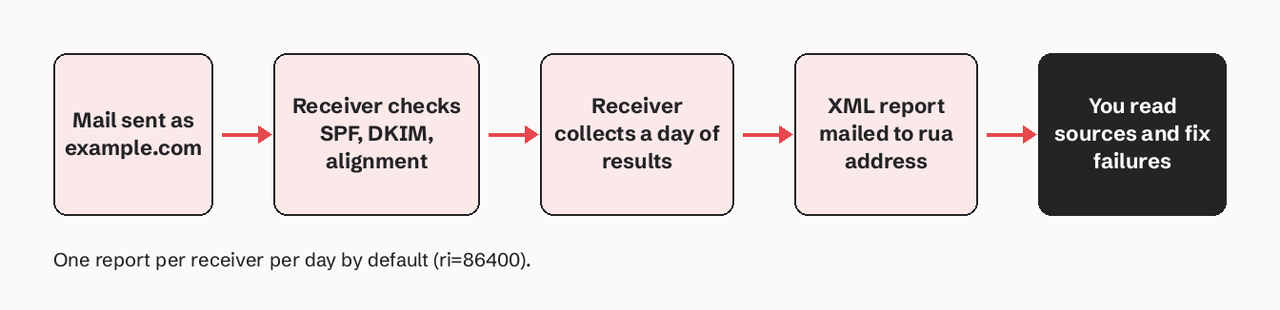
One report per receiver per day by default (ri=86400).
## Why does rua matter?
rua matters because DMARC enforcement without reports is guesswork. A concrete scenario: your product sends password resets through an email API, your sales team uses a CRM, and finance sends invoices from accounting software. Only the API was set up with DKIM on your domain. If you jump straight to `p=reject`, invoices and CRM mail start bouncing, and nobody tells you why.
With `rua` set at `p=none`, the reports show three sources within a day or two: the API at 100% aligned, the CRM failing DKIM alignment, the accounting tool failing both. You fix the two, watch the next reports go clean, then tighten the policy as described in our guide to [DMARC p=none, quarantine and reject](https://sendhq.cc/blog/dmarc-policy-p-none-quarantine-reject).
## Where SendHQ fits
SendHQ is an email API for sending and receiving email from products and AI agents, and it handles the sending side of DMARC for the mail it sends:
- **Records at domain setup:** when you add a domain, SendHQ provisions three DKIM CNAMEs, an SPF TXT policy, a DMARC TXT policy and a verification TXT value ([SendHQ domains docs](https://sendhq.cc/docs/domains.md)).
- **No silent overwrite:** if you already have a DMARC record, SendHQ reports the DMARC value to retain instead of replacing your policy, so your existing `rua` stays in place.
- **Per-message evidence:** delivery, bounce, complaint and reject events for each message, plus breakdowns by sending domain and sender (`GET /deliverability/domains`, `GET /deliverability/senders`) ([deliverability docs](https://sendhq.cc/docs/deliverability.md)).
- **Price:** Starter is $9/month for 50,000 emails ([pricing](https://sendhq.cc/pricing.md)).
What it does not do: SendHQ does not receive or parse DMARC aggregate reports. Point `rua` at a mailbox you read or at a report processor; our roundup of [DMARC monitoring tools](https://sendhq.cc/blog/dmarc-monitoring-tools) compares the options. What SendHQ changes is the content of those reports: mail sent through it is signed with DKIM on your domain, so it shows as aligned and the failures that remain are the ones worth chasing.
## Worked example: reading one aggregate report row
Here is the record and one report row, simplified from the XML a receiver sends.
`_dmarc.example.com. TXT "v=DMARC1; p=none; rua=mailto:dmarc@example.com; fo=1; ruf=mailto:dmarc-fail@example.com"`
```
203.0.113.25
1240
none
fail
pass
example.com
```
Read it like this: 1,240 messages from `203.0.113.25` claimed `example.com` in the From header. SPF passed with alignment, DKIM did not, and because one aligned pass is enough, all 1,240 passed DMARC. The receiver applied `none` because the policy is `p=none`. With `fo=1`, a receiver that sends failure reports could still send one per message here, because one mechanism produced something other than an aligned pass.
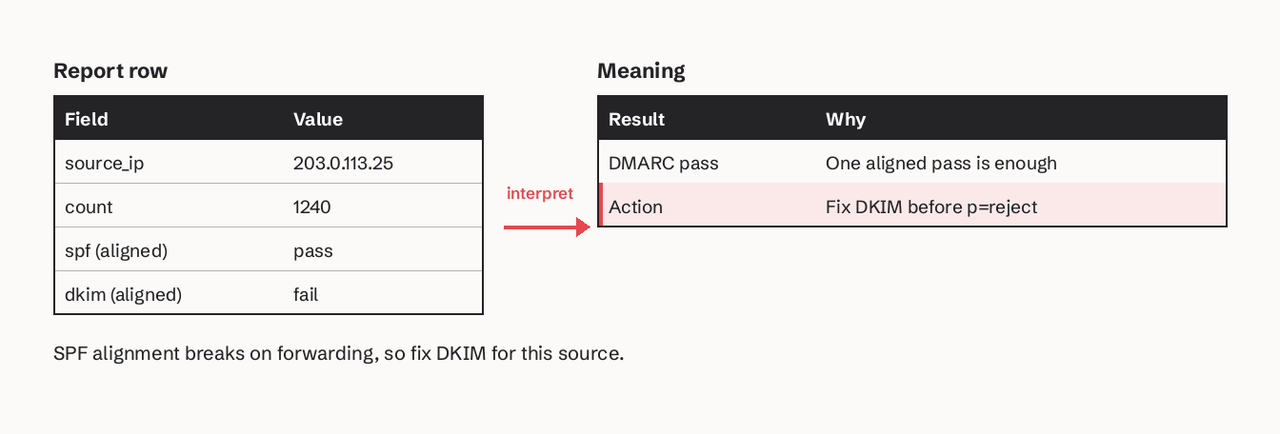
SPF alignment breaks on forwarding, so fix DKIM for this source.
The action: SPF alignment fails when mail is forwarded, as our post on [DMARC aspf](https://sendhq.cc/blog/dmarc-aspf) explains, so this source needs DKIM signing on your domain before you enforce.
## What is the difference between rua and ruf?
rua gets daily aggregate counts; ruf gets a copy of details for individual failing messages. The table below sets them side by side.
rua (aggregate) | ruf (failure / forensic)
| What you get | XML summary per receiver per day | One report per failing message |
| --- | --- | --- |
| Content | IPs, counts, SPF/DKIM/alignment results | Headers, often subject, URLs, sometimes body |
| Timing | Daily by default (`ri=86400`) | Near real time |
| Who sends it | Gmail, Yahoo, Microsoft and most receivers | Few receivers; Gmail does not |
| Privacy risk | Low | High: contains message data |
| Controlled by | `rua`, `ri` | `ruf`, `fo`, `rf` |
## Which mailbox providers send ruf data?
Few large mailbox providers send them. Google states plainly that Gmail does not support the `ruf` tag ([Google Workspace Admin Help](https://support.google.com/a/answer/2466580)). Failure reports carry headers, subjects, URLs and attachments of real messages, so most receivers and many domain owners avoid them for privacy and compliance reasons ([EasyDMARC](https://easydmarc.com/blog/what-are-rua-and-ruf-in-dmarc/)). Add `ruf` if you want whatever arrives, but plan your monitoring around `rua`.
## What does fo=1 mean?
`fo` sets when a receiver should send a failure report, and it is ignored unless `ruf` is also set. The default is `0`. Values can be combined with colons, for example `fo=1:d:s` ([RFC 7489, section 6.3](https://www.rfc-editor.org/rfc/rfc7489)).
| fo value | Sends a failure report when |
| --- | --- |
| `0` (default) | All mechanisms fail to produce an aligned pass |
| `1` | Any mechanism produces something other than an aligned pass |
| `d` | A DKIM signature failed evaluation, aligned or not |
| `s` | SPF failed, aligned or not |
`fo=1` is the most useful setting while you are fixing sources, because it reports partial failures that `fo=0` hides.
## Can rua point to a third-party address?
Yes, but the other domain must agree. When the rua address is on a different domain than the policy, the receiver looks up a TXT record at `._report._dmarc.` and needs it to contain `v=DMARC1` (RFC 7489, section 7.1). Without it, receivers drop your reports and nothing warns you.
```
; published by the report receiver, e.g. a DMARC service
example.com._report._dmarc.reports.example.net. TXT "v=DMARC1"
; or authorize every domain at once
*._report._dmarc.reports.example.net. TXT "v=DMARC1"
```
Hosted DMARC services publish this for you. If you route reports to your own second domain, publish it yourself. You can also cap report size with `!` after the address, for example `rua=mailto:dmarc@reports.example.net!10m`. List two addresses separated by a comma to send reports to both a mailbox and a tool. Use our free [email DNS checker](https://sendhq.cc/tools/email-dns-checker.md) to see your current DMARC record.
## Common pitfalls
- **Missing \`mailto:\`**: `rua=dmarc@example.com` is invalid; it must be `rua=mailto:dmarc@example.com`.
- **Two DMARC records**: receivers treat multiple records at `_dmarc` as no record. Edit the one record.
- **No external verification record**: reports to a third-party domain silently stop.
- **A personal inbox as rua**: large domains get dozens of XML files a day. Use a dedicated address or a processor.
- **Registrar defaults**: some registrars add their own rua. GoDaddy domains bought since April 2025 get `rua=mailto:dmarc_rua@onsecureserver.net`, which sends your reports to GoDaddy, not you.
## FAQ
### What is rua in DMARC?
rua is the DMARC tag listing the `mailto:` addresses where receivers send daily aggregate XML reports about mail that used your domain in the From header.
### What is the difference between rua and ruf?
rua gets daily aggregate counts per sending IP with no message content. ruf asks for individual failure reports with message details, and most large providers, including Gmail, do not send them.
### Can I send DMARC reports to another domain?
Yes. The receiving domain must publish a TXT record `v=DMARC1` at `yourdomain.com._report._dmarc.theirdomain.com`, or a wildcard `*._report._dmarc.theirdomain.com`.
### Who sends DMARC forensic reports?
Only some receivers. Gmail states it does not support `ruf`, and many providers skip failure reports for privacy reasons.
### What does fo=1 mean?
`fo=1` asks receivers to send a failure report when any mechanism, SPF or DKIM, fails to produce an aligned pass, not only when both fail.
### Is rua required for DMARC?
No. RFC 7489 marks it optional, but without it you have no evidence for when it is safe to move to `p=quarantine` or `p=reject`. See our [DMARC check guide](https://sendhq.cc/guides/dmarc-check.md).
Want the mail your product and agents send to show up aligned in every rua report? [Start a SendHQ workspace](https://sendhq.cc/index.md) and send your first email from a verified domain.
## Related articles
[DKIM Record Example: 8 Real Formats With Every Tag Decoded](https://sendhq.cc/blog/dkim-record-example) [8 Best DMARC Monitoring Tools for Small Teams (Compared)](https://sendhq.cc/blog/dmarc-monitoring-tools) [DMARC aspf Explained: Strict vs Relaxed SPF Alignment](https://sendhq.cc/blog/dmarc-aspf)