---
title: "HTML Email Resources: 20 Tools, Frameworks and Specs"
description: An HTML email is a message with an HTML body styled by inline CSS. These 20 resources cover client support, frameworks, inliners and testing.
canonical: https://sendhq.cc/blog/html-email
last-updated: 2026-11-05
author: Dhrumil Barot
author_bio: Dhrumil is an email marketing expert. Dhrumil built SendHQ so developers and AI agents can send, receive and track email without fighting deliverability on their own.
published: 2026-11-05
updated: 2026-11-05
---
# HTML Email Resources: 20 Tools, Frameworks and Specs

By [Dhrumil Barot](https://sendhq.cc/about.md#founder), Founder

An HTML email is a message with an HTML body styled by inline CSS. These 20 resources cover client support, frameworks, inliners and testing.

Published November 5, 2026 · Updated November 5, 2026

**TL;DR:** An HTML email is a message whose body is written in HTML and CSS instead of plain text, usually sent next to a plain-text copy. Building one well needs four kinds of resource: a client support table (Can I email), a framework (MJML, Maizzle or React Email), a CSS inliner (Juice) and a test tool (Mailpit locally, Parcel or Mailgun Inspect for client previews).

An HTML email is an email whose content is an HTML document, so it can carry layout, colours, images, buttons and links, while a plain-text email carries only characters. The HTML email format is a MIME message: the HTML body and a plain-text fallback sit side by side in a `multipart/alternative` part, defined in [RFC 2046](https://www.rfc-editor.org/rfc/rfc2046) in 1996, and the reader's client shows the richest version it supports. The hard part is that every client renders HTML differently: Gmail ignores CSS it does not support, classic Outlook for Windows uses its own engine with partial `<style>` support and no flexbox, and every client strips JavaScript and forms. So HTML email formatting looks like 2005 web development: tables for layout, CSS inlined into `style` attributes, and testing in real clients. The resources below are the ones worth your time, grouped by job, each with its cost and why it earns a place.

![An HTML email travels as one MIME message holding a plain-text part and an HTML part](https://cdn.sanity.io/images/l4lj7ros/production/f6ec79ca6e49260705383c0e618f2169d78a6c2e-1344x326.png?w=1280&auto=format)

Clients without HTML support show the text/plain part.

## What is an HTML email?

An HTML email is a message whose body uses HTML markup and CSS for presentation, sent with the `Content-Type: text/html` part, almost always inside `multipart/alternative` with a `text/plain` twin. It is not a web page: there is no JavaScript, no forms, no external stylesheet you can rely on, and the "browser" is whichever of dozens of mail clients the reader uses. Our [MIME explainer](https://sendhq.cc/terms/mime) shows how the parts are assembled.

A minimal, client-safe skeleton looks like this:

```
<!DOCTYPE html>
<html lang="en">
<head>
  <meta charset="utf-8">
  <meta name="viewport" content="width=device-width, initial-scale=1">
  <meta name="color-scheme" content="light dark">
  <title>Your receipt</title>
</head>
<body style="margin:0; padding:0; background:#f4f4f5;">
  <table role="presentation" width="100%" cellpadding="0" cellspacing="0" border="0">
    <tr>
      <td align="center" style="padding:24px;">
        <table role="presentation" width="600" style="max-width:600px; width:100%; background:#ffffff;">
          <tr>
            <td style="padding:32px; font-family:Arial, sans-serif; font-size:16px; line-height:24px; color:#111827;">
              <h1 style="margin:0 0 16px; font-size:22px;">Thanks for your order</h1>
              <p style="margin:0 0 24px;">Order #1042 is confirmed.</p>
              <a href="https://example.com/orders/1042" style="display:inline-block; padding:12px 20px; background:#2563eb; color:#ffffff; text-decoration:none; border-radius:6px;">View order</a>
            </td>
          </tr>
        </table>
      </td>
    </tr>
  </table>
</body>
</html>
```

Video: [What Is HTML Email?](https://www.youtube.com/watch?v=1hYCn5yug6c) (Envato)

The first two minutes define HTML email against plain text, explain why each mail client renders HTML and CSS differently and blocks JavaScript and forms, and point to MJML and preview testing as the standard workflow.

1. [0:00](https://www.youtube.com/watch?v=1hYCn5yug6c) Plain text versus HTML email formats
2. [0:45](https://www.youtube.com/watch?v=1hYCn5yug6c&t=45s) Why building email differs from building a web page
3. [1:09](https://www.youtube.com/watch?v=1hYCn5yug6c&t=69s) Clients block JavaScript and forms for security
4. [1:31](https://www.youtube.com/watch?v=1hYCn5yug6c&t=91s) Frameworks like MJML and testing before sending

## Support tables: what does each client render?

Start every design decision here. These answer "can I use this CSS in email?" before you write it.

- [Can I email](https://www.caniemail.com/): the caniuse.com of email, free. It tracks 308 HTML and CSS features across clients; Apple Mail on macOS supports 288 of them. Recent entries (September 2026) cover SVG images and the `color-scheme` meta tag. It is sponsored by Resend, which it discloses.
- [Can I email scoreboard](https://www.caniemail.com/scoreboard/): free ranking of clients by feature support. Use it to explain to a designer why Apple Mail and classic Outlook will never look the same.
- [Gmail CSS support](https://developers.google.com/workspace/gmail/design/css): Google's own page, free. Gmail accepts `<style>` blocks, class, element and ID selectors and media queries on width, orientation and resolution, and silently drops unsupported properties. The authoritative list for the largest webmail.
- [Email Bugs on GitHub](https://github.com/hteumeuleu/email-bugs): free issue tracker of real rendering bugs in Outlook.com, Yahoo Mail and Thunderbird, by Rémi Parmentier. Search it when a layout breaks in one client only.

![Support for the style element and flexbox differs sharply between clients](https://cdn.sanity.io/images/l4lj7ros/production/db78d47d64209f9ab8509fcf6245567ae9fb4444-1344x456.png?w=1280&auto=format)

Classic Outlook is why email layout still uses tables.

## Frameworks: which tools compile components into email markup?

A framework lets you write components and compiles them to the nested-table, inlined HTML that clients need. Pick by the stack your team already uses.

- [MJML](https://documentation.mjml.io/): free, open source, created by Mailjet. You write `<mj-section>` and `<mj-column>` and it outputs responsive table HTML. Best for teams that want markup, not JavaScript; ports exist for Rust (MRML), Python, .NET and Laravel.
- [Maizzle](https://maizzle.com/docs/introduction): free, open source. Vue single-file components plus Tailwind CSS; the production build inlines CSS, purges unused styles and adds Outlook fallbacks. Best if you already think in Tailwind utilities.
- [React Email](https://react.email/docs/introduction): free, MIT licensed, maintained by Resend. JSX components rendered to an HTML string with `render()`, tested in Gmail, Apple Mail, Outlook, Yahoo Mail, HEY and Superhuman. Best for TypeScript and Next.js codebases; works with any sending API that accepts HTML.

```
<mjml>
  <mj-body background-color="#f4f4f5">
    <mj-section background-color="#ffffff">
      <mj-column>
        <mj-text font-size="22px">Thanks for your order</mj-text>
        <mj-button href="https://example.com/orders/1042">View order</mj-button>
      </mj-column>
    </mj-section>
  </mj-body>
</mjml>
```

Building in Node? Our guide to [sending transactional email from Node.js](https://sendhq.cc/blog/send-transactional-email-nodejs-api) shows where the rendered HTML string goes in the API call.

## Why does email need inline CSS?

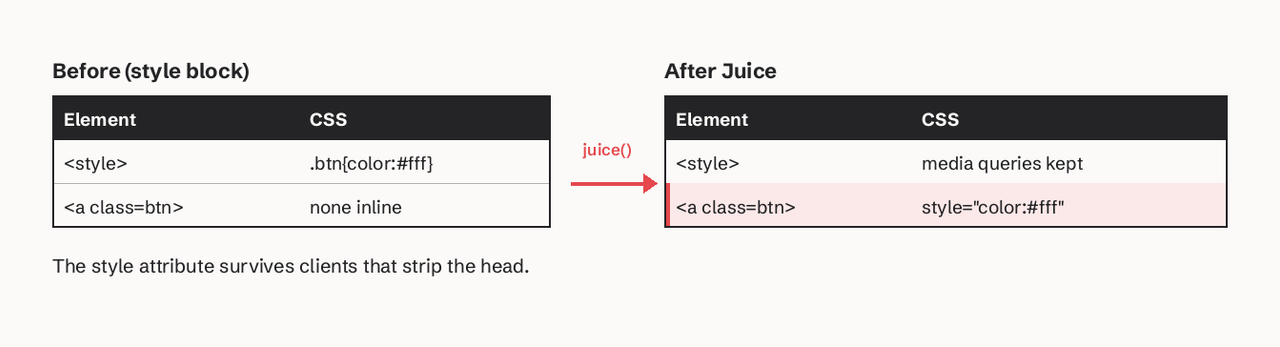
HTML emails need inline CSS because some clients drop or limit `<style>` blocks: classic Outlook for Windows has partial support, and older or forwarded paths (mobile apps, some webmails, forwarding chains) strip the head entirely. A `style` attribute on the element survives all of them. Keep a `<style>` block too, for media queries and dark mode, which inline styles cannot express.

- [Juice](https://github.com/Automattic/juice): free, open source, by Automattic. Node library and CLI; `juice("<style>div{color:red;}</style><div/>")` returns `<div style="color: red;"></div>`. It flattens modern CSS nesting before inlining. Run it in your build, not by hand.
- [Lee Munroe's responsive template](https://github.com/leemunroe/responsive-html-email-template): free, MIT. One clean template with a call-to-action button, shipped in both `email.html` and `email-inlined.html`, so you can see exactly what inlining changes. Its README states the rule plainly: if you send through an API, inline before sending.

```
import juice from "juice";

const html = juice(rawTemplateHtml, { preserveMediaQueries: true });
// send `html` as the html body, plus a text version
```
![Inlining copies class styles from the style block onto each element](https://cdn.sanity.io/images/l4lj7ros/production/78f29f61dfeb17797edf7e12685ffcfe010a13ec-1344x364.png?w=1280&auto=format)

The style attribute survives clients that strip the head.

## How do I test rendering across mail clients?

Test in two layers: capture every message locally while developing, then preview in real clients before a template ships.

- [Mailpit](https://mailpit.axllent.org/): free, open source, single binary or Docker image. A fake SMTP server with a web UI, an HTML compatibility checker against common clients, a link checker, SpamAssassin or Rspamd scoring and a REST API for integration tests. The best free default for local development.
- [Parcel](https://parcel.io/pricing): a code editor built for email. The Community plan is $0 (50 emails, HTML problem checking, previews); Pro is $29 per user per month. It also publishes free tools such as an EML viewer.
- [Mailgun Inspect (formerly Email on Acid)](https://www.emailonacid.com/pricing/): screenshots in 100+ clients and devices. Basic is $99 a month for 1,000 previews, Premium $199 for 2,000, $0.15 per extra preview (prices checked November 2026). Worth it when a broken Outlook render costs you real money.
- [Litmus](https://www.litmus.com/pricing): the other long-standing preview suite, now part of Validity Engage; pricing is quote-based. Its blog and dark mode guides are useful even without an account.

Before relying on previews, check the message size: Gmail clips messages over roughly 102KB and hides the rest behind a "View entire message" link ([Email on Acid](https://www.emailonacid.com/blog/article/email-development/gmail-clipping/)), which can hide your footer and unsubscribe link. Bloated inlined CSS and whitespace from templating engines are the usual causes.

## Code references and learning

- [Good Email Code](https://www.goodemailcode.com/): free, by Mark Robbins. Copy-paste base template, preview text, button-styled links and spacing, each with the reasoning behind it, plus accessibility notes on headings, ARIA landmarks and `rem` units.
- [Parcel's Learn Email course](https://parcel.io/): free course on the foundations of HTML and CSS for email, from the same team as the editor.
- [RFC 2046](https://www.rfc-editor.org/rfc/rfc2046): the MIME media types spec. Read the `multipart/alternative` section once and multipart bugs stop being mysterious.
- [SendHQ email templates](https://sendhq.cc/templates.md): free, ready transactional layouts (receipt, password reset, magic link, verification, welcome) to start from, with a [responsive design guide](https://sendhq.cc/guides/email-responsive-design-template).

## Where should a beginner start?

1. Read Good Email Code's base template and copy it as your skeleton.
2. Check every CSS property you plan to use on Can I email.
3. Build your first template in MJML (markup) or React Email (TypeScript), whichever matches your stack.
4. Inline with Juice, or let the framework's build do it, and generate a plain-text version.
5. Send it to Mailpit locally and fix what its compatibility checker flags.
6. Before launch, preview in Gmail, Apple Mail and classic Outlook with Parcel or Mailgun Inspect, and keep the message under 102KB.

## From template to production sending

Once templates render, the next problem is operating them: which version a customer actually received, and what happens when a variable is missing. [SendHQ](https://sendhq.cc/index.md) hosted templates declare typed variables, reject a render with a 422 when data does not match, escape inserted values by context, and record the published release and a rendered-content hash on every send, so a support ticket about a broken receipt traces back to the exact HTML that went out. If your mail is mostly transactional, our [transactional vs marketing email guide](https://sendhq.cc/guides/transactional-email-vs-marketing.md) explains why it belongs on a separate stream.

## FAQ

### What is an HTML email template?

An HTML email template is a reusable HTML email layout with placeholders, such as `{{first_name}}` or an order total, that your code or email service fills in at send time. Good templates are table-based, have CSS inlined, include a plain-text version and are tested in the major clients.

### Is HTML email better than plain text?

Neither is better for every message. HTML supports branding, buttons and tables such as receipts; plain text is lighter and looks personal. Send both in one `multipart/alternative` message so each client shows what it supports.

### Can I use JavaScript or forms in HTML email?

No. Mail clients strip JavaScript and generally block forms for security, so interactive behaviour must be a link to a web page.

### Why does my HTML email look broken in Outlook?

Classic Outlook for Windows (2007 to 2019 versions) renders HTML with a limited engine: partial `<style>` support, no flexbox and weak support for many modern properties. Use table layouts, inline styles and Outlook conditional comments, which MJML and Maizzle generate for you.

### How big can an HTML email be?

Keep the HTML under about 102KB. Gmail clips larger messages and shows only the first part with a "View entire message" link.

### Can I send HTML email from Gmail?

Gmail's composer is not designed for pasting custom HTML and may alter the code. For production or transactional mail, send through an email API or SMTP service that accepts your HTML body as is.

## Keep reading

- [Idempotency Keys for Email APIs](https://sendhq.cc/blog/idempotency-keys-email-api): Prevent duplicate emails during network retries by implementing idempotency keys. Learn how to handle distributed system failures without sp Read article →
- [Designing Email Webhooks for At-Least-Once Delivery](https://sendhq.cc/blog/email-webhook-reliability-patterns): Learn how to build resilient webhook consumers for email events using retries, idempotency keys, and signature verification to ensure no del Read article →
- [The Transactional Email Migration Playbook](https://sendhq.cc/blog/transactional-email-migration-playbook): Migrating transactional email providers without losing observability requires a phased approach: dual-sending, event parity mapping, and gra Read article →
