
Guides
6 Best Email APIs for Django (Compared)
The best email APIs for Django are SendHQ, Postmark, Amazon SES, Mailgun, Resend and SendGrid. Compare backend setup, anymail support, inbound and price.
Published · Updated
TL;DR: The best email APIs for Django are SendHQ (REST API with inbound, delivery events and a hard $9 cap, wired in through a 30-line custom backend), Postmark (fast transactional mail, full django-anymail support), Amazon SES (cheapest at volume), Mailgun (inbound routing), Resend (developer API with a 3,000 email free tier) and SendGrid (enterprise scale). If you want zero custom code, pick a provider django-anymail supports; if you want sending, receiving and bounce visibility in one place for a fixed price, pick SendHQ.
Create a SendHQ account and send your first Django email from a verified domain.
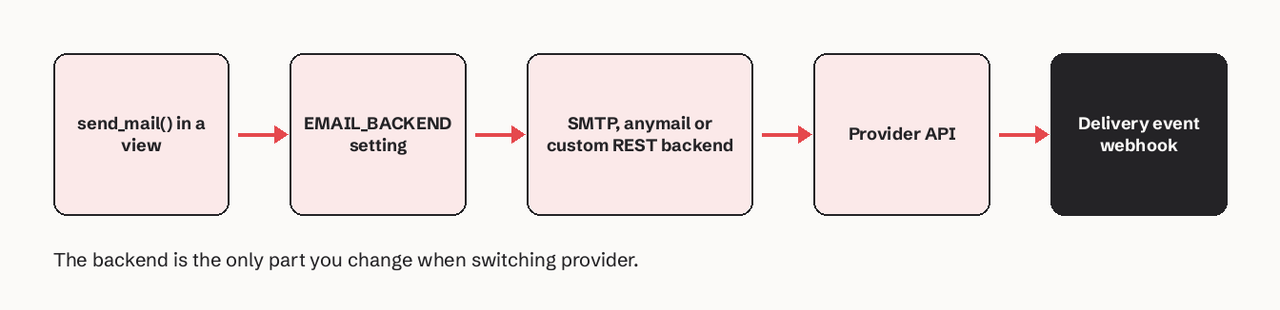
Django sends email through django.core.mail, and the EMAIL_BACKEND setting decides how the message leaves your app: over SMTP with EMAIL_HOST and EMAIL_PORT, or through an HTTP API backend (Django docs). For production transactional email (password resets, receipts, login codes), an API backend is the better choice: it returns a message ID, reports errors as structured responses instead of SMTPException, and lets you receive bounce and delivery events by webhook. The most common route is django-anymail, which in version 15.3 supports 14 providers including Amazon SES, Mailgun, Postmark, Resend and SendGrid (Anymail supported ESPs). The other route is a small custom backend that calls the provider's REST API directly. Below, six providers compared on how they plug into Django, what they cost and whether they receive mail.
How we judged Django email APIs
- Django integration: a django-anymail backend, an SMTP endpoint for the built-in backend, or a REST API you wrap yourself.
- Inbound email: can the provider receive mail and hand it to a Django view?
- Delivery events: bounces, complaints and deliveries pushed to a webhook you can verify.
- Price at 50,000 emails a month and what happens when you exceed it.
- Free tier or trial for testing before you pay.
We did not rank on "deliverability rates": no provider publishes comparable, audited numbers, and inbox placement depends mostly on SPF, DKIM, DMARC and your list. The table sums it up:
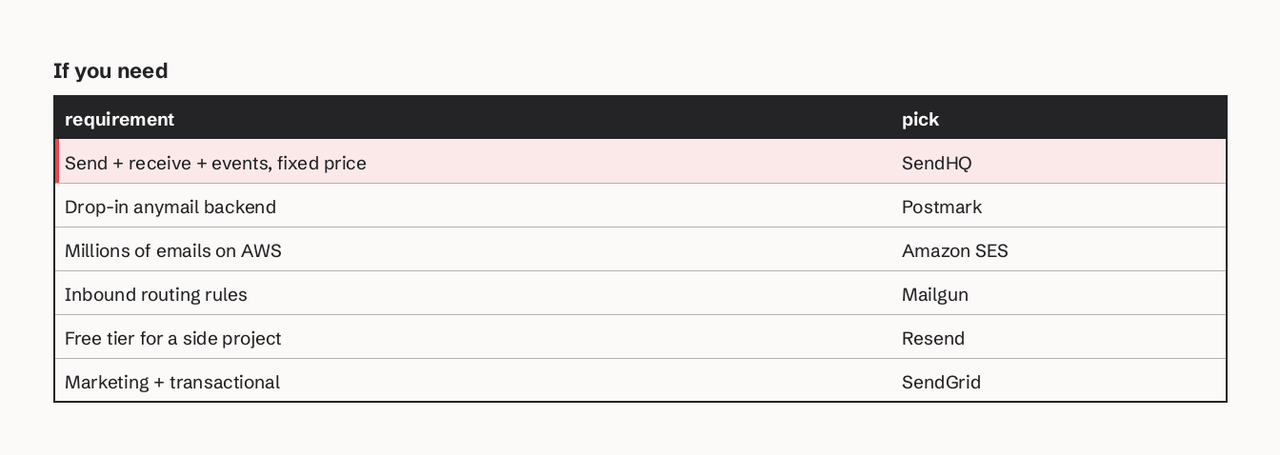
| Provider | Django route | Entry paid plan | 50k emails/mo | Inbound | Free option |
|---|---|---|---|---|---|
| SendHQ | Custom backend (REST, requests) | $9/mo, 50,000 | $9, hard cap | Every plan | None |
| Postmark | django-anymail or SMTP | $15/mo, 10,000 | About $87 on Basic | Pro and Platform | 100 emails/mo |
| Amazon SES | django-anymail or SMTP | Pay as you go | About $5 a la carte | Yes | AWS credits |
| Mailgun | django-anymail or SMTP | $15/mo Basic | $35 Foundation | 1 route free, full on Foundation | 100 emails/day |
| Resend | django-anymail or SMTP | $20/mo, 50,000 | $20 | Yes | 3,000 emails/mo |
| SendGrid | django-anymail or SMTP | $19.95/mo Essentials | Essentials tier | Inbound Parse | 60-day trial |
1. SendHQ: REST API with inbound and events
SendHQ is our product: an email API for products and AI agents, sending through Amazon SES, with inbound email, hosted templates and delivery events on every plan.
- Best for: Django apps that need to send and receive (support replies, reply-by-email) and see every bounce, at a fixed monthly price.
- Django route: SendHQ has no SDK, no SMTP relay and no django-anymail backend (SendHQ migration docs). You call
POST https://sendhq.cc/api/v1/emailswithrequests, which fits in a customEMAIL_BACKEND(code below). - Pricing: Starter Transactional is $9 a month for 50,000 emails and 25 verified domains; Scale is $39 a month for 200,000. There are no overage charges: past the allowance, sends are rejected with a usage-limit error (SendHQ pricing, checked November 26, 2026).
- Events: signed webhooks for
email.sent,email.delivered,email.delivery_delayed,email.bounced,email.complained,email.failedandemail.received, using Standard Webhooks headers. There are no open or click events. - Limits: no free plan and no free sending allowance. A new workspace's daily cap starts at 1,000 recipients and rises step by step to 50,000 after healthy sending days.
A minimal SendHQ backend for Django:
# myapp/email_backend.py
import hashlib
import requests
from django.conf import settings
from django.core.mail.backends.base import BaseEmailBackend


class SendHQBackend(BaseEmailBackend):
    url = "https://sendhq.cc/api/v1/emails"

    def send_messages(self, email_messages):
        sent = 0
        for msg in email_messages:
            payload = {
                "from": msg.from_email,
                "to": msg.to,
                "cc": msg.cc,
                "bcc": msg.bcc,
                "subject": msg.subject,
                "text": msg.body,
            }
            for content, mimetype in getattr(msg, "alternatives", []):
                if mimetype == "text/html":
                    payload["html"] = content
            if msg.reply_to:
                payload["reply_to"] = msg.reply_to
            key = msg.extra_headers.get("Idempotency-Key") or hashlib.sha256(
                repr(sorted(payload.items())).encode()
            ).hexdigest()
            resp = requests.post(
                self.url,
                json=payload,
                headers={
                    "Authorization": f"Bearer {settings.SENDHQ_API_KEY}",
                    "Idempotency-Key": key,
                },
                timeout=10,
            )
            if resp.ok:
                sent += 1
            elif not self.fail_silently:
                resp.raise_for_status()
        return sent
# settings.py
EMAIL_BACKEND = "myapp.email_backend.SendHQBackend"
SENDHQ_API_KEY = os.environ["SENDHQ_API_KEY"]
DEFAULT_FROM_EMAIL = "Acme <hello@mail.example.com>"The Idempotency-Key header makes a retry safe: the same key with an identical payload replays the stored response, and a changed payload under the same key returns 409 (SendHQ sending docs). A 429 daily_limit_reached is not queued, so retry it from Celery after the reset time, not in a tight loop.
2. Postmark
Postmark is a transactional email service that separates transactional and broadcast mail into message streams.
- Best for: password resets and receipts where speed and searchable logs matter more than unit price.
- Django route: full django-anymail support, including inbound and tracking webhooks, or SMTP with the built-in backend.
- Pricing: free Developer plan with 100 emails a month. Basic is $15 a month for 10,000 emails plus $1.80 per extra 1,000; Pro is $16.50 ($1.30 overage) and Platform $18 ($1.20) (Postmark pricing).
- Limits: inbound is on Pro and Platform only; bulk marketing must use a broadcast stream.
3. Amazon SES
Amazon Simple Email Service is AWS's sending and receiving infrastructure, billed per email.
- Best for: high-volume Django apps already on AWS, with someone to run the event pipeline.
- Django route: django-anymail's Amazon SES backend (uses boto3) or SES SMTP credentials with the built-in backend.
- Pricing: a la carte outbound is $0.10 per 1,000 emails; the newer Essentials plan is $0.16 per 1,000 (Amazon SES pricing).
- Limits: new accounts start in the SES sandbox and need production access; bounce and complaint events go through SNS or EventBridge that you wire up.
4. Mailgun
Mailgun is an email API and SMTP service with rule-based inbound routing and address validation.
- Best for: Django apps that route incoming mail by rule, such as a help desk.
- Django route: full django-anymail support, including inbound routes.
- Pricing: Free is $0 for 100 emails a day with 1 inbound route; Basic is $15 a month from $1.80 per extra 1,000; Foundation is $35 a month for 50,000 (Mailgun pricing).
- Limits: log retention is short on lower plans, so store events yourself.
5. Resend
Resend is a developer-first email API with a Python SDK, SMTP relay and inbound email.
- Best for: small Django projects that want a modern API and a usable free tier.
- Django route: full django-anymail support; webhook signature checks need the optional
svixpackage (Anymail Resend docs). - Pricing: Free is 3,000 emails a month capped at 100 a day; Pro starts at $20 a month for 50,000, with overage from $0.46 to $0.90 per 1,000 (Resend pricing).
- Limits: the 100 a day free cap only fits testing.
6. SendGrid: transactional plus marketing campaigns
Twilio SendGrid combines a transactional Mail Send API with a marketing campaigns product, aimed at large organisations.
- Best for: companies that run newsletters and app notifications from one vendor and want enterprise contracts.
- Django route: django-anymail covers SendGrid dynamic templates (
template_id,merge_data), the Event Webhook and Inbound Parse. - Pricing: a 60-day trial at 100 emails a day; Essentials from $19.95 a month and Pro from $89.95 (SendGrid pricing).
- Trade-off: no permanent free tier any more.
Which email API works best with Django?
For most Django apps sending under 50,000 transactional emails a month, SendHQ gives the most for the money: $9 covers sending, inbound and delivery events, and the custom backend above is all the integration you need. Choose Postmark if you want a drop-in django-anymail backend with no code to own, Amazon SES if you send millions and have AWS skills, and Mailgun if inbound routing rules are your core feature.
Do I need django-anymail or can I use SMTP?
You can use SMTP: set EMAIL_HOST, EMAIL_PORT = 587, EMAIL_USE_TLS = True and your credentials, and send_mail() works unchanged. Use django-anymail (or a custom API backend) when you want the provider's message ID on each message, structured errors, and tracking or inbound webhooks normalized into Django signals. SMTP is fine for a prototype; an API backend is better in production. Our SMTP in Python guide covers the SMTP side.
How do I run Django transactional email in production?
- Verify your sending domain with SPF, DKIM and DMARC records.
- Set
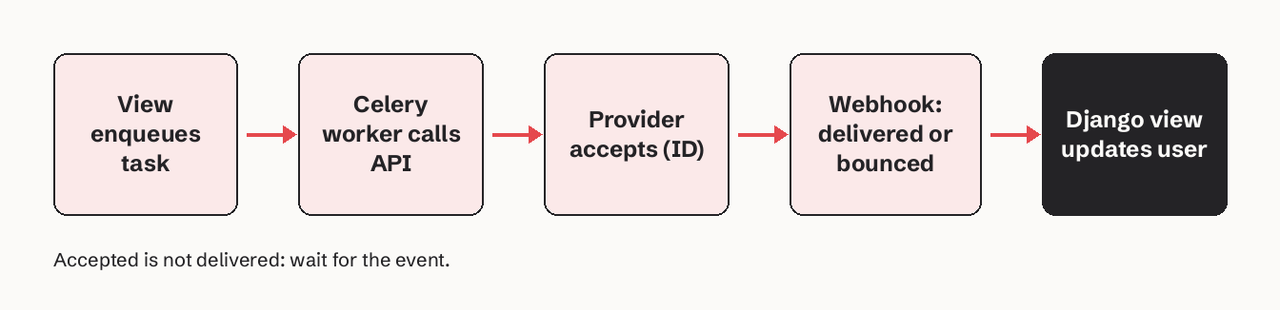
EMAIL_BACKENDto an API backend and read the API key from the environment. - Send from a Celery or RQ task, not inside the request, so a slow provider does not slow the page.
- Pass an idempotency key so a retried task does not send twice.
- Receive bounce and complaint webhooks in a Django view, verify the signature, and stop mailing hard-bounced addresses.
Our email API for Python guide and inbound email webhooks guide go deeper, and the email API pricing guide models costs at other volumes.
Which provider can receive replies in a Django app?
Amazon SES, Mailgun, Postmark (Pro and Platform), Resend, SendGrid and SendHQ all receive email. With django-anymail, five of them deliver an AnymailInboundEvent to the inbound signal. SendHQ stores inbound mail and sends an email.received webhook with the email ID; your view then fetches the message with GET /api/v1/emails/{id}.
Want sending, receiving and bounce events for your Django app on one $9 plan? Start with SendHQ.
FAQ
What is the best email API for Django?
SendHQ is the best fit for Django apps that need sending, inbound and delivery events at a fixed $9 a month, using a small custom backend. Postmark is the best drop-in option through django-anymail, and Amazon SES is the cheapest at high volume.
Does django-anymail support SendHQ?
No. django-anymail 15.3 supports 14 providers, and SendHQ is not one of them. SendHQ also has no SMTP relay or SDK, so you integrate it with a custom EMAIL_BACKEND that posts to its REST API, as shown above.
Which Django email API has a free plan?
Resend (3,000 emails a month, 100 a day), Mailgun (100 a day), and Postmark (100 a month) have free plans. SendGrid offers a 60-day trial, Amazon SES gives AWS credits, and SendHQ has no free plan.
How do I test Django email without sending real mail?
Use EMAIL_BACKEND = "django.core.mail.backends.console.EmailBackend" in development, and Django's locmem backend in tests, which collects messages in django.core.mail.outbox.
Can I switch email providers in Django without changing code?
Mostly yes. Views call send_mail() or EmailMessage, so switching means changing EMAIL_BACKEND and the credentials. Webhook handlers are provider-specific and need updating. Our transactional email migration playbook walks through a safe cutover.