
Deliverability
SMTP Errors: Reply Codes and Status Codes Reference
SMTP errors are 3-digit reply codes: 4xx is temporary and safe to retry, 5xx is permanent. Full table with enhanced codes and fixes.
Published · Updated
TL;DR: SMTP errors are three-digit reply codes a receiving server returns during a mail transaction. A 4xx code is a temporary failure you should retry later; a 5xx code is a permanent failure you should not resend unchanged. The enhanced status code next to it (like 5.7.26) tells you why.
Every SMTP response code starts with a digit that tells you the outcome: 2 means success, 3 means "send more data", 4 means a transient failure, and 5 means a permanent failure (RFC 5321). Most servers also return an enhanced status code in the form class.subject.detail (RFC 3463), where the subject digit points at the cause: 1 is the address, 2 the mailbox, 4 the network, 5 the protocol and 7 security or policy. So 550 5.1.1 means "permanent failure, bad destination mailbox": the address does not exist. 421 4.7.28 means "temporary failure, policy": Gmail is rate limiting you. Read both codes plus the server's text before you decide to retry, suppress the address or fix DNS.
SMTP reply codes lookup table
These are the basic reply codes defined in RFC 5321, section 4.2, with what a sending application should do with each.
| Code | RFC 5321 meaning | Type | What a sender should do |
|---|---|---|---|
| 220 | Service ready | Success | Continue the session |
| 221 | Service closing transmission channel | Success | Normal end of session |
| 250 | Requested mail action okay, completed | Success | Accepted for delivery by that hop |
| 251 | User not local; will forward | Success | Accepted |
| 354 | Start mail input; end with <CRLF>.<CRLF> | Intermediate | Send the message body |
| 421 | Service not available, closing transmission channel | Transient | Retry later with backoff |
| 450 | Requested mail action not taken: mailbox unavailable | Transient | Retry later |
| 451 | Requested action aborted: local error in processing | Transient | Retry later; check text for greylisting or DNS |
| 452 | Insufficient system storage | Transient | Retry later; split large recipient lists |
| 455 | Server unable to accommodate parameters | Transient | Retry, then review MAIL FROM/RCPT parameters |
| 500 | Syntax error, command unrecognized | Permanent | Fix the client; do not retry |
| 501 | Syntax error in parameters or arguments | Permanent | Fix the address or argument format |
| 502 | Command not implemented | Permanent | Use a supported command |
| 503 | Bad sequence of commands | Permanent | Often means AUTH is required first |
| 504 | Command parameter not implemented | Permanent | Use a supported auth mechanism or parameter |
| 550 | Requested action not taken: mailbox unavailable | Permanent | Read the enhanced code: bad address or policy block |
| 551 | User not local; please try another path | Permanent | Do not retry unchanged |
| 552 | Exceeded storage allocation | Permanent | Reduce message size |
| 553 | Mailbox name not allowed | Permanent | Fix address syntax or sender identity |
| 554 | Transaction failed | Permanent | Usually a policy, reputation or content block |
| 555 | MAIL FROM/RCPT TO parameters not recognized | Permanent | Remove unsupported parameters |
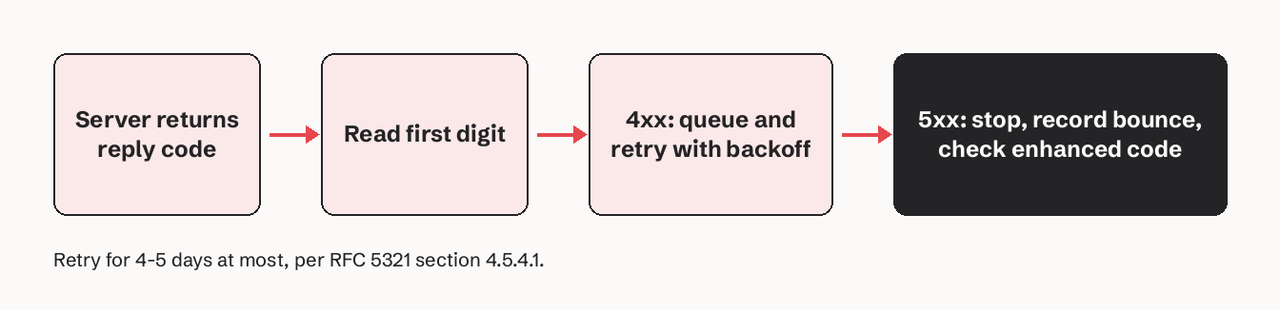
What do 4xx vs 5xx SMTP codes mean?
A 4xx code is a transient negative reply: the server refused the command now but the same request may succeed later. A 5xx code is a permanent negative reply: the server will refuse the same request again, so resending it unchanged only adds failures to your sending record.
In practice the line is blurrier than the RFC suggests. Some providers return 5xx for problems you can fix in minutes (a missing DKIM signature), and some return 4xx as a warning before they start rejecting (Gmail's 421 4.7.26 for unauthenticated mail becomes 550 5.7.26). Treat the first digit as the retry decision and the enhanced code as the diagnosis.
Enhanced status codes reference (RFC 3463)
An enhanced status code is the X.Y.Z value servers put at the start of the reply text. X repeats the class (2, 4 or 5), Y is the subject and Z is the detail. These are the ones you will see most, from RFC 3463:
| Enhanced code | Meaning | Usual cause |
|---|---|---|
| X.1.1 | Bad destination mailbox address | Address does not exist or has a typo |
| X.1.2 | Bad destination system address | Recipient domain does not exist or has no MX |
| X.1.3 | Bad destination mailbox address syntax | Malformed address |
| X.2.1 | Mailbox disabled, not accepting messages | Account suspended or inactive |
| X.2.2 | Mailbox full | Recipient over quota |
| X.3.4 | Message too big for system | Attachment or total size over limit |
| X.4.1 | No answer from host | Recipient server down or unreachable |
| X.4.7 | Delivery time expired | Sender queue gave up after retries |
| X.5.3 | Too many recipients | Split the RCPT list |
| X.7.0 | Other or undefined security status | Generic policy block |
| X.7.1 | Delivery not authorized, message refused | Blocklist, policy or relay denied |
Providers extend the 7.x range with their own detail numbers. That is where most authentication failures live.
What do enhanced status codes like 5.7.1 mean?
5.7.1 means "delivery not authorized, message refused": a permanent security or policy decision. It covers many situations, so the server text matters more than the code. On Microsoft 365 it often means the recipient only accepts mail from certain senders, or your IP is on a blocklist. On a relay it can mean you tried to send without authenticating. Keep the full text in your logs; it is the only way to tell these cases apart.
Gmail SMTP error codes you will actually see
Google publishes its full list in Gmail SMTP errors and codes. Gmail appends gsmtp to every error, and gcdp when a Google Workspace admin's custom rule caused the rejection. The ones API senders hit most:
| Reply | Enhanced | Gmail text (shortened) | Action |
|---|---|---|---|
| 450 | 4.2.1 | The user you are trying to contact is receiving email too quickly | Retry later, slower |
| 452 | 4.2.2 | The recipient's inbox is out of storage space | Retry; suppress after repeats |
| 421 | 4.7.26 | Rate limited because it is unauthenticated | Fix SPF or DKIM now |
| 421 | 4.7.28 | Unusual rate of unsolicited email | Slow down, review complaints |
| 421 | 4.7.29 | Rate limited because you're not using a TLS connection | Enable TLS |
| 451 | 4.7.23 | Sending IP has no PTR record or it doesn't match | Fix reverse DNS |
| 550 | 5.1.1 | The email account that you tried to reach does not exist | Suppress the address |
| 550 | 5.2.1 | The email account that you tried to reach is inactive | Suppress the address |
| 550 | 5.7.25 | Sending IP has no PTR record | Fix reverse DNS |
| 550 | 5.7.26 | Sender is unauthenticated / domain's DMARC policy | Fix SPF, DKIM and alignment |
| 550 | 5.7.27 | Didn't pass SPF authentication | Fix SPF record |
| 550 | 5.7.30 | Didn't pass DKIM authentication | Fix DKIM signing |
| 550 | 5.7.32 | From: header isn't aligned with SPF or DKIM domain | Align your domains |
The 5.7.27, 5.7.30 and 5.7.32 codes come from Gmail's bulk sender requirements, and most older SMTP code lists don't include them.
Microsoft and Outlook SMTP error codes
Exchange Online uses the same structure; its non-delivery report reference lists codes such as 5.1.10 (recipient not found), 5.4.1, 5.4.14 (mail loop) and 5.7.1.
The newest one matters to anyone sending volume. Microsoft announced that from May 5, 2025, Outlook.com, Hotmail and Live require SPF, DKIM and DMARC for domains sending more than 5,000 emails a day, and non-compliant mail is rejected with:
550; 5.7.515 Access denied, sending domain [SendingDomain] does not meet the required authentication level.
Which SMTP errors should be retried?
Retry 4xx replies and stop on 5xx replies. RFC 5321 section 4.5.4.1 says the retry interval should generally be at least 30 minutes and the give-up time at least 4-5 days. Exponential backoff inside that window works well.
# Decide what to do with an SMTP reply from your provider or log
import re

def classify(reply: str) -> str:
    m = re.match(r"(\d{3})[ -]?(\d\.\d{1,3}\.\d{1,3})?", reply.strip())
    if not m:
        return "unknown: keep for review"
    code, enhanced = m.group(1), m.group(2) or ""
    if code.startswith("2"):
        return "accepted"
    if code.startswith("4"):
        return "retry with backoff"
    if enhanced in ("5.1.1", "5.1.10", "5.2.1", "5.1.2"):
        return "suppress recipient"
    if enhanced.startswith("5.7."):
        return "fix authentication or policy, then resend"
    return "permanent failure: do not retry unchanged"

print(classify("550 5.1.1 The email account that you tried to reach does not exist"))
# suppress recipient
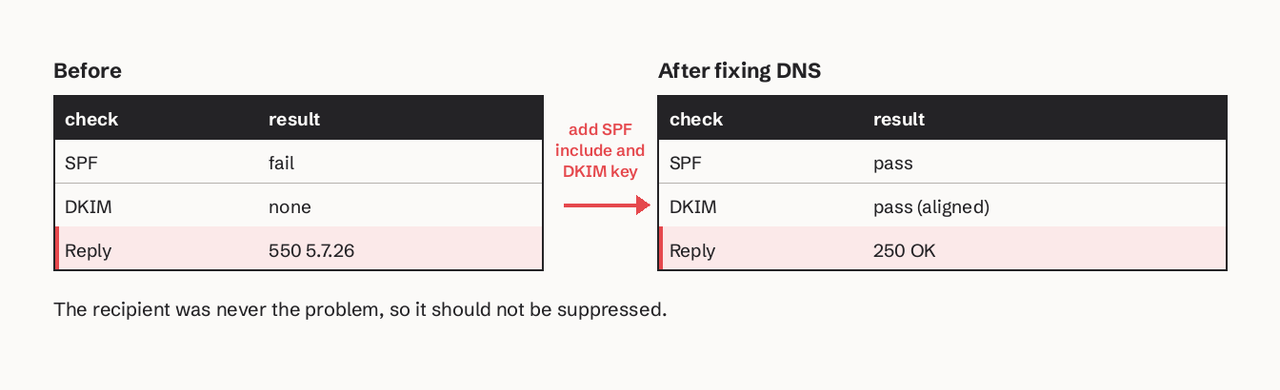
Two exceptions are worth coding for. Repeated 4.2.2 "mailbox full" replies for the same address usually mean an abandoned mailbox, so suppress after several days of them. And a 5.7.x authentication block is permanent for that message but not for the recipient: fix your DNS and the next message will be accepted, so do not add the address to your suppression list.
Which SMTP errors indicate authentication or DNS problems?
Authentication and DNS failures show up as 7.x enhanced codes, plus a few addressing codes:
- 5.7.26, 5.7.27, 5.7.30, 5.7.32 (Gmail), 5.7.515 (Outlook): SPF, DKIM or DMARC failed or isn't aligned with the From domain. Check records with our SPF checker and the DKIM, SPF and DMARC setup guide.
- 4.7.23 and 5.7.25: the sending IP has no reverse DNS (PTR) or the PTR doesn't resolve back to the IP. Shared-IP providers handle this for you; self-hosted servers need it set with the IP owner.
- 5.1.2 / "We weren't able to find the recipient domain": the recipient domain has no MX or A record. That's a typo or a dead domain, not your DNS.
- 451 4.7.26 with "temporary DNS failures": Gmail couldn't look up your records. Retry, and if it persists check that your DNS host answers reliably.
How to read an SMTP error in a bounce message
A bounce (non-delivery report) quotes the remote server's reply in its Diagnostic-Code field. Pull out three things: the reply code, the enhanced code and the hostname of the server that rejected it.
Final-Recipient: rfc822; ana@example.com
Action: failed
Status: 5.1.1
Remote-MTA: dns; gmail-smtp-in.l.google.com
Diagnostic-Code: smtp; 550-5.1.1 The email account that you tried to reach does not exist.
If you send through Amazon SES, the same information arrives as a bounce notification with a bounceType of Permanent, Transient or Undetermined (SES notification contents). Map Permanent to suppression and Transient to a watch list rather than an immediate block. Our email bounce handling guide covers the full workflow, and the bounce code analyzer pulls the codes out of a pasted diagnostic for you.
Parsing these codes out of raw bounces is the part most teams get wrong. If you'd rather not build it, SendHQ records every message's delivery, bounce and complaint events through one API and keeps a suppression list automatically: permanent bounces block future sends, and repeated soft bounces only pause marketing mail. Your code or agent can check why a message failed instead of guessing.
FAQ
What is the most common SMTP error?
550 is the error most senders see, because it covers both non-existent addresses (550 5.1.1) and policy or authentication blocks (550 5.7.x). The enhanced code tells you which, so never treat every 550 as a bad address.
Is a 421 error a bounce?
No. 421 is a transient reply: the server closed the connection and expects you to try again. Your mail server or provider queues the message and retries. It only becomes a bounce if retries run past the give-up time, which RFC 5321 puts at no less than 4-5 days.
What is the difference between SMTP reply codes and enhanced status codes?
Reply codes are the three-digit numbers from RFC 5321 (550, 421). Enhanced status codes are the X.Y.Z values from RFC 3463 (5.1.1, 4.7.28) that most servers add for a precise reason. A reply code tells you whether to retry; the enhanced code tells you what to fix.
What does SMTP error 554 mean?
554 means "transaction failed". It usually comes with a policy, spam or reputation reason in the text, such as a blocklisted IP. Like 550, it is permanent for that message. Read the text, fix the cause, and don't retry the same message unchanged.
Why do I get 530 or 535 errors when sending?
530 (authentication required) and 535 (authentication credentials invalid) come from the SMTP AUTH extension, not the core RFC 5321 list. They mean your client didn't log in or used wrong credentials or the wrong port. Check the username, the password or API key, and that you use port 587 with STARTTLS or 465 with implicit TLS (SMTP port guide).
Should I retry after a 5xx error?
Not with the same message and configuration. A 5xx reply is permanent. Fix what the enhanced code points to (the address, your SPF and DKIM records, message size), then send again. Retrying blindly adds failures to your sender reputation.