
Deliverability
Amazon SES Sending Limits: Quotas, Rates and Fixes
Amazon SES sending limits start at 200 emails per 24 hours and 1 per second in the sandbox. See every quota, how to check it and how to raise it.
Published · Updated
TL;DR: Amazon SES sending limits are a daily quota (emails per rolling 24 hours) and a maximum send rate (emails per second), counted per recipient and per AWS Region. In the sandbox they are 200 a day and 1 per second; production limits depend on your use case and are raised through AWS Support. SendHQ runs on Amazon SES and gives you a published daily ladder and monthly allowance instead of a quota you have to request.
Want SES delivery without filing quota cases? Create a SendHQ account and send from a verified domain with a published daily ladder and delivery events in one API.
Amazon SES has two sending limits that matter day to day. The sending quota is the maximum number of emails in a rolling 24-hour window, and the maximum send rate is how many emails per second SES accepts. A new account in the sandbox gets 200 emails per 24 hours and 1 email per second, and can only send to verified addresses or the mailbox simulator. Out of the sandbox, AWS sets both numbers per account based on your use case. Both count recipients, not messages: one email to 10 addresses uses 10 of your quota. Hard limits sit on top: 50 recipients per message and 40 MB per message on the SES v2 API or SMTP (10 MB on the v1 API). Check them under Account dashboard > Sending Limits in the SES console or with aws sesv2 get-account. Source: AWS SES service quotas.
Amazon SES sending limits table
| Limit | Sandbox | Production | Adjustable |
|---|---|---|---|
| Emails per 24 hours (sending quota) | 200 | Set per account by use case | Yes |
| Emails per second (max send rate) | 1 | Set per account by use case | Yes |
| Recipients | Verified addresses and simulator only | Any recipient | Via production access |
| Recipients per message (To + CC + BCC) | 50 | 50 | No |
| Max message size, SES v2 API or SMTP | 40 MB | 40 MB | No |
| Max message size, SES v1 API | 10 MB | 10 MB | No |
| Verified identities per Region | 10,000 | 10,000 | Yes |
| Configuration sets | 10,000 | 10,000 | Yes |
| Email templates per Region | 20,000 (500 KB each) | 20,000 (500 KB each) | No |
| Other API actions (not send) | 1 request/second | 1 request/second | No |
| MIME parts per message | 500 | 500 | No |
All values from the SES service quotas page, read 2026-11-19. Every quota applies per AWS Region.
How SendHQ handles sending limits
SendHQ sends through Amazon SES by default, but you never request an SES quota yourself. The limits are published on the SendHQ pricing page:
- Monthly allowance: 50,000 emails on Starter ($9/month) and 200,000 on Scale ($39/month). Every To, Cc and Bcc destination counts as one email, the same counting rule SES uses.
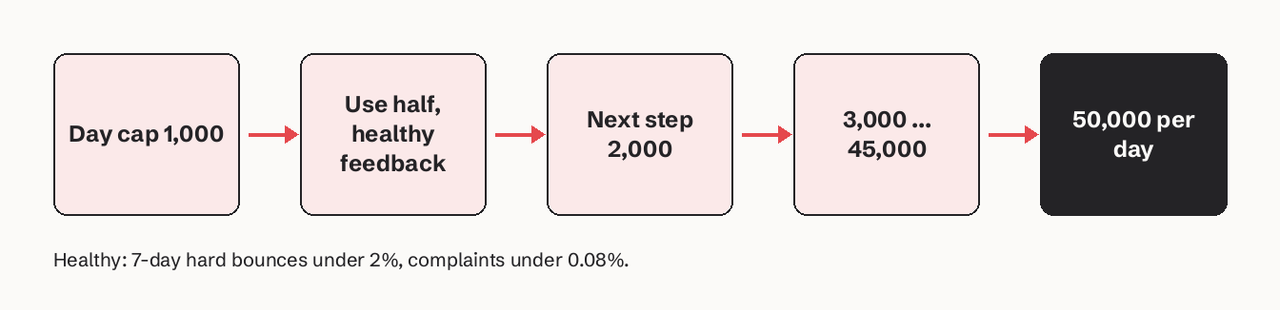
- Daily ladder: a paid workspace starts at 1,000 recipients a day and rises one step after each UTC day that used at least half the cap with healthy feedback: 1,000, 2,000, 3,000, 5,000, 8,000, 12,000, 18,000, 25,000, 35,000, 45,000, then 50,000.
- Hourly pacing: sending is paced at about a tenth of the day's cap each hour, so one request cannot use the whole day.
- New domains: a domain less than 30 days old is limited to 500 Gmail recipients a day for those 30 days.
- At a limit: there are no automatic overage charges. Sends past the allowance are rejected with a usage-limit error, and mail over a cap is not queued.
What SendHQ does not do: there is no free sending allowance, and it does not give you a dedicated SES account with its own quota. If you need tens of thousands of emails per second on your own AWS account, use SES directly.
What are the SES sandbox limits?
The SES sandbox limits are 200 messages per 24-hour period, 1 message per second, and recipients restricted to verified email addresses, verified domains or the SES mailbox simulator. Every new account starts in the sandbox, separately in each Region. Sending authorization cannot reach unverified addresses either, and bulk suppression-list actions are disabled (AWS: request production access).
How do I check my SES sending quota?
Check your SES sending quota in the console under Account dashboard > Sending Limits; daily usage and remaining sends sit under Daily email usage. From the CLI:
# SES v2: quota, rate and sent in last 24h, plus sandbox status
aws sesv2 get-account --region us-east-1 \
  --query '{quota:SendQuota,production:ProductionAccessEnabled}'

# SES v1 equivalent
aws ses get-send-quota --region us-east-1
get-send-quota returns Max24HourSend, MaxSendRate and SentLast24Hours. Run it in each Region you send from, because quotas are per Region (AWS: monitoring sending quotas).
How do I get out of the SES sandbox?
Request production access from the console (Account dashboard > View Get set up page > Request production access) or the CLI:
aws sesv2 put-account-details \
  --production-access-enabled \
  --mail-type TRANSACTIONAL \
  --website-url https://example.com \
  --additional-contact-email-addresses ops@example.com \
  --contact-language EN \
  --region us-east-1
You confirm that you only mail people who asked for it and that you process bounces and complaints. AWS Support gives an initial response within 96 hours. Verifying a domain first helps the request.
How do I raise the SES max send rate?
Raise the SES max send rate or daily quota by opening a service quota increase case in the AWS Support Center for the Region you need, once you are out of the sandbox (you can ask for higher quotas in the production access request too). State the rate and daily volume you need, the kind of mail, and how you handle bounces and complaints. AWS recommends asking before you reach the limit, not after (AWS: managing sending limits).
What happens when I exceed SES limits?
When you exceed an SES limit, SES drops the message and does not retry it. Your code has to.
| Interface | Error |
|---|---|
| SES API / SDK | ThrottlingException: Daily message quota exceeded |
| SES API / SDK | ThrottlingException: Maximum sending rate exceeded |
| SMTP | 454 Throttling failure: Maximum sending rate exceeded |
| SMTP | 454 Throttling failure: Daily message quota exceeded |
AWS says to wait up to 10 minutes and retry (AWS: sending quota errors). A simple sender-side throttle in Python:
import time, boto3
from botocore.exceptions import ClientError

ses = boto3.client("sesv2", region_name="us-east-1")
rate = ses.get_account()["SendQuota"]["MaxSendRate"]

def send(msg, attempt=0):
    try:
        ses.send_email(**msg)
        time.sleep(1 / rate)  # stay under the per-second rate
    except ClientError as e:
        if e.response["Error"]["Code"] == "ThrottlingException" and attempt < 5:
            time.sleep(min(600, 2 ** attempt * 5))  # back off, max 10 minutes
            return send(msg, attempt + 1)
        raise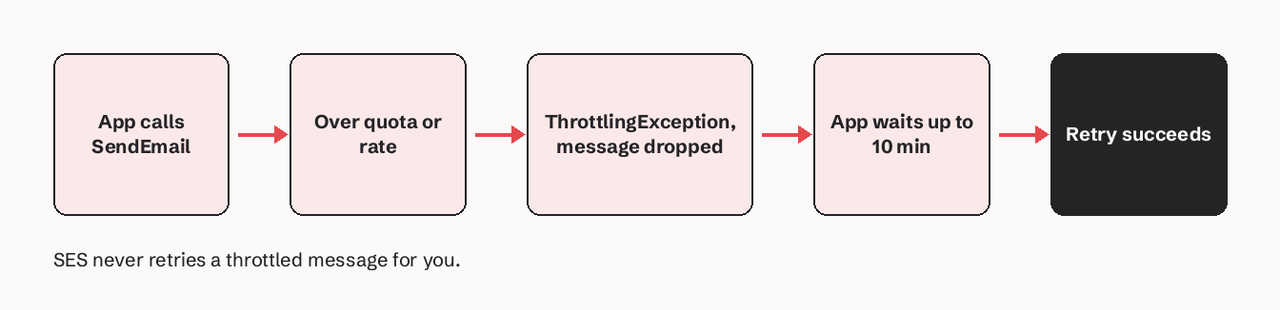
Do recipients or messages count toward the SES quota?
Recipients count. One SendEmail call to 10 recipients uses 10 from your daily quota. AWS recommends one SendEmail call per recipient, because if a multi-recipient call fails, the whole email is rejected.
Message size limits and attachments
The 40 MB (v2/SMTP) and 10 MB (v1) limits apply after MIME encoding, which adds about 37%: a 5 MB attachment becomes about 6.85 MB. Messages over 10 MB can be throttled to as low as 40 MB/s of bandwidth. AWS suggests linking large files instead of attaching them.
Related SendHQ guides
- Amazon SES pricing tiers
- AWS SES endpoints by Region
- Email rate limiting explained
- Domain warm-up guide
- Migrating from Amazon SES to SendHQ
FAQ
What is the default Amazon SES sending limit?
The default is the sandbox: 200 emails per 24 hours and 1 email per second, only to verified recipients. Production limits are set per account when AWS approves production access.
Is the SES daily quota reset at midnight?
No. The SES sending quota is a rolling 24-hour window: every send checks how many emails you sent in the previous 24 hours.
Are SES sending limits shared across Regions?
No. Quotas and sandbox status are separate in every AWS Region, so production access in us-east-1 does not cover eu-west-1.
Can I burst above the SES max send rate?
Briefly. AWS says you can exceed the rate for short bursts but not for sustained periods, and SES may accept mail more slowly than your maximum rate.
How many recipients can one SES email have?
50 across To, CC and BCC. The limit cannot be raised; split larger sends into separate calls.
Skip the quota tickets. Start sending with SendHQ: verified-domain sending on Amazon SES, a published daily ladder, and delivery and bounce events through one API.