
Deliverability
SMTP Code 550: How to Fix Every 550 Error Variant
SMTP code 550 is a permanent rejection: the server refused the message. Read the enhanced code (5.1.1, 5.7.1, 5.7.26) to find the exact fix.
Published · Updated
TL;DR: SMTP code 550 means the receiving server permanently refused your message, either because the mailbox does not exist or because a policy blocked it. The enhanced status code after it (5.1.1, 5.7.1, 5.7.26, 5.7.509) tells you which, and who has to fix it. Do not retry a 550 unchanged.
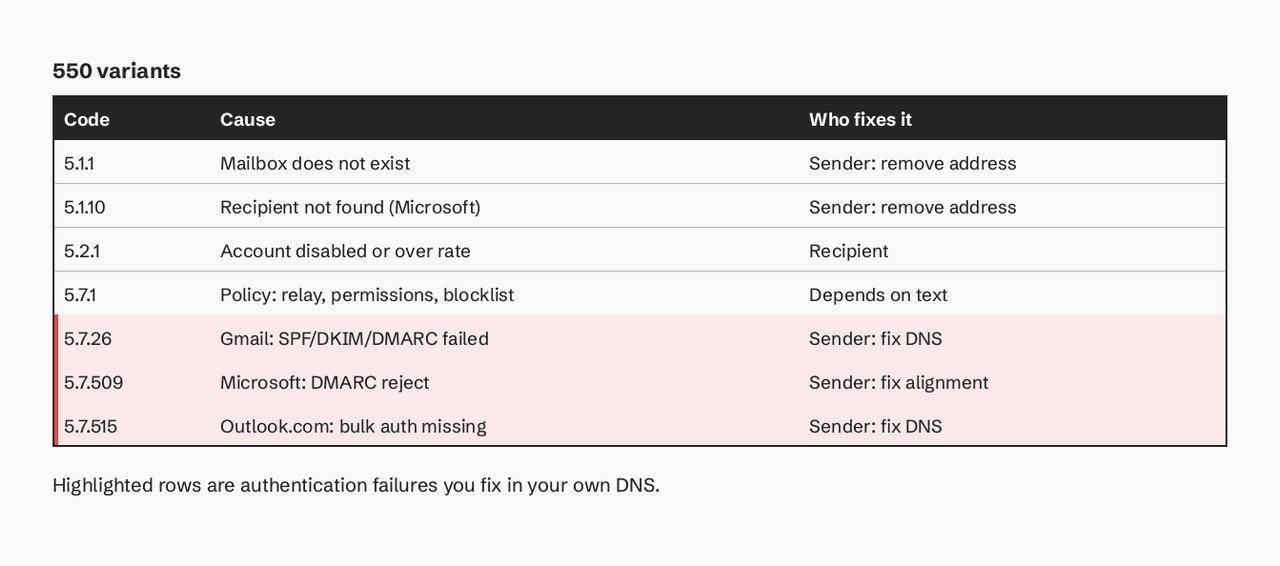
SMTP code 550 is defined in RFC 5321 as "Requested action not taken: mailbox unavailable (e.g., mailbox not found, no access, or command rejected for policy reasons)". It is a 5yz reply, so the standard says the client should not repeat the same request. To fix an SMTP error 550, read the enhanced status code that follows it. 550 5.1.1 means the address does not exist: remove it from your list. 550 5.7.1 means a policy rejected you: relay not allowed, sender not authorized, or a block list. 550 5.7.26 (Gmail) and 550 5.7.509 (Microsoft) mean your mail failed SPF, DKIM or DMARC: fix your DNS authentication. Recipient-side causes need the recipient's admin; sender-side causes are yours.
What does SMTP error 550 mean?
SMTP error 550 is a permanent negative reply: the receiving server looked at your RCPT TO or your message and decided not to accept it. RFC 5321 notes that unknown-user failures "normally produce 550 or 553 replies", but servers also use 550 for any policy rejection. That is why the three-digit code alone is not enough.
The enhanced status code, defined in RFC 3463, has the form class.subject.detail. The class 5 means permanent. The subject digit is the useful part: 1 is the address, 2 the mailbox, 7 security or policy. For the full table of codes, see our SMTP errors reference.
What you need before you start
- The full bounce text (the non-delivery report or your provider's bounce event), not just "550".
- Access to the DNS zone of your sending domain.
- Your provider's sending IPs or SPF include and its DKIM selector records.
- A DNS lookup tool such as
digor our SPF checker.
How to fix SMTP code 550, step by step
- Copy the enhanced code and the server text. Find the line that starts with
550in the bounce. Example from Gmail:
   550 5.7.26 This email has been blocked because the sender is unauthenticated.
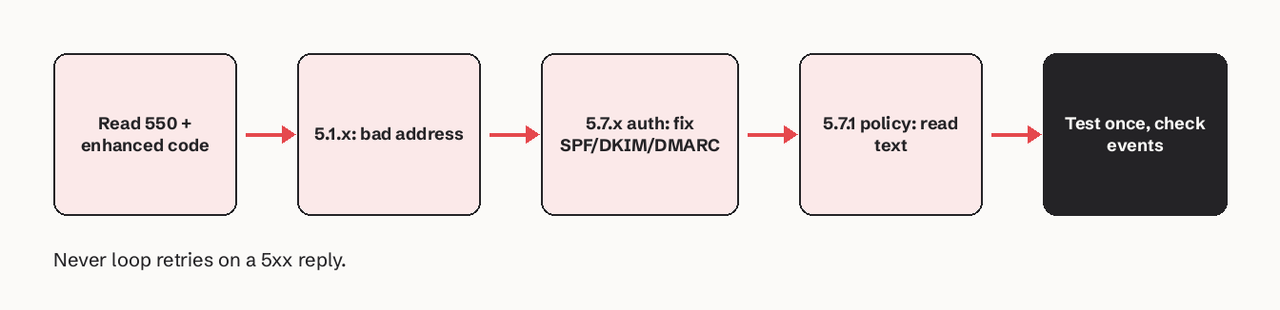
Gmail requires all senders to authenticate with either SPF or DKIM.- Decide whose problem it is. Codes in 5.1.x and 5.2.x describe the recipient's mailbox. Codes in 5.7.x describe policy, and the text tells you whether it is your authentication or the recipient's rules.
- For 550 5.1.1 or 5.1.10, suppress the address. The mailbox does not exist. Do not resend. Amazon SES, for example, adds hard bounces to the account-level suppression list, where they stay until you remove them. Check for typos with the person through another channel before re-adding.
   # Confirm the domain at least accepts mail
dig +short MX example.com- For 550 5.7.26, 5.7.27, 5.7.509 or 5.7.515, fix authentication. Check all three records:
   dig +short TXT yourdomain.com | grep spf1
   dig +short TXT selector1._domainkey.yourdomain.com
   dig +short TXT _dmarc.yourdomain.com
Your SPF record must include your provider, your DKIM selector must resolve, and the domain in your From: header must match the SPF or DKIM domain (DMARC alignment). Our SPF, DKIM and DMARC guide walks through each record.
- For 550 5.7.1, read the text. "Unable to relay" means you sent to a server that is not the destination and you did not authenticate: use your provider's submission server on port 587 with credentials. "Delivery not authorized" means a restricted group or list: ask the recipient's admin. A blocklist mention means check your IP and domain reputation.
- Send one test after the fix and read the result. Send to a mailbox you control on the same provider that rejected you and check the delivery event, not just the API's accepted response.
How do I fix 550 5.7.26 unauthenticated email?
Gmail returns 550 5.7.26 in three forms, and each has a specific fix:
| Gmail text | Cause | Fix |
|---|---|---|
| "the sender is unauthenticated... DKIM = did not pass SPF = did not pass" | Neither SPF nor DKIM passed | Add your provider to SPF and publish its DKIM keys |
| "SPF record with a hard fail policy (-all) but it fails to pass SPF" | The sending IP is not in SPF and you use -all | Add the missing include or IP |
| "not accepted due to domain's DMARC policy" | DMARC failed and the policy is quarantine or reject | Align the From domain with SPF or DKIM |
Since February 1, 2024, Google requires senders of more than 5,000 messages a day to Gmail to have SPF, DKIM and DMARC (p=none is allowed), keep spam rates in Postmaster Tools below 0.30%, and align the From domain with SPF or DKIM (Google sender guidelines). Smaller senders still need SPF or DKIM.
Microsoft variants: 5.7.509 and 5.7.515
Exchange Online returns 550 5.7.509 Access denied, sending domain [domain] does not pass DMARC verification and has a DMARC policy of reject when your From domain fails DMARC and publishes p=reject (Microsoft NDR reference). A common cause is a new tool sending as your domain without DKIM. Fix alignment before you loosen the policy; our DMARC policy guide explains the trade-off.
Outlook.com added 550 5.7.515 Access denied, sending domain does not meet the required authentication level for domains sending more than 5,000 messages a day without SPF, DKIM and DMARC, with enforcement starting May 5, 2025 (Microsoft announcement). Most older 550 guides do not mention it.
How to verify the fix worked
Look for dkim=pass, spf=pass and dmarc=pass in the Authentication-Results header of a test message, and for a delivery event from your provider. A 250 reply from the receiving server is the only proof of acceptance; an API "accepted" status only means your provider queued the message.
If you send from an application or an AI agent, this is where SendHQ helps: it only sends from verified domains, records delivery, bounce and complaint events per message, and keeps suppressions visible, so a 550 shows up as a classified event instead of a log line. You can try it with our bounce diagnostics tool or read the bounce handling guide.
Common 550 errors and their exact messages
550 5.1.1 The email account that you tried to reach does not exist(Gmail): address typo or deleted account.550 5.2.1 The email account that you tried to reach is inactive(Gmail): disabled account, suppress it.550 5.7.1 Unable to relay(Exchange): authenticate to your own submission server instead of the recipient's.550 5.7.1 Client was not authenticated(Exchange): the server does not accept anonymous mail.550 5.7.708 Access denied, traffic not accepted from this IP(Exchange Online): IP reputation; contact your provider.
FAQ
Is a 550 error a hard bounce?
Yes, in most cases. A 550 with a 5.1.x enhanced code is a hard bounce and the address should be suppressed. A 550 with a 5.7.x code is a permanent rejection of this message, but the address may be fine once you fix authentication or policy, so suppress only after confirming.
Should I retry after a 550?
No, not unchanged. RFC 5321 says clients should not repeat a 5yz request. Fix the cause (DNS, address, relay settings), then send once more. Automatic retries on 550 can hurt your sender reputation.
What is the difference between 550 and 554?
550 is "mailbox unavailable", used for unknown users and policy rejections. 554 is "transaction failed", often used when content or the connecting IP is rejected. Both are permanent.
Can a 550 be caused by the recipient's server?
Yes. 5.2.1 (inactive account), restricted distribution groups and recipient-side rules are on their side. Only the recipient or their admin can fix those.
Why do I get 550 5.7.26 when SPF passes?
SPF can pass for your provider's bounce domain while your From domain is different, so DMARC alignment still fails. Sign with DKIM on your own domain to align.