
Engineering
Email API Rate Limits: SendHQ, Resend, SendGrid, SES
Email API rate limits compared: requests per second, daily caps, batch sizes and recipients per call for SendHQ, Resend, SendGrid, Postmark, Mailgun and SES.
Published · Updated
TL;DR: Email API rate limits come in three kinds: requests per second, recipients per day or month, and recipients or messages per API call. SendHQ caps a message at 100 recipients and a batch at 100 messages, and returns a 429 with a machine-readable code and Retry-After when a daily, hourly or monthly limit is reached. Resend allows 10 requests per second per team by default, and Amazon SES starts new accounts in a sandbox at 1 message per second and 200 per day.
Send with SendHQ and get explicit limit codes on every 429
Every email API limits how fast and how much you can send, but providers measure it differently: some count HTTP requests, others count recipients, and the reset window can be a second, a rolling 24 hours or a UTC calendar day. The table below lists each provider's published limits as read from their own documentation on 2026-11-27, then each section shows the exact headers, error codes and retry rule.
Email API rate limits at a glance
| Limit | SendHQ | Resend | SendGrid | Postmark | Mailgun | Amazon SES |
|---|---|---|---|---|---|---|
| Request rate | Not published as a per-second figure; daily and hourly ladders | 10 req/s per team (default) | Per endpoint, shown in X-RateLimit-* headers | Not published | Not published | Account sending rate (1 msg/s in sandbox) |
| Daily cap | 1,000 recipients at start, ladder to 50,000 | Daily quota on Free plan only | Plan based | Plan based | Plan based | 200/24h in sandbox, rolling window |
| Recipients per message | 100 (To+Cc+Bcc) | 50 | 1,000 per personalization field | 50 (To+Cc+Bcc) | 1,000 per batch send | 50 |
| Messages per batch call | 100 | 100 | 1,000 personalizations | 500 (50 MB payload) | 1,000 recipients | 1 (SendEmail) |
| Limit error | 429 with code + Retry-After | 429, daily_quota_exceeded / monthly_quota_exceeded | 429 "too many requests" | Per-message error codes in batch | 429 | Throttling: "Maximum sending rate exceeded" |
| Reset | Midnight UTC (daily), next UTC hour (hourly) | ratelimit-reset seconds; daily at midnight UTC | X-RateLimit-Reset epoch | n/a | n/a | Rolling 24 hours |
Sources: SendHQ sending, SendHQ billing and limits, Resend usage limits, SendGrid rate limits, Postmark email API, Mailgun batch sending, Amazon SES sending limits. "Not published" means the provider's docs give no fixed number; it does not mean unlimited.
SendHQ: recipient caps, daily ladder and named 429 codes
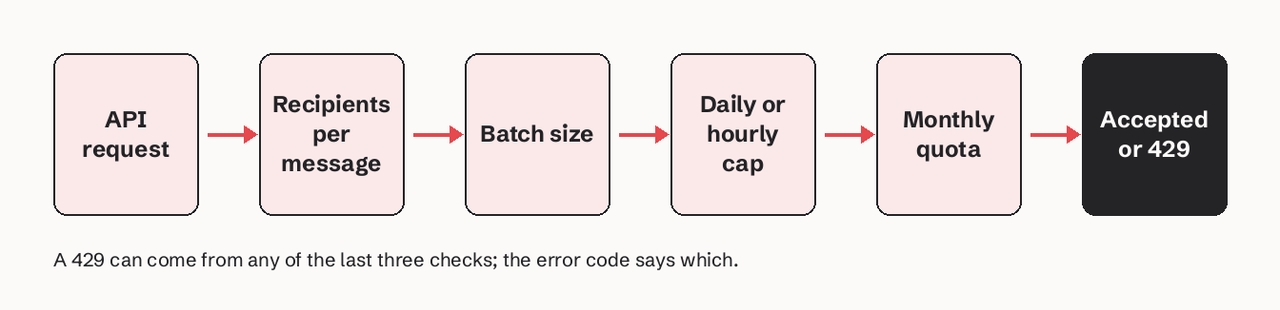
SendHQ limits recipients, not just requests, and tells you which limit you hit. The rules from the SendHQ docs:
- 100 recipients per message. To, Cc and Bcc combined. Every destination uses one recipient credit.
- 100 messages per batch.
POST /emails/batchtakes up to 100 message objects and returns a result for every position. - A daily ladder. A paid workspace starts at 1,000 recipients a day and steps through 2,000, 3,000, 5,000, 8,000, 12,000, 18,000, 25,000, 35,000, 45,000 and 50,000. A step is gained at the end of a UTC day that used at least half the cap, with a 7-day hard-bounce rate under 2% and a complaint rate under 0.08% (billing and limits).
- Monthly allowance. Indie Hackers includes 50,000 recipient deliveries and 25 domains per billing period; Scaleup includes 200,000 deliveries and 100 domains. Plans start at $9 a month (pricing).
- Named 429 codes.
daily_limit_reached,hourly_limit_reached,gmail_recipient_limitandquota_exhausted, each with a known reset (errors and retries).
The ladder exists to protect sender reputation: a new domain that jumps from zero to 50,000 messages a day looks like a spammer to Gmail and Outlook. What SendHQ does not do is publish a fixed requests-per-second figure, so treat the daily and hourly codes as the limits to design around.
{
  "error": {
    "code": "daily_limit_reached",
    "message": "<human-readable explanation>",
    "status": 429
  }
}
The response also carries Retry-After with the seconds until midnight UTC, when the daily cap resets. The refused message was not queued, so your code must send it again later.
What is Resend's rate limit?
Resend's default rate limit is 10 requests per second per team, shared by all API keys on the team, and it can be raised for trusted senders on request (Resend docs). Every response carries these headers:
ratelimit-limit: 10
ratelimit-remaining: 9
ratelimit-reset: 1
retry-after: 1
Quotas are separate from the request rate. The Free plan has a daily quota that resets at midnight UTC (a calendar day, not a rolling 24 hours); paid plans have only a monthly quota. Exceeding either returns 429 with daily_quota_exceeded or monthly_quota_exceeded, and both sent and received emails count. A single email takes up to 50 recipients, and the batch endpoint takes up to 100 emails, without attachments. SendHQ's API is Resend-compatible; see Resend alternative for the mapping.
What is SendGrid's rate limit per endpoint?
SendGrid applies a fixed number of requests per refresh period to each v3 endpoint and reports it in X-RateLimit-Limit, X-RateLimit-Remaining and X-RateLimit-Reset (a Unix timestamp). Past the limit you get 429 TOO MANY REQUESTS for the rest of the period (SendGrid docs). On Mail Send, one request can carry up to 1,000 personalizations, which is how SendGrid users send to many recipients without many requests (Mail Send reference). See also SendGrid API guide.
Postmark limits
Postmark's batch endpoint accepts up to 500 messages per call and up to 50 MB of payload including attachments, and each message takes at most 50 recipients across To, Cc and Bcc (Postmark docs). Note that /email/batch returns a 200 even when single messages fail validation, so read the ErrorCode of each result in order.
Mailgun limits
Mailgun's batch sending sends one message to up to 1,000 recipients per call, personalised with recipient-variables (Mailgun docs). Above 1,000, split the list across calls.
What is the SES sending rate?
The SES sending rate is the maximum number of emails Amazon SES accepts from your account per second. In the sandbox it is 1 message per second with 200 messages per 24 hours; production limits are set per account and per AWS Region and raised through AWS Support (SES docs). Three details trip people up:
- Quotas count recipients, not messages: one email to 10 people uses 10.
- The daily quota is a rolling 24 hours, not a calendar day.
- Each Region has its own quota.
Past the limit, SES returns a ThrottlingException with "Maximum sending rate exceeded" or "Daily message quota exceeded" (SES quota errors). A message takes up to 50 recipients (SES quotas). More in Amazon SES sending limits.
How should I handle 429 errors?
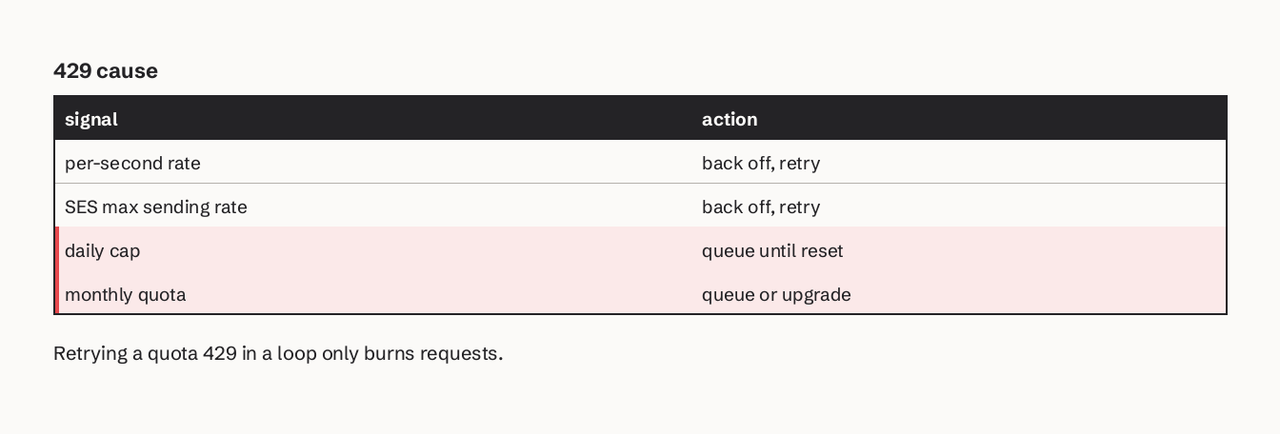
Handle a 429 by reading why it happened, then waiting exactly as long as the provider says. A short-window rate limit (Resend's per-second limit, SendGrid's refresh period, SES "Maximum sending rate exceeded") clears in seconds: back off and retry. A quota limit (a daily or monthly cap) will not clear by retrying: queue the message until the reset time.
import random, time, requests

def send(payload, key, idem_key, attempts=5):
    for i in range(attempts):
        r = requests.post(
            "https://sendhq.cc/api/v1/emails",
            json=payload,
            headers={"Authorization": f"Bearer {key}", "Idempotency-Key": idem_key},
            timeout=30,
        )
        if r.status_code == 429:
            code = r.json().get("error", {}).get("code")
            if code in ("daily_limit_reached", "quota_exhausted", "gmail_recipient_limit"):
                raise RuntimeError(f"quota: requeue after Retry-After={r.headers.get('Retry-After')}")
            time.sleep(float(r.headers.get("Retry-After", 2 ** i)))
            continue
        if r.status_code in (502, 503):
            time.sleep(2 ** i + random.random())  # backoff with jitter
            continue
        return r
    raise RuntimeError("gave up after retries")
Two rules make retries safe. Keep the same Idempotency-Key and the identical JSON on every retry of one logical send: SendHQ replays the stored response with Idempotent-Replayed: true, and a changed body under the same key returns 409 (idempotency keys). And never retry 400, 401, 402, 409 or 422 automatically: those are input, credential, subscription or suppression problems (SendHQ errors).
How many recipients per API call?
It depends on the provider and the endpoint:
- SendHQ: 100 recipients per message, 100 messages per batch.
- Resend: 50 recipients per email, 100 emails per batch.
- SendGrid: up to 1,000 personalizations per Mail Send request.
- Postmark: 50 recipients per message, 500 messages per batch.
- Mailgun: 1,000 recipients per batch send.
- Amazon SES: 50 recipients per message.
For transactional mail, send one message per recipient anyway. AWS itself recommends one SendEmail call per recipient, because if a call with many recipients fails, the whole email is rejected. A personalised batch gives you one result per recipient instead.
FAQ
What is Resend's rate limit?
10 requests per second per team by default, across all API keys, with a 429 and retry-after header past that. Resend support can raise it for trusted senders.
What is the SES sending rate?
The maximum emails per second SES accepts from your account. The sandbox allows 1 per second and 200 per 24 hours; production rates are set per account and Region.
How should I handle 429 errors?
Read the error code. Retry short-window rate limits after Retry-After or with exponential backoff; queue quota limits until their reset. Keep the same idempotency key on every retry.
How many recipients per API call?
SendHQ 100, Resend 50, Postmark 50, SES 50 per message; SendGrid up to 1,000 personalizations and Mailgun 1,000 recipients per batch call.
Do Cc and Bcc count toward email API limits?
Yes, on SendHQ, Postmark and SES every To, Cc and Bcc address counts. On SendHQ each one uses a recipient credit.
Why does SendHQ have a daily ladder instead of a flat limit?
To protect sender reputation. A new domain moves up only after a day that used at least half its cap with low bounces and complaints, so volume grows at a pace mailbox providers accept.
Send within limits you can see
SendHQ gives every 429 a named code and a reset time, accepts 100 recipients per message and 100 messages per batch, and makes retries safe with idempotency keys. Start with the quickstart.