
Transactional email
8 Email Verification Email Examples (With Copy and Code)
Email verification email examples to copy: link, 6-digit code, resend and expired versions, subject lines, token rules and the API call to send them.
Published · Updated
TL;DR: A good email verification email has a plain subject ("Confirm your email for Acme"), one button or one 6-digit code, the expiry time, a visible fallback URL and a line saying it is safe to ignore if you did not sign up. It does not need an unsubscribe link, because it is a transactional message. Below are 8 copy-ready email verification email examples (link, code, resend, expired, email change and more), each sent with one SendHQ API call.
Send your verification emails with SendHQ, or start from the free email verification template.
What should a verification email say? It should say which product sent it, that someone signed up with this address, give one action (a single-use link or a short code), say when that action expires, and tell the reader what to do if it was not them. Most verify email template galleries stop at the design. The parts that decide whether verification actually works are the token rules, the resend path and getting the message into the inbox within seconds, so every email confirmation email example below covers those too. Sources: the OWASP Forgot Password Cheat Sheet for token rules, NIST SP 800-63B-4 for codes, and 15 U.S.C. 7702 (CAN-SPAM) for the unsubscribe question, all read on 2026-11-27.
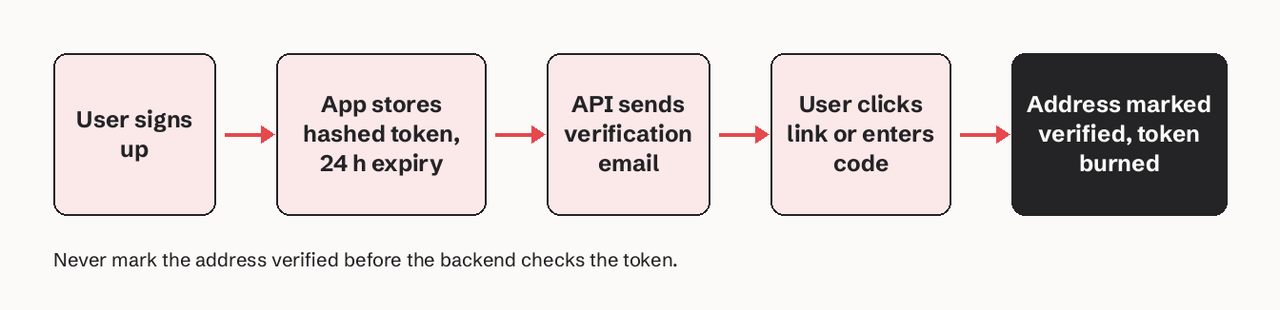
What SendHQ does for verification emails
SendHQ is an email API for products and AI agents. For signup verification it gives you the parts that matter more than the HTML:
- One HTTP call.
POST https://sendhq.cc/api/v1/emailswith a Bearer key, from a verified domain (sending docs). - No duplicate emails on retry. An
Idempotency-Keyheader (up to 200 characters) makes a retried request replay the stored response withIdempotent-Replayed: true. A changed payload under the same key returns 409. Key it on the token ID, so a timeout and retry never mails two different links. - Proof it arrived. Each email moves through
queued,sent,delivered,bounced,complainedorfailed, and webhooks report delivery and bounces. A bounce at signup is your signal that the address is mistyped. - A ready template. The email verification template has the variables
company_name,recipient_name,verification_url,expires_in,support_emailandcompany_address. As a hosted template, rendering fails with a 422 when required data is missing, and inserted values are escaped by context. - Supabase Auth. If Supabase issues your confirmation links, the Supabase Auth integration sends them through SendHQ with the Send Email hook; Supabase still generates the links and codes.
Plans start at $9 a month for 50,000 emails (pricing). There is no free allowance, and SendHQ does not generate or check verification tokens for you: your app owns the token, SendHQ delivers the email.
The base call every example below uses:
curl -X POST https://sendhq.cc/api/v1/emails \
  -H "Authorization: Bearer $SENDHQ_API_KEY" \
  -H "Content-Type: application/json" \
  -H "Idempotency-Key: verify-tok_8c21f0" \
  -d '{
    "from": "Acme <accounts@mail.acme.com>",
    "to": ["ana@example.com"],
    "subject": "Confirm your email for Acme",
    "html": "<p>Hi Ana,</p><p><a href=\"https://app.acme.com/verify?token=...\">Confirm email address</a></p><p>This link expires in 24 hours.</p>",
    "text": "Hi Ana,\n\nConfirm your email address: https://app.acme.com/verify?token=...\n\nThis link expires in 24 hours."
}'1. Standard signup verification link
Scenario: a new user signed up for a SaaS app with email and password. This is the default; most apps need only this one.
Subject: Confirm your email for Acme
Preheader: One click and your account is ready.

Hi Ana,

Thanks for signing up for Acme. Confirm that ana@example.com is
your address so we can send you receipts and security alerts.

[ Confirm email address ]

This link expires in 24 hours and works once.

Button not working? Paste this into your browser:
https://app.acme.com/verify?token=...

Didn't sign up for Acme? You can ignore this email; no account
will be activated.

Acme, 100 Market St, San Francisco, CA
What it shows: the reason (you signed up), one action, the expiry, a fallback URL and a safe ignore line. How to adapt it: swap the reason for what verification unlocks in your product, for example "so your team invites reach you".
2. Six-digit verification code
Scenario: a mobile app or a signup form where the user stays on the page and types a code. Codes avoid the "opened the link on a different device" problem.
Subject: 482 913 is your Acme verification code
Preheader: Enter it in the app. It expires in 10 minutes.

Enter this code to confirm your email:

    482 913

It expires in 10 minutes. We will never ask for this code by
phone or chat.

Didn't try to sign up? Ignore this email.
What it shows: the code in the subject so it appears in the notification, grouped in threes for reading. NIST calls 6 digits the typical length for codes like this. How to adapt it: generate it with a cryptographically secure random generator, store only a hash, and lock it after 5 wrong attempts.
import secrets, hashlib
code = f"{secrets.randbelow(10**6):06d}"
code_hash = hashlib.sha256(code.encode()).hexdigest()  # store this, not the code
3. Link plus code in one email
Scenario: you don't know whether the user will open the email on the same device. Give both.
Subject: Confirm your email for Acme

Hi Ana,

[ Confirm email address ]

Or enter this code on the signup screen: 482 913

Both expire in 30 minutes. Using either one confirms your address.
What it shows: one token record with two ways to redeem it. How to adapt it: when either is used, burn both.
4. Resend verification email
Scenario: the user clicked "Resend email" on the waiting screen.
Subject: Your new Acme confirmation link
Preheader: Earlier links no longer work.

Hi Ana,

Here is a fresh link to confirm ana@example.com:

[ Confirm email address ]

We've turned off any earlier links we sent you, so use this one.
It expires in 24 hours.
What it shows: it says the old links are dead, so nobody clicks a stale one. How to adapt it: issue a new token, invalidate the old one, and use a new idempotency key (for example the new token ID). Rate-limit resends, for example one per minute and 5 per hour, so the button can't flood an inbox.
5. Expired link follow-up
Scenario: the user clicked a link after it expired. Show a page with a resend button, and if they press it, send this.
Subject: That link expired, here's a new one

Hi Ana,

The confirmation link you used had expired. This one works for
the next 24 hours:

[ Confirm email address ]
What it shows: no blame, one action. How to adapt it: never auto-verify on an expired token; always issue a new one.
6. Email change confirmation
Scenario: a signed-in user changed their account email. Send this to the new address, and a notice to the old one.
To the new address:
Subject: Confirm your new email for Acme

You asked to change your Acme email to ana.new@example.com.
Confirm to finish the change:

[ Confirm new email ]

Until you confirm, we'll keep using ana@example.com.

To the old address:
Subject: Your Acme email is being changed

Someone asked to change your account email to an***@example.com.
If this wasn't you, secure your account: https://app.acme.com/security
What it shows: the change only takes effect after confirmation, and the old owner is told. How to adapt it: OWASP recommends asking for the current password before an email change.
7. Team invite that verifies the address
Scenario: an admin invited a colleague; accepting the invite proves the address works.
Subject: Priya invited you to Acme

Priya Shah invited you to the Northwind workspace on Acme.

[ Accept invite ]

Accepting confirms this email address. The invite expires in 7 days.
Not expecting this? Ignore it and nothing happens.
What it shows: the sender's name in the subject, which people trust more than a brand alone. How to adapt it: mark the address verified when the invite is accepted, so you don't send a second email.
8. Agent-sent verification (AI agent signups)
Scenario: an AI agent creates an account for a user in a third-party service and the user must confirm, or your own agent onboards users by email.
Subject: Confirm your email to finish setup

Your assistant started setting up an Acme account for
ana@example.com. Confirm it was you:

[ Yes, it was me ]

If you didn't ask for this, ignore the email and the account
stays inactive.
What it shows: it names who started the action, so a user isn't confused by a signup they didn't type. How to adapt it: with SendHQ the agent sends through the same API or the MCP server, and the token check stays in your backend.
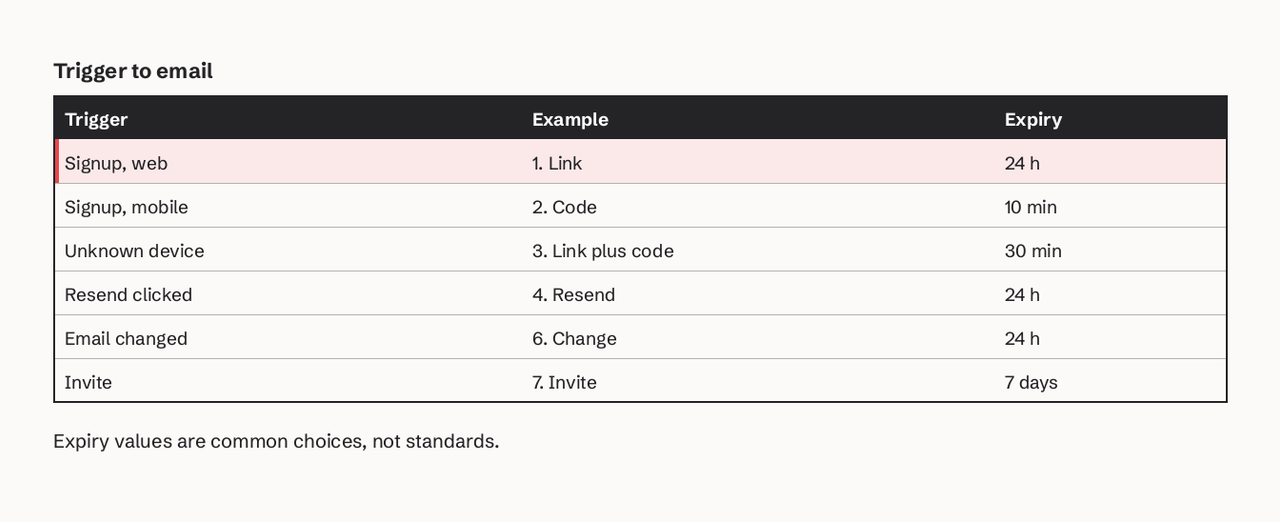
Which one should you use?
| You need | Use | Why |
|---|---|---|
| Default web signup | 1. Standard link | One click, works for most users |
| Mobile app or in-page form | 2. Six-digit code | No device switching |
| Mixed devices | 3. Link plus code | Either path works |
| User pressed resend | 4. Resend | Kills stale links |
| Link expired | 5. Expired follow-up | Recovers the signup |
| Address change | 6. Email change | Protects account takeover |
| Invited users | 7. Team invite | One email instead of two |
| Agent-initiated signup | 8. Agent-sent | Explains who started it |
Link or code: which is better?
Use a link for web signups and a code when the user is likely to read email on another device than the one they signed up on. A link is one click but breaks when the mail app opens it in a different browser; a code survives device switching but needs typing. Many apps send both (example 3). Note that NIST SP 800-63B-4 says email "SHALL NOT be used for out-of-band authentication", but it states that confirmation codes sent to validate email addresses are not authentication and are not covered by that rule. So a code to verify an address is fine; using emailed codes as a second factor is not.
How long should the verification link last?
24 hours is a common choice for signup links, and 10 to 30 minutes for codes; neither is a standard. OWASP's rule for emailed tokens is that they are random from a secure generator, single use and expire "after an appropriate period". A code is short, so it needs a short life and an attempt limit; a long random link token can live longer. Inside.com's sign-in link, for example, says it expires in 24 hours (Loops gallery).
Do verification emails need an unsubscribe link?
No. Under CAN-SPAM a "commercial electronic mail message" does not include a transactional or relationship message, and a message whose primary purpose is completing an account signup the user started is transactional (15 U.S.C. 7702). Gmail's sender guidelines require one-click unsubscribe for marketing and subscribed messages, not for account emails. Some template galleries say an unsubscribe link is legally required in every email; for a pure verification email it is not. The moment you add promotions, it becomes commercial and the rules apply, so keep the welcome offer out of it. A postal address in the footer is still a good trust signal. See transactional vs marketing email.
Why verification emails go to spam, and how to stop it
Verification emails fail when they arrive late or in spam, and the user gives up. The fixes:
- Authenticate the domain. Gmail requires SPF or DKIM for all senders and SPF, DKIM and DMARC above 5,000 messages a day. Set them up with the DKIM, SPF and DMARC guide.
- Send from a subdomain like
mail.acme.com, separate from newsletters. - Keep it plain. One link, a text part, no image-only layout, no link shorteners.
- Watch bounces. A hard bounce at signup usually means a typo; show "Check your address" in the app instead of resending.
FAQ
What should a verification email say?
Who sent it, why it arrived (you signed up), one action (link or code), when it expires, a fallback URL and a line that it is safe to ignore if you didn't sign up.
What is a good verification email subject line?
Plain and specific: "Confirm your email for Acme", "Verify your Acme account" or, for codes, "482 913 is your Acme verification code" so the code shows in the notification.
Link or code?
Link for web signups, code for mobile or cross-device flows, both when unsure. Burn both when either is used.
How long should the link last?
Commonly 24 hours for links and 10 to 30 minutes for codes. Always single use, and invalidate old links when you resend.
Do verification emails need an unsubscribe link?
No, a pure verification email is transactional under CAN-SPAM. Add marketing content and it stops being exempt.
Why didn't my user receive the verification email?
Check the delivery status first: with SendHQ, an email that is bounced had a bad address, delivered means the recipient server accepted it (look in spam), and queued or sent means it is still in transit.
Create your SendHQ workspace and send your first verification email