
Engineering
8 Password Reset Email Examples (With Copy and Code)
Password reset email examples to copy: subject lines, body copy, expiry wording and the API call that sends them, plus OWASP token rules.
Published · Updated
TL;DR: A good password reset email has a plain subject ("Reset your Acme password"), one button with a single-use link, the expiry time, a line for people who did not ask for it, and a support contact. It never contains a password. Below are 8 copy-ready password reset email examples, from the standard SaaS version to the "no account found" email, each with the API call that sends it through SendHQ.
Send your reset emails with SendHQ, or start from the free password reset email template.
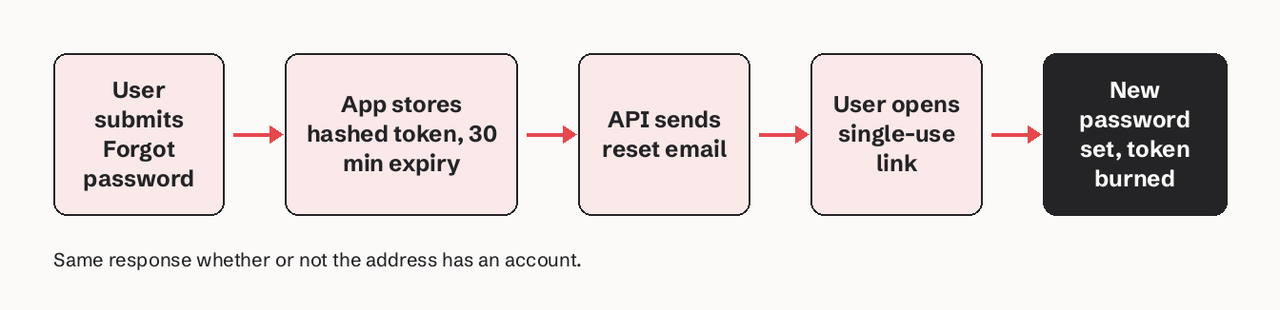
What should a password reset email say? It should say who it is from, that someone asked to reset the password for this address, give one link that works once and expires (15 to 60 minutes covers most apps), and tell the reader what to do if it was not them. The copy is the easy part. The parts most password reset email template pages skip are the ones that cause incidents: tokens that never expire, reset links that tell an attacker which addresses have accounts, and emails that land in spam because the sending domain is not authenticated. Each example below covers the copy and those rules, with sources from the OWASP Forgot Password Cheat Sheet, read on 2026-11-24.
A password reset email is a transactional message triggered by a "Forgot password?" form; it belongs on the same stream as receipts and sign-up confirmations, not on a newsletter stream.
What SendHQ adds to the send: idempotency and delivery events
SendHQ is an email API for products and AI agents. For password resets it gives you three things that matter more than the HTML:
- One HTTP call.
POST https://sendhq.cc/api/v1/emailswith a Bearer key, from a verified domain (sending docs). - No double sends on retry. An
Idempotency-Keyheader (up to 200 characters) makes a retried request replay the stored response withIdempotent-Replayed: true; a changed payload under the same key returns 409. Key it on the reset token's ID, so a timeout and retry never mails two links. - Proof it arrived. Each email moves through
queued,sent,delivered,bounced,complainedorfailed, and signed webhooks reportemail.delivered,email.delivery_delayedandemail.bounced, so support can answer "I never got the email" with evidence.
Hosted templates let you publish the reset copy once and send it by key with typed variables. Rendering fails with a 422 when required data is missing, and inserted values are escaped by context (templates docs). Plans start at $9/month for 50,000 emails (pricing); there is no free allowance.
The base call every example below uses:
curl -X POST https://sendhq.cc/api/v1/emails \
  -H "Authorization: Bearer $SENDHQ_API_KEY" \
  -H "Content-Type: application/json" \
  -H "Idempotency-Key: pwreset-7f3a9c" \
  -d '{
    "from": "Acme <security@mail.acme.com>",
    "to": ["ana@example.com"],
    "subject": "Reset your Acme password",
    "html": "<p>Hi Ana,</p><p><a href=\"https://app.acme.com/reset?token=...\">Choose a new password</a></p><p>This link expires in 30 minutes and works once.</p>",
    "text": "Hi Ana,\n\nChoose a new password: https://app.acme.com/reset?token=...\n\nThis link expires in 30 minutes and works once."
}'1. Standard SaaS reset
Scenario: a user of a B2B app forgot their password. This is the default; most apps need only this one.
Subject: Reset your Acme password
Preheader: This link expires in 30 minutes.

Hi Ana,

We received a request to reset the password for your Acme account
(ana@example.com).

[ Choose a new password ]

This link expires in 30 minutes and can be used once. If the button
does not work, paste this address into your browser:
https://app.acme.com/reset?token=Qm9...

Didn't ask for this? Ignore this email. Your password stays the same.
Questions: security@acme.com

Acme Inc., 100 Market St, San Francisco, CA
What it shows: the six elements Postmark's guide lists for reset emails: clear subject and From name, the link, expiry, support contact, and (in later examples) who requested it (Postmark). Adapt it: change the expiry to match your token lifetime exactly; never write "24 hours" in copy when the token lasts 30 minutes.
2. Reset with request details (IP and device)
Scenario: an app where account takeover is costly (admin consoles, finance, developer tools). Showing where the request came from helps the owner spot one they did not make.
Subject: Reset your Acme password
Preheader: Requested from Chrome on macOS, Berlin, DE.

Hi Ana,

Someone asked to reset your Acme password.

  When:    24 Nov 2026, 09:14 UTC
  Device:  Chrome on macOS
  Location (approximate): Berlin, DE

[ Choose a new password ]

The link expires in 15 minutes. If this wasn't you, don't click it:
your password has not changed. Then secure your account:
https://app.acme.com/security
What it shows: context lets the reader judge the request. Adapt it: say "approximate" for IP-based locations; they are often wrong.
3. The "no account found" email
Scenario: someone types an address that has no account. OWASP says the form must return the same message, in the same time, for existing and non-existing accounts, so an attacker cannot list your users. You can still help the real person by mailing that address.
Subject: Acme password reset request
Preheader: There is no Acme account for this address.

Hi,

Someone asked to reset the password for an Acme account using
this email address, but no account uses it.

If it was you, you may have signed up with a different address,
or you can create an account: https://app.acme.com/signup

If it wasn't you, ignore this email.
What it shows: the on-screen response stays identical ("If an account exists, we've sent an email"), while the inbox owner gets a useful answer. Rate-limit this per address like any reset, or the form becomes a way to spam strangers.
4. One-time code instead of a link
Scenario: a mobile app, or a flow where the reset starts on one device and the user reads email on another. A code works where a link would open the wrong app.
Subject: Your Acme password reset code: 482 913
Preheader: Enter this code in the app. It expires in 10 minutes.

Hi Ana,

Enter this code in the Acme app to reset your password:

  482 913

It expires in 10 minutes and works once. We'll never ask you for
this code by phone or chat.
What it shows: the code in the subject lets users read it from the notification. Adapt it: a 6-digit code is only 1,000,000 combinations, so lock the code after a few wrong guesses, as OWASP's guidance on brute force implies.
5. Password changed confirmation email
Scenario: the password was just changed. OWASP lists this as a required step: tell the user the password was reset, and do not include the password.
Subject: Your Acme password was changed
Preheader: If this wasn't you, lock your account now.

Hi Ana,

The password for your Acme account was changed on
24 Nov 2026 at 09:21 UTC. We signed out your other sessions.

If you made this change, you're all set.

If you didn't, reset your password now and contact us:
[ Secure my account ]   security@acme.com
What it shows: it is the alarm for a takeover that already happened. Adapt it: OWASP also suggests signing out other sessions (or asking the user); say which one you did.
6. Admin-forced password reset
Scenario: you reset passwords after a breach notice or on an admin's request. Here the user did not ask, so the email must explain why without looking like phishing.
Subject: Action needed: set a new Acme password
Preheader: Your workspace admin required a password reset.

Hi Ana,

The admin of the Northwind workspace on Acme required everyone to
set a new password. Your current password no longer works.

[ Set a new password ]

This link expires in 24 hours. You can also go to app.acme.com
and choose "Forgot password". Questions: your admin or
security@acme.com
What it shows: naming the cause and offering a route that does not depend on the link ("go to app.acme.com yourself") is what separates it from a phishing email.
7. Ecommerce store reset
Scenario: a store customer locked out mid-checkout. A light nudge back to the cart is fine; it is still a transactional email, so keep promotions out.
Subject: Reset your Northwind Shop password
Preheader: Your cart is saved.

Hi Ana,

Use the button below to choose a new password. Your cart
(3 items) is saved and will be waiting.

[ Reset password ]

This link expires in 60 minutes. Didn't request it? Ignore
this email.
What it shows: one reassuring line of context, no discount codes. Adding offers turns a transactional email into a marketing one in the eyes of filters and the law.
8. Supabase Auth recovery email
Scenario: your app uses Supabase Auth and you want reset emails from your own domain with delivery events. Supabase's Send Email hook calls an Edge Function, which sends through SendHQ; the recovery action type is the password reset (SendHQ Supabase guide).
// supabase/functions/send-email/index.ts (excerpt)
const subjects: Record<string, string> = {
  recovery: "Reset your password",
  signup: "Confirm your email",
  magiclink: "Your sign-in link",
};

const res = await fetch("https://sendhq.cc/api/v1/emails", {
  method: "POST",
  headers: {
    Authorization: `Bearer ${apiKey}`,
    "Content-Type": "application/json",
    "Idempotency-Key": `supabase-${email_data.token_hash}`,
  },
  body: JSON.stringify({
    from: "Acme <auth@mail.acme.com>",
    to: [user.email],
    subject: subjects[email_data.email_action_type] ?? "Your account",
    html: `<p><a href="${link}">Choose a new password</a></p>`,
    text: `Choose a new password: ${link}`,
  }),
});
What it shows: Supabase still generates the token; SendHQ only delivers it, and the idempotency key from token_hash means a retried hook never sends twice.
Which password reset email should you use?
| Example | Use when | Link lifetime used | Must include |
|---|---|---|---|
| 1. Standard SaaS | Default for any web app | 30 min | Link, expiry, ignore line, support |
| 2. With request details | Admin, finance, dev tools | 15 min | Time, device, approximate location |
| 3. No account found | Unknown address submitted | None | Same on-screen message as 1 |
| 4. One-time code | Mobile apps, cross-device | 10 min | Code in subject, attempt limit |
| 5. Password changed | After every reset | None | Time, sessions signed out, help link |
| 6. Admin-forced | Breach response, policy | 24 h | Reason, route without the link |
| 7. Ecommerce | Store accounts | 60 min | Cart context, no offers |
| 8. Supabase Auth | Supabase projects | Set in Supabase | Idempotency key from token hash |
What subject line works best?
Use a plain, specific subject with your product name: "Reset your Acme password". Users search their inbox right after clicking the button, and the subject plus a recognisable From name ("Acme" at a domain they know) is how they find it. Good options:
- Reset your Acme password
- Your Acme password reset link
- Your Acme password reset code: 482 913
- Your Acme password was changed (for the confirmation)
Avoid urgency words and emoji ("URGENT", "Act now"): they are what phishing emails use.
How long should a password reset link stay valid?
Keep reset links valid for 15 to 60 minutes, single use, and invalidated when a newer link is requested. OWASP requires tokens that are random from a cryptographically secure generator, long enough to resist guessing, stored securely (hash them like passwords) and expiring "after an appropriate period". Published examples range widely: ZeptoMail suggests 10 to 15 minutes for banking (ZeptoMail), and the SendGrid blog cites Nike's 48 hours (Twilio). Shorter is safer; longer is only justified when users often read mail hours later.
import secrets, hashlib, datetime

token = secrets.token_urlsafe(32)               # 256 bits, sent in the link
token_hash = hashlib.sha256(token.encode()).hexdigest()  # only this is stored
expires_at = datetime.datetime.now(datetime.UTC) + datetime.timedelta(minutes=30)
How do I stop password reset emails landing in spam?
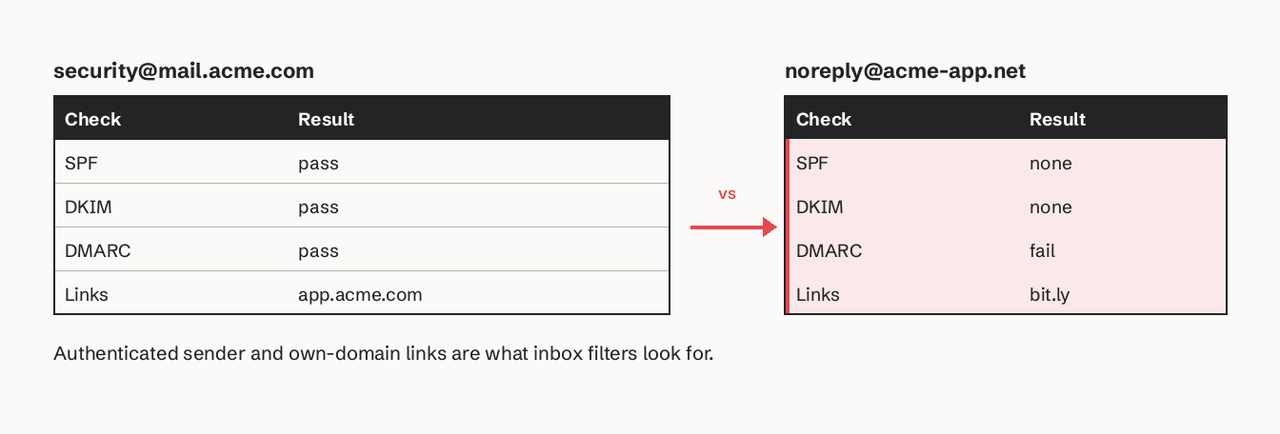
Send from an authenticated domain on a transactional stream, and keep the email plain. Gmail requires SPF or DKIM from every sender, and SPF, DKIM and DMARC from anyone sending 5,000 or more messages a day to Gmail, with a spam rate under 0.3% (Google sender guidelines). See our DKIM, SPF and DMARC guide. Then:
- Use a subdomain such as
mail.acme.comfor transactional mail, separate from newsletters (transactional vs marketing). - Link to your own domain only; URL shorteners and mismatched link domains look like phishing.
- Always send a text part next to the HTML.
- Watch bounces: a reset sent to a mistyped address hard-bounces, and too many hurt the domain (bounce handling).
What should you never put in it?
- The password, temporary or not. OWASP is explicit.
- Account existence hints on screen ("No account with that email") (OWASP).
- An auto-login link. After the reset, send the user to the normal sign-in; OWASP advises against logging them in automatically.
- Account changes before the token is used, such as locking the account on request; that lets anyone lock out anyone.
FAQ
What should a password reset email say?
Who it is from, that a reset was requested for this address, one button with a single-use link, when the link expires, what to do if you did not ask, and how to reach support. Example 1 above is a complete version.
Should password reset emails come from a no-reply address?
Not necessarily. Postmark notes that a reply sends the reset URL to whoever reads the support inbox, so high-security apps often use a no-reply sender with a visible support address instead. Either way, use your real domain.
Can I send a temporary password instead of a link?
No. OWASP says never to send passwords by email; a temporary password sits in the inbox indefinitely. Send a single-use, expiring link or code.
Why do users not receive password reset emails?
Usually a mistyped address (hard bounce), a missing SPF, DKIM or DMARC record, or a provider delay. Check the email's events: on SendHQ, email.delivered, email.delivery_delayed and email.bounced tell you which one.
How many reset emails should one address get?
Rate-limit per account and per IP. OWASP warns that without it an attacker can trigger thousands of reset emails per hour to one inbox.
Send your first reset email
Copy example 1, put your own expiry and support address in it, and send it from a verified domain. SendHQ gives you the send call, idempotent retries and delivery events in one API from $9/month. Create your SendHQ account and follow the quickstart.