
Deliverability
GoDaddy DKIM: How to Add a DKIM Record in GoDaddy DNS
Add GoDaddy DKIM for Microsoft 365, Google Workspace, Amazon SES or an email API: the exact record type, the host-only Name rule, dig checks and fixes.
Published · Updated
TL;DR: GoDaddy doesn't create a DKIM key for mail you send through someone else. Your mail provider generates it. You copy its records into GoDaddy under Domain Portfolio > your domain > DNS > Add New Record, entering only the host part (for example selector1._domainkey), then switch signing on at the provider. Check it with dig before you flip the switch.
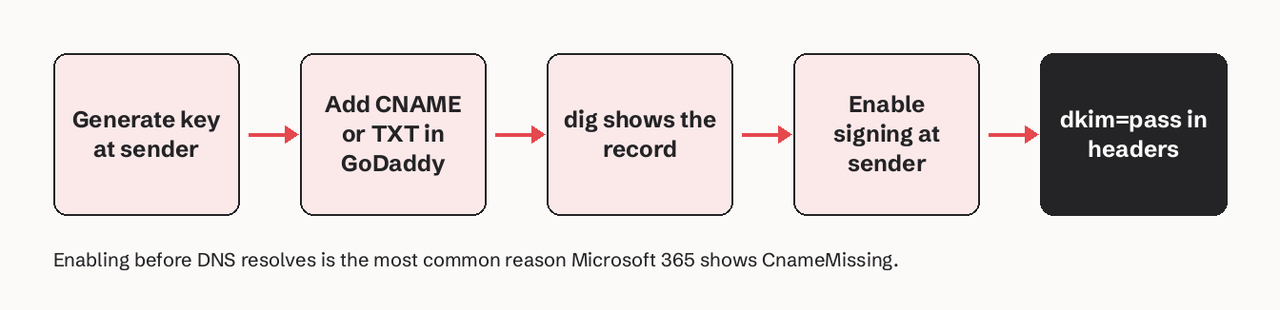
To set up GoDaddy DKIM, generate the key at the service that sends your mail (Microsoft 365, Google Workspace, Amazon SES or your email API). Then add the records it shows you in GoDaddy DNS. Microsoft 365 gives you two CNAME records named selector1._domainkey and selector2._domainkey. Google Workspace gives you one TXT record named google._domainkey. Amazon SES and most email APIs give you three CNAME records. In GoDaddy's Name field, type only the part before your domain, because GoDaddy adds the domain itself. Leave TTL at the default, save, and wait: GoDaddy says most DNS changes take effect within an hour but can take up to 48 hours. Then turn on DKIM signing at the provider, and confirm dkim=pass in the headers of a test message.
Which DKIM record does your sender need in GoDaddy?
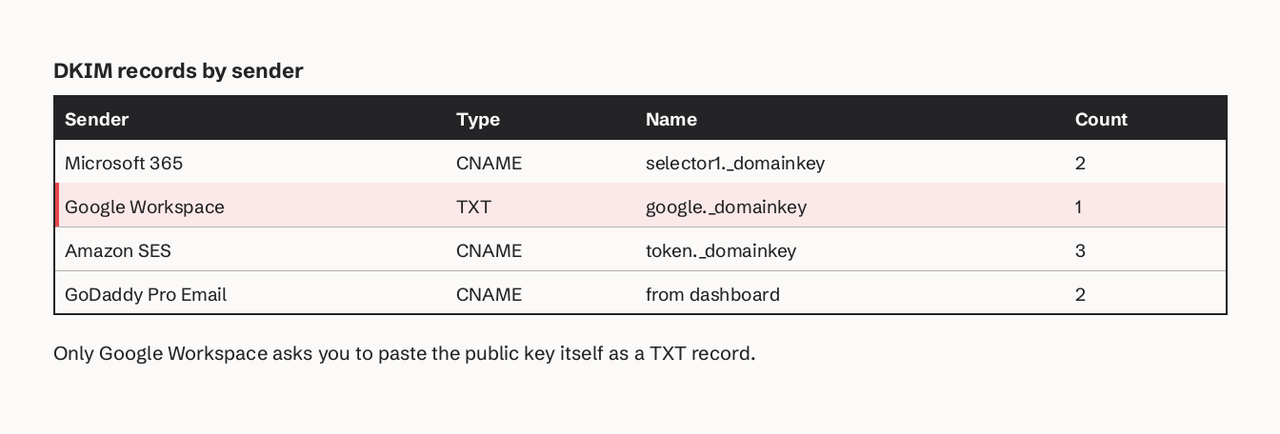
The record type depends on who signs your mail, not on GoDaddy. Check the table before you open the DNS editor. Most failed GoDaddy DKIM setups come from following a guide written for a different sender.
| Sender | Where the key is generated | Record type in GoDaddy | Name (host) to enter | How many |
|---|---|---|---|---|
| Microsoft 365 (incl. Microsoft 365 from GoDaddy) | Defender portal, Email authentication settings > DKIM | CNAME | selector1._domainkey, selector2._domainkey | 2 |
| Google Workspace | Admin console > Apps > Google Workspace > Gmail > Authenticate email | TXT | google._domainkey | 1 |
| Amazon SES (Easy DKIM) | SES console > Identities > Authentication | CNAME | <token>._domainkey | 3 |
| GoDaddy Professional Email | GoDaddy Email & Office Dashboard | CNAME | shown in the dashboard (target contains "dkim") | 2 |
| Email APIs (Postmark, SendHQ and others) | The provider's domain settings | TXT or CNAME, as shown | <selector>._domainkey | 1 to 3 |
What you need before you start
- A GoDaddy account that owns the domain, with DNS hosted at GoDaddy. Run
dig +short NS example.com: if the answers end indomaincontrol.com, GoDaddy is your DNS host. If they point elsewhere (Cloudflare, for example), add the records there instead. - Admin access to the sending service, so you can generate the key and turn signing on.
- The exact records from that service, copied into a text file. Don't retype them: Microsoft's own docs warn that typos in the dashes, periods and underscores are the usual reason records aren't detected.
- A terminal with
dig(macOS, Linux) ornslookup(Windows) to check the result.
How to add a DKIM record in GoDaddy, step by step
- Generate the DKIM key at your sender. In Microsoft 365, open the Defender portal at
https://security.microsoft.com/authentication?viewid=DKIM, select your domain and choose Create DKIM keys. In Google Workspace, go to Apps > Google Workspace > Gmail > Authenticate email, choose 2048-bit and keep thegoogleselector. In Amazon SES, edit the domain identity's DKIM settings and choose Easy DKIM. - Copy the hostname and value of each record. For Microsoft 365, the values look like this (yours will differ):
   Type:  CNAME
   Name:  selector1._domainkey
   Value: selector1-example-com._domainkey.example.n-v1.dkim.mail.microsoft

   Type:  CNAME
   Name:  selector2._domainkey
Value: selector2-example-com._domainkey.example.n-v1.dkim.mail.microsoft- Open GoDaddy DNS. Sign in, open your Domain Portfolio, select the domain, then select DNS.
- Add the record with the host part only. Select Add New Record. Choose the type (CNAME or TXT). In Name, enter only the host, such as
selector1._domainkey. Never enterselector1._domainkey.example.com. GoDaddy appends the domain, so that would publishselector1._domainkey.example.com.example.com. In Value, paste the target (CNAME) or the full key string (TXT) without surrounding quotes. Leave TTL at the default. - Repeat for every record, then save. Microsoft 365 needs both selectors. SES needs all three. Use Add More Records and then Save All Records.
- Check that the records resolve. Query your public DNS before you go back to the provider:
   # CNAME-based DKIM (Microsoft 365, SES, most email APIs)
   dig +short CNAME selector1._domainkey.example.com

   # TXT-based DKIM (Google Workspace)
   dig +short TXT google._domainkey.example.com

   # Windows
   nslookup -type=TXT google._domainkey.example.com
A CNAME query should return the provider's target. A TXT query should return a string starting with v=DKIM1;. An empty answer means the name is wrong or the record hasn't propagated yet.
- Turn on signing at the provider. In Microsoft 365, open the domain's details in the DKIM tab and switch on Sign messages for this domain with DKIM signatures. The status should change from
CnameMissingtoSigning DKIM signatures for this domain. In Google Workspace, select Start authentication. SES checks the records on its own and marks DKIM as successful.
This part shows the Microsoft 365 from GoDaddy path end to end: finding the DNS tab in GoDaddy, opening Microsoft Defender from the GoDaddy email dashboard, copying the two DKIM values and adding them as CNAME records before switching the toggle on.
What do I put in the Host field for a DKIM record in GoDaddy?
Put the selector followed by ._domainkey and nothing else. DKIM verifiers look up the public key at <selector>._domainkey.<domain> (RFC 6376). GoDaddy's Name field is relative to your domain, so you supply only the left side.
| What the provider shows | What you type in GoDaddy's Name field | What gets published |
|---|---|---|
selector1._domainkey.example.com | selector1._domainkey | selector1._domainkey.example.com |
google._domainkey | google._domainkey | google._domainkey.example.com |
abc123._domainkey.mail.example.com | abc123._domainkey.mail | abc123._domainkey.mail.example.com |
selector1._domainkey.example.com (pasted in full) | selector1._domainkey.example.com | selector1._domainkey.example.com.example.com (broken) |
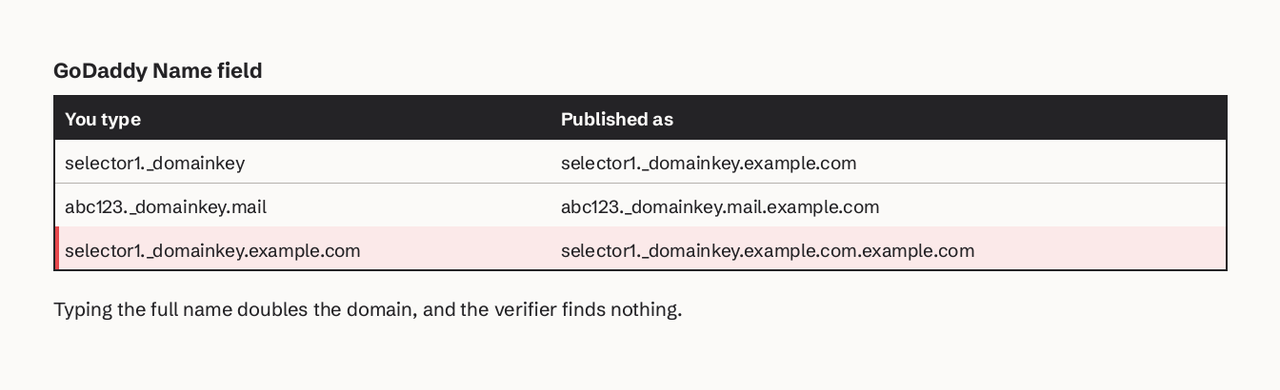
If you sign mail from a subdomain such as mail.example.com, keep the subdomain label in the Name field, as in the third row.
Microsoft 365: why old GoDaddy DKIM tutorials now fail
Microsoft changed its DKIM CNAME format in May 2025 for new custom domains. Older guides, including many videos, show targets ending in .onmicrosoft.com:
selector1-example-com._domainkey.example.onmicrosoft.com
Custom domains added since May 2025 use a target under dkim.mail.microsoft, with a partition letter Microsoft assigns (for example n or r):
selector1-example-com._domainkey.example.n-v1.dkim.mail.microsoft
Microsoft states that the old and new formats can't coexist for the same selector. So copy the values from your own Defender portal, not from a tutorial. If you can't find them, Exchange Online PowerShell prints the exact targets:
Get-DkimSigningConfig -Identity example.com | Format-List Name,Enabled,Status,Selector1CNAME,Selector2CNAME
Microsoft 365 already signs mail for your initial onmicrosoft.com domain. Each custom domain needs its own two CNAME records. The default key size from New-DkimSigningConfig is 1024-bit. You can move to 2048-bit with Rotate-DkimSigningConfig -KeySize 2048, and a rotation takes four days (96 hours) to take effect.
Google Workspace: the 2048-bit key and GoDaddy's TXT field
Google Workspace is the one common sender where you paste the public key itself into GoDaddy as a TXT record. Google recommends a 2048-bit key. That key is about 400 characters of base64, while a single DNS TXT string can hold only 255 characters (RFC 1035). DKIM handles this: a TXT record can hold several strings, and RFC 6376 says verifiers join them before reading the key.
Paste the value as one line, with no quotes and no line breaks. Then check what was actually published:
dig +short TXT google._domainkey.example.com
"v=DKIM1; k=rsa; p=MIIBIjANBgkqhkiG9w0BAQEFAAOCAQ8AMIIBCgKCAQEA..." "...IDAQAB"
Two quoted strings are fine. A key that ends early, without the closing characters Google showed you, is a truncated record. Re-paste it. If your DNS host can't store a 2048-bit key, Google's fallback is a 1024-bit key. RFC 8301 still allows 1024-bit keys, but recommends 2048-bit.
Google says DKIM can take up to 48 hours to start working after you add the record. The Admin console may show a DNS update message for that long even when the record is right.
Amazon SES and email APIs: three CNAMEs, no key to paste
Amazon SES Easy DKIM publishes a 2048-bit key by default through three CNAME records of the form <token>._domainkey.example.com pointing to <token>.dkim.amazonses.com. Because the key lives at the provider, nothing gets truncated, and the provider can rotate keys without another DNS change. Many email APIs work the same way. Postmark is an exception: it uses one TXT record for DKIM plus a CNAME for its Return-Path, and re-checks DNS every five minutes.
If you send product email through SendHQ, the domain setup lists three DKIM CNAMEs, an SPF TXT, a DMARC TXT and a verification TXT. On GoDaddy you add them by hand with the host-only rule above. Then POST /domains/:id/verify forces a fresh check instead of waiting. SendHQ's one-click DNS setup currently works only for domains on Cloudflare. If you're adding a domain for transactional or agent email, start with the domain docs.
GoDaddy Professional Email: DKIM may already be there
GoDaddy says that domains bought after April 2025 have DKIM added to DNS automatically for Professional Email (including Professional Email powered by Titan). It plans to add DKIM to older domains over time. Check your DNS records for two CNAMEs whose targets contain dkim before adding anything. If they're missing, the Email & Office Dashboard lists them. Microsoft 365 from GoDaddy is different: you generate the keys in Defender as described above.
How do I check that DKIM is working after adding it?
Check in two layers: DNS first, then a real signed message.
- DNS: the
digcommands in step 6 return the CNAME target or thev=DKIM1string. - Message: send a message from the domain to a Gmail address. Open it, choose Show original, and look for:
   DKIM:  'PASS' with domain example.com
   Authentication-Results: mx.google.com;
          dkim=pass header.i=@example.com header.s=selector1 header.b=...
The header.d or header.i domain should be your domain, not the provider's. Only then does DKIM help DMARC: see how DMARC alignment works. Our email DNS checker checks SPF, DKIM and DMARC records in one pass.
Common GoDaddy DKIM errors and fixes
| Symptom | Cause | Fix |
|---|---|---|
dig returns nothing; provider says record not found | Name entered as the full domain, so it was published as ...example.com.example.com | Edit the record and keep only selector._domainkey |
Microsoft 365 status stays CnameMissing | Target copied from an old tutorial (.onmicrosoft.com format) or a typo | Copy values from Defender or Get-DkimSigningConfig |
| GoDaddy won't save the CNAME | A TXT record already exists at the same name; DNS forbids a CNAME next to other records (RFC 1034) | Delete the old TXT at that name first |
dkim=fail (bad signature) in headers | Truncated or edited TXT key, or quotes pasted into the value | Re-paste the full key on one line without quotes |
| Records correct but nothing changes | DNS for the domain isn't hosted at GoDaddy | dig +short NS example.com; add the records at the host it shows |
dkim=pass but DMARC fails | Signature uses the provider's domain (d= not yours) | Make sure custom-domain DKIM is enabled at the sender |
For a deeper diagnosis, from selector choice to rotation, see our DKIM setup guide and how to check for DKIM.
FAQ
Does GoDaddy generate DKIM keys for me?
Only for its own email products. GoDaddy adds DKIM automatically for Professional Email on domains bought after April 2025. For Microsoft 365, Google Workspace, Amazon SES or an email API, the sending service generates the key and GoDaddy only hosts the DNS records.
How long until a GoDaddy DKIM record works?
GoDaddy says most DNS changes take effect within an hour but can take up to 48 hours. Microsoft 365 usually detects the CNAMEs within minutes. Google says DKIM authentication can take up to 48 hours to start. Check with dig instead of waiting blind.
Should a DKIM record in GoDaddy be TXT or CNAME?
Use whatever your sender gives you. Google Workspace uses a TXT record with the key in it. Microsoft 365, Amazon SES, GoDaddy Professional Email and most email APIs use CNAMEs that point to a key the provider hosts and rotates.
Can I have more than one DKIM record in GoDaddy?
Yes. Each selector is its own DNS name, so google._domainkey, selector1._domainkey and an email API's selectors can all exist on one domain. Add one set per service that sends as your domain.
Do I still need SPF and DMARC if DKIM is set up?
Yes. DKIM proves a message wasn't altered and was signed by a key for the domain. DMARC tells receivers what to do when a message fails, and it needs DKIM or SPF to pass and align with the From domain. Our SPF, DKIM and DMARC guide covers how the three work together.
How do I add a DKIM record in GoDaddy for a subdomain?
Keep the subdomain label in the Name field. For a selector at s1._domainkey.mail.example.com, type s1._domainkey.mail. GoDaddy appends example.com.
Sources: Microsoft Learn, DKIM for custom domains, Google Workspace, Set up DKIM, Amazon SES, Easy DKIM, GoDaddy Help, DKIM for Microsoft 365, RFC 6376, RFC 8301.