
Deliverability
SMTP Commands Reference: EHLO to QUIT, With Reply Codes
Every SMTP command with its syntax, the reply codes it can return, and an annotated session with STARTTLS and AUTH, plus what 503 bad sequence of commands means.
Published · Updated
TL;DR: SMTP commands are short text verbs (EHLO, MAIL FROM, RCPT TO, DATA, QUIT) that a client sends to a mail server, one per line, each answered by a three-digit reply code. They must run in a fixed order: greet, name the sender, name each recipient, send the message, quit. Most errors you see in logs, including 503 Bad sequence of commands, come from breaking that order or skipping STARTTLS or AUTH.
SMTP commands are the instructions defined in RFC 5321 that move one email from a client to a server: EHLO (or the older HELO) opens the session, MAIL FROM sets the bounce address, RCPT TO adds each recipient, DATA sends headers and body, and QUIT closes the connection. The extensions STARTTLS (RFC 3207) and AUTH (RFC 4954) add encryption and login, and RSET, NOOP, VRFY, EXPN and HELP are utilities. Every command line, including the CRLF, is limited to 512 octets, and every server must support EHLO, HELO, MAIL, RCPT, DATA, RSET, NOOP, QUIT and VRFY. The table below is the lookup; the sections after it show each command in a real session.
SMTP commands table: syntax and reply codes
| Command | Syntax | What it does | Success reply | Common error replies |
|---|---|---|---|---|
| EHLO | EHLO client.example.com | Opens an ESMTP session and asks for the server's extension list | 250 (multi-line) | 501, 502, 504, 550 |
| HELO | HELO client.example.com | Opens a plain SMTP session, no extension list | 250 | 501, 504, 550 |
| STARTTLS | STARTTLS | Upgrades the connection to TLS | 220 Ready to start TLS | 454, 501 |
| AUTH | AUTH PLAIN <base64> | Logs in with a SASL mechanism | 235 2.7.0 | 334 (continue), 535 5.7.8, 534 5.7.9, 538 5.7.11 |
| MAIL FROM | MAIL FROM:<bounce@example.com> | Starts a transaction and sets the reverse-path (bounce address) | 250 | 451, 452, 503, 550, 552, 553, 555 |
| RCPT TO | RCPT TO:<user@example.net> | Adds one recipient (repeat per address) | 250, 251 | 450, 451, 452, 503, 550, 551, 552, 553 |
| DATA | DATA | Asks to send the message; end with a line containing only . | 354, then 250 | 503, 554, 552, 451, 452 |
| BDAT | BDAT 86 LAST | Sends the message in sized chunks (CHUNKING extension) | 250 | 503, 552, 554 |
| RSET | RSET | Aborts the current transaction, keeps the connection | 250 | 501 if arguments given |
| NOOP | NOOP | Does nothing; checks the server is alive | 250 | 501 |
| VRFY | VRFY postmaster | Asks whether a mailbox exists | 250, 251, 252 | 502, 550, 551, 553 |
| EXPN | EXPN staff-list | Asks for the members of a list | 250, 252 | 500, 502, 550 |
| HELP | HELP or HELP MAIL | Returns help text | 211, 214 | 502, 504 |
| QUIT | QUIT | Ends the session | 221 | 501 if arguments given |
Reply codes come from RFC 5321 section 4.3.2, RFC 3207, RFC 4954 and RFC 3030. Any command can also return 500 (line too long or command unknown), 501 (syntax error) or 421 (service shutting down). For a code-by-code guide, see our SMTP error codes reference.
What order must SMTP commands be sent in?
SMTP commands must follow one order: greeting, optional STARTTLS and AUTH, then one or more mail transactions of MAIL FROM, one or more RCPT TO, and DATA, and finally QUIT. RFC 5321 section 3.3 defines a transaction as exactly those three steps, and MAIL may only be sent when no transaction is in progress.
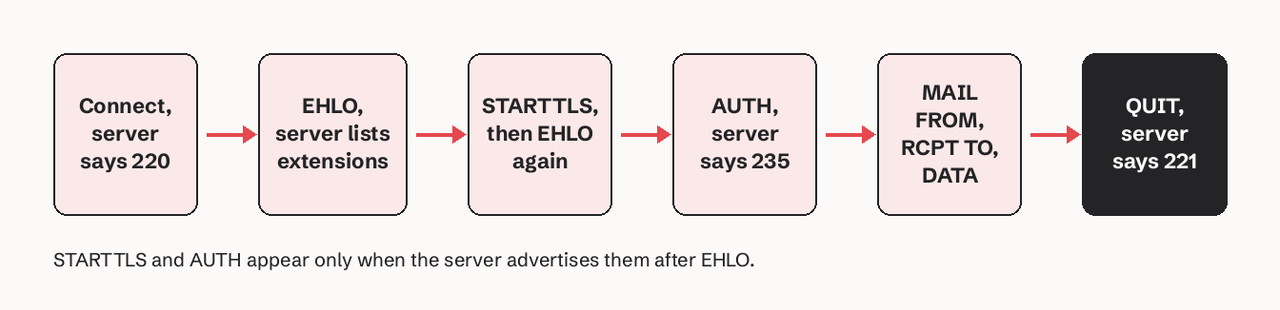
After a 250 for the message, the client can start another transaction on the same connection with a new MAIL FROM, or send RSET to drop a half-built one. Sending QUIT closes cleanly with 221.
Annotated SMTP session with STARTTLS and AUTH
This is a full submission session on port 587, the kind you see in a client debug log. S: lines come from the server, C: lines from the client. The comments are ours.
S: 220 mx.example.net ESMTP ready                # greeting: server is ready
C: EHLO app.example.com                           # identify, ask for extensions
S: 250-mx.example.net
S: 250-SIZE 36700160                              # max message size in bytes (RFC 1870)
S: 250-8BITMIME
S: 250-STARTTLS                                   # TLS is offered
S: 250-ENHANCEDSTATUSCODES                        # replies will carry x.y.z codes
S: 250-PIPELINING
S: 250 CHUNKING                                   # space after 250 = last line
C: STARTTLS
S: 220 2.0.0 Ready to start TLS
   ...TLS handshake...
C: EHLO app.example.com                           # must greet again after TLS
S: 250-mx.example.net
S: 250-SIZE 36700160
S: 250-AUTH PLAIN LOGIN                           # AUTH is advertised only now
S: 250 ENHANCEDSTATUSCODES
C: AUTH PLAIN AGFwcEBleGFtcGxlLmNvbQBzM2NyZXQtcGFzcw==
S: 235 2.7.0 Authentication Succeeded
C: MAIL FROM:<bounces@app.example.com> SIZE=1843
S: 250 2.1.0 OK
C: RCPT TO:<ana@example.net>
S: 250 2.1.5 OK
C: RCPT TO:<old-user@example.net>
S: 550 5.1.1 User unknown                         # one recipient rejected, the rest continue
C: DATA
S: 354 Start mail input; end with <CRLF>.<CRLF>
C: From: App <hello@app.example.com>
C: To: ana@example.net
C: Subject: Your receipt
C:
C: Thanks for your order.
C: .                                              # a lone dot ends the message
S: 250 2.0.0 OK queued as 4QJ7x2
C: QUIT
S: 221 2.0.0 Bye
Three details in this log trip people up. The - after 250 means more lines follow, and a space means the last line. The server drops everything it learned before TLS, so the client sends EHLO a second time (RFC 3207 section 4.2). And one RCPT TO can fail with 550 while others in the same transaction succeed: the message goes only to the accepted recipients.
What is the difference between HELO and EHLO?
HELO is the original SMTP greeting from RFC 821; EHLO is the extended greeting that also asks the server to list the extensions it supports, such as STARTTLS, AUTH, SIZE, PIPELINING and CHUNKING. Use EHLO: without it the server never advertises STARTTLS or AUTH, so you cannot encrypt or log in.
C: HELO app.example.com
S: 250 mx.example.net                 # one line, no extension list

C: EHLO app.example.com
S: 250-mx.example.net
S: 250-STARTTLS
S: 250 AUTH PLAIN LOGIN               # extensions you can now use
RFC 5321 says a client should send EHLO and fall back to HELO only if the server rejects EHLO with 502 (command not recognized). The argument should be the client's fully qualified domain name. Gmail rejects an empty one with 501 5.5.4 Empty HELO/EHLO argument not allowed. Our ESMTP explainer covers the extension mechanism in more depth.
MAIL FROM, RCPT TO and DATA: the mail transaction
MAIL FROM sets the reverse-path, also called the envelope sender or Return-Path: the address that receives bounces. It does not have to match the From: header the reader sees, and DMARC alignment compares the two domains. An empty path, MAIL FROM:<>, is used for bounces themselves so they cannot bounce in a loop. Extensions add parameters such as SIZE=1843, BODY=8BITMIME or SMTPUTF8.
RCPT TO names one recipient per command. A server must accept at least 100 RCPT TO commands per message (RFC 5321 section 4.5.3.1.8); above its limit it rejects the extra addresses with 452, and the client sends the rest in another transaction.
DATA asks to send the message. The server answers 354, the client sends headers, a blank line and the body, then a line holding only a dot. Any body line that starts with a dot is sent with an extra dot (dot-stuffing) so it is not read as the end marker. Each text line is limited to 1,000 octets including CRLF. BDAT from the CHUNKING extension (RFC 3030) replaces this with byte counts, so no end marker or dot-stuffing is needed:
C: BDAT 86 LAST
C: <86 bytes of message>
S: 250 2.0.0 Message accepted
What does 503 bad sequence of commands mean?
503 Bad sequence of commands means the server received a valid command at the wrong point in the session. The command itself is fine; its position is not. Fix the order in your client code or test script rather than retrying, because the same sequence will fail again.
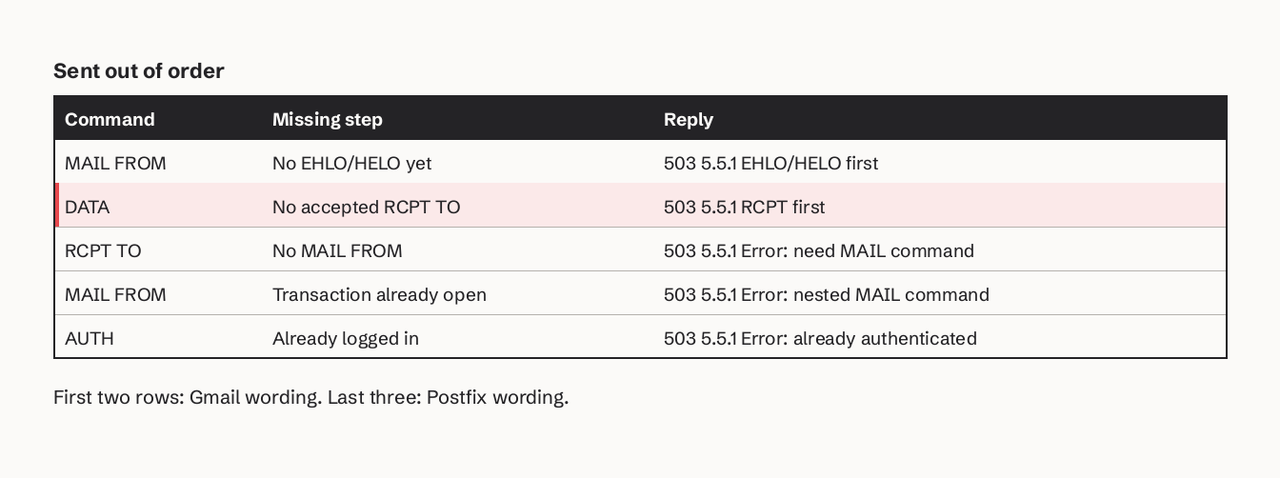
The most common causes:
- DATA after every RCPT TO was rejected. If all recipients got
550, there is no recipient, soDATAreturns503 5.5.1 RCPT first. Check the RCPT replies, not the DATA reply. - Skipped greeting. A raw socket or telnet test that sends
MAIL FROMstraight after connecting gets503 5.5.1 EHLO/HELO first. - Second MAIL FROM without RSET. Starting a new message before the previous one ended. Postfix answers
503 5.5.1 Error: nested MAIL command. SendRSETfirst. - AUTH in the wrong place. Sending
AUTHtwice, or to a server that did not advertise it, gets503 5.5.1 Error: already authenticatedor503 5.5.1 Error: authentication not enabledon Postfix. Read the EHLO reply before sending AUTH. - Pipelining bugs. With
PIPELINING(RFC 2920) a client sends several commands before reading replies; if it pipelines past a failed step, later commands arrive out of sequence.
Gmail's published list of SMTP errors includes four 503 5.5.1 variants: "Bad sequence of commands", "EHLO/HELO first", "RCPT first" and "No DATA after BDAT".
STARTTLS and AUTH: encrypting and logging in
STARTTLS (RFC 3207) turns a plain connection into a TLS one. The server answers 220 Ready to start TLS, both sides run the TLS handshake, and both forget everything from before it, so the client sends EHLO again. If TLS is temporarily unavailable the reply is 454. A server that requires TLS may answer 530 5.7.0 Must issue a STARTTLS command first to every command except NOOP, EHLO, STARTTLS and QUIT. Since RFC 8314 (2018), implicit TLS on port 465 is the recommended choice for message submission, with STARTTLS on 587 still widely used; our SMTP SSL vs TLS comparison explains the trade-off.
AUTH (RFC 4954) logs in. With PLAIN, the argument is base64 of \0username\0password:
printf '\0app@example.com\0s3cret-pass' | base64
# AGFwcEBleGFtcGxlLmNvbQBzM2NyZXQtcGFzcw==
The replies you will see: 334 (send the next piece), 235 2.7.0 (logged in), 535 5.7.8 (wrong credentials), 534 5.7.9 (mechanism too weak, for example PLAIN without TLS), 538 5.7.11 (encryption required first) and 530 5.7.0 Authentication required when you skip AUTH entirely. Base64 is encoding, not encryption, so never send AUTH PLAIN before STARTTLS.
RSET, NOOP, HELP, QUIT: utility commands
- RSET clears the sender, recipients and buffered data of the current transaction but keeps the connection and the EHLO state. Use it after a rejected recipient list or before reusing a connection.
- NOOP returns
250and nothing else. Clients use it as a keep-alive between messages. - HELP returns
214with server-specific text. Many production servers return502or a link instead. - QUIT asks the server to reply
221and close.DATA,RSETandQUITtake no arguments; adding one gets501.
Which SMTP commands are disabled on most servers?
VRFY and EXPN are disabled or neutered on most public servers, and TURN, SEND, SOML and SAML are obsolete. VRFY confirms whether a mailbox exists and EXPN lists a mailing list's members, which made both useful for harvesting addresses. RFC 5321 still lists VRFY as required, so servers that do not want to reveal mailboxes return 252 ("cannot verify, but will accept the message") instead of 250, and many return 502 outright. Do not build address validation on VRFY; send to the address and read the RCPT TO reply or the bounce.
RFC 5321 Appendix F deprecates TURN because, without strong authentication, it lets anyone collect another domain's queued mail. ETRN (RFC 1985) and ATRN (RFC 2645) replace it for dial-up era queue flushing and are rare today. SEND, SOML and SAML delivered to terminals rather than mailboxes; clients should not offer them.
SMTP limits and timeouts worth knowing
| Limit (RFC 5321) | Value |
|---|---|
| Command line, including CRLF | 512 octets |
| Reply line, including CRLF | 512 octets |
| Text line in DATA, including CRLF | 1,000 octets |
| Local part of an address | 64 octets |
| Domain | 255 octets |
| Recipients a server must accept per message | at least 100 |
| Timeout waiting for the 220 greeting | 5 minutes |
| Timeout for MAIL and RCPT replies | 5 minutes each |
| Timeout for the 354 after DATA | 2 minutes |
| Timeout after the final dot | 10 minutes |
The 10-minute wait after the final dot exists because the server may be scanning or delivering the message; a client that gives up early and retries can create duplicates.
How to send SMTP commands by hand
You can type these commands yourself to test a server. Port 25 is often blocked on home and cloud networks, so test submission on 587 with openssl, which handles STARTTLS for you:
openssl s_client -starttls smtp -crlf -quiet -connect smtp.example.com:587
# then type: EHLO test.example.com, AUTH ..., MAIL FROM:<...>, RCPT TO:<...>, DATA, ., QUIT
The -crlf flag matters: SMTP lines end in CRLF and some servers reject bare LF. For port 465 drop -starttls smtp. For scripted tests, swaks builds the whole session for you. If you only need to know which port to open, see our SMTP port guide.
The video below walks through the same classic session (greeting, HELO, MAIL FROM, RCPT TO, DATA, QUIT) with the server's reply at each step.
An animated walk-through of one SMTP transfer between two mail servers. It shows the 220 greeting, the HELO introduction, the MAIL FROM, RCPT TO and DATA commands with their 250 and 354 replies, the lone dot that ends the message, and QUIT with 221.
Reading SMTP replies without running SMTP yourself
If you send through an HTTP email API, you never type these commands, but you still need what they return. The receiving server's last reply (550 5.1.1 User unknown, 421 4.7.28 rate limiting, 554 5.7.1 policy block) is the only real explanation of why a message bounced or is delayed. SendHQ sends over a REST API and passes that reply through: the email.bounced webhook carries it in data.bounce.diagnostic (for example 550 5.1.1 user unknown) along with whether the address was suppressed, and email.delivery_delayed carries the server's diagnostic while retries continue. If you want those diagnostics in your app instead of in a mail server log, create a SendHQ account and point a webhook at your endpoint. Our SMTP 550 guide covers what to do with the most common one.
FAQ
What are the basic SMTP commands?
The basic SMTP commands are EHLO (or HELO), MAIL FROM, RCPT TO, DATA and QUIT: greet, set the sender, add recipients, send the message, close. RFC 5321 also requires servers to support RSET, NOOP and VRFY, which gives nine mandatory commands in total.
What is the difference between SMTP commands and SMTP reply codes?
Commands are what the client sends (RCPT TO:<ana@example.net>); reply codes are the server's three-digit answers (250, 550). The first digit carries the meaning: 2 success, 3 send more, 4 temporary failure (retry later), 5 permanent failure (do not retry as is).
Is EHLO required, or can I still use HELO?
HELO still works on every server, but you lose STARTTLS and AUTH because the server only lists extensions after EHLO. Use EHLO and fall back to HELO only when the server answers EHLO with 502.
Which SMTP commands can be used more than once in a session?
RCPT TO repeats once per recipient. MAIL FROM, RCPT TO and DATA repeat as a group for each message on the same connection. EHLO is sent again after STARTTLS. NOOP and RSET can be sent at any time.
What does a 250 reply after DATA mean: is the email delivered?
No. A 250 after the final dot means the server accepted responsibility for the message and queued it. It can still bounce later, land in spam, or be delayed. Watch for a later bounce (a delivery status notification to the MAIL FROM address) or, with an API, the delivery and bounce events.
Why does my SMTP server return 530 before I send anything?
530 5.7.0 Must issue a STARTTLS command first or 530 5.7.0 Authentication required means the server requires TLS or a login before it accepts MAIL FROM. Send STARTTLS, then EHLO again, then AUTH. Our SMTP authentication explainer shows the full login flow.
Sources: RFC 5321, Simple Mail Transfer Protocol, RFC 3207, SMTP over TLS, RFC 4954, SMTP AUTH, RFC 3030, CHUNKING and BDAT, RFC 8314, Cleartext Considered Obsolete, Gmail SMTP error reference.