
Deliverability
GoDaddy SPF Record: How to Add or Merge It Correctly
Add a GoDaddy SPF record as one TXT at @ starting v=spf1. Already have one? Edit it to add your new sender instead of creating a second record.
Published · Updated
TL;DR: A GoDaddy SPF record is one TXT record with Host @ and a value that starts with v=spf1. If your domain already has one (GoDaddy email, Microsoft 365 and Google Workspace setups usually do), edit it and add the new sender's include: instead of adding a second record, because two SPF records make SPF fail with permerror. Email APIs such as SendHQ show you the exact SPF value they need and a merged value when you already have a policy.
Sending product or agent email from your GoDaddy domain? Create a SendHQ account and add your domain: it lists every DNS record to paste into GoDaddy, including a merged SPF value.
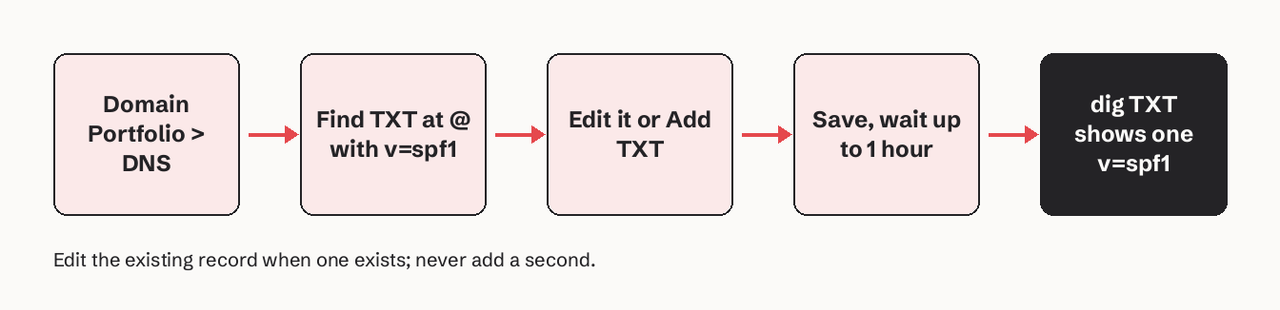
To add an SPF record in GoDaddy, open Domain Portfolio, select the domain, click DNS, and look for an existing TXT record at @ that starts with v=spf1. If there is none, click Add New Record, choose Type TXT, Name @, paste your SPF value (for example v=spf1 include:spf.protection.outlook.com -all for Microsoft 365), keep the default TTL and save. If one exists, click its edit (pencil) icon and add the new include: before the final -all or ~all. Most GoDaddy DNS changes take effect within an hour, though GoDaddy says they can take up to 48 hours globally.
What you need before you start
- A GoDaddy login with access to the domain.
- DNS managed at GoDaddy. Run
dig +short NS yourdomain.com: GoDaddy nameservers look likens51.domaincontrol.com. If you see Cloudflare or another host, edit SPF there; changes in GoDaddy's editor will do nothing. - The list of every service that sends mail with your domain in the envelope sender: your mailbox provider, your website's contact form, your CRM, and any email API.
- Each service's SPF mechanism from its own docs (table below).
| Sender | SPF mechanism | Source |
|---|---|---|
| SendHQ | Shown in your domain setup, with a merged value if you already have SPF | SendHQ docs |
| Microsoft 365 | include:spf.protection.outlook.com | Microsoft Learn |
| Google Workspace | include:_spf.google.com | Google Workspace Admin Help |
| GoDaddy legacy hosting email | include:secureserver.net | Google's own merge examples list it |
| Amazon SES (custom MAIL FROM) | include:amazonses.com on the MAIL FROM subdomain | AWS SES docs |
How SendHQ handles SPF on a GoDaddy domain
SendHQ provisions three DKIM CNAMEs, an SPF TXT policy, a DMARC TXT policy and a verification TXT value for each domain you add. On GoDaddy you paste them by hand. The part that matters for this guide: SendHQ's docs say to "keep exactly one selectable SPF policy and one DMARC policy at their respective names", and SendHQ "reports a recommended merged SPF value or the DMARC value to retain; it does not silently overwrite an unrelated policy during ordinary setup." So if your GoDaddy zone already has Microsoft 365 SPF, you get a single value to paste over it rather than a second record. After saving, POST /domains/:id/verify forces a fresh DNS check, and the domain moves through pending, checking, propagating and verified. One-click DNS setup is for Cloudflare-hosted domains; on GoDaddy the records are manual.
How do I add an SPF record in GoDaddy?
- Sign in and open DNS. Go to Domain Portfolio, select your domain, then the DNS tab (DNS Records).
- Look for an existing SPF. Filter or scan the TXT records at Name
@for a value starting withv=spf1. If you find one, skip to the next section and edit it instead. - Add a new record. Click Add New Record and set:
   Type:  TXT
   Name:  @
   Value: v=spf1 include:spf.protection.outlook.com -all
   TTL:   Default (1 hour)
Replace the value with your provider's mechanism. Type is TXT: the separate SPF record type is deprecated by RFC 7208.
- Do not add quotes. Paste the value bare. GoDaddy stores TXT values as strings; typed quotation marks can end up inside the value.
- Save and wait. Microsoft recommends a TTL of at least 3600 seconds for SPF records, which matches GoDaddy's default.
- Delete legacy records. If the zone still has an old record of type SPF, or a stale TXT from a provider you stopped using, remove it.
Which SPF value does each GoDaddy email product use?
There is no single default; it depends on the email product attached to the domain. GoDaddy's legacy hosting email uses v=spf1 include:secureserver.net -all. Microsoft 365 from GoDaddy needs include:spf.protection.outlook.com. GoDaddy says SPF is added automatically for Professional Email powered by Titan. A common trap: domains moved to Microsoft 365 still carrying include:secureserver.net, which authorizes GoDaddy's servers but not Microsoft's. Check which service actually sends your mail, then make the record match.
GoDaddy also adds DMARC automatically to domains bought from April 2025: v=DMARC1; p=quarantine; adkim=r; aspf=r; rua=mailto:dmarc_rua@onsecureserver.net;. With p=quarantine, a broken SPF combined with missing DKIM can now send your mail to spam, so the SPF fix is no longer optional on newer domains.
Why two v=spf1 TXT values cause permerror
No. GoDaddy's editor will accept a second TXT at @ starting with v=spf1, but receivers then return permerror. Microsoft's docs: "Multiple SPF TXT records for the same domain or subdomain cause SPF to return permerror." Combine all senders into one record:
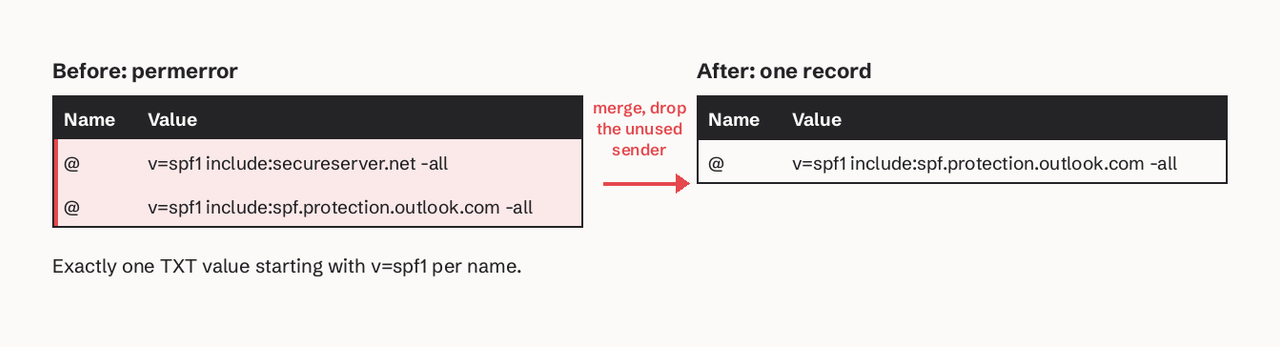
Other TXT records at @ (Google site verification, SendHQ's verification TXT, Facebook domain verification) are fine. Only the ones starting with v=spf1 count.
Merging Microsoft 365, Google and API senders
Edit the existing record and insert the new include: before the all qualifier. One v=spf1 at the start, one all at the end:
# Microsoft 365 only
v=spf1 include:spf.protection.outlook.com -all

# Microsoft 365 + Google Workspace (during a migration)
v=spf1 include:spf.protection.outlook.com include:_spf.google.com -all

# Google Workspace + GoDaddy hosting email (Google's own example)
v=spf1 include:_spf.google.com include:secureserver.net ~all
Pick -all or ~all once. Microsoft recommends -all when DKIM and DMARC are in place; Google recommends ~all. Under DMARC both count as an SPF failure.
Does an email API need to be in the root SPF?
Often not, and this is where most GoDaddy guides over-add. SPF is checked against the envelope sender (the MAIL FROM or Return-Path domain), not the visible From address. Amazon SES, for example, sends with a MAIL FROM subdomain of amazonses.com by default, so SPF passes without your record. When you set a custom MAIL FROM such as bounce.yourdomain.com, SES needs an SPF TXT and an MX on that subdomain, not on @. Adding include:amazonses.com to your root then costs a DNS lookup for nothing. Follow what your provider's setup screen lists for each name; SendHQ shows the exact name and value for each record it needs.
The 10-lookup limit and the 255-character string
The limit is DNS lookups, not includes. RFC 7208 section 4.6.4 allows at most 10 terms that cause DNS queries (include, a, mx, ptr, exists, redirect), counting nested ones inside each include. Past 10, SPF returns permerror. ip4: and ip6: cost nothing. Large providers chain several lookups inside one include, so four or five includes can already reach the limit. Remove senders you no longer use first; move bulk or API senders to their own subdomain second; flatten to IP addresses last, because provider IPs change. Our guide to SPF flattening and the lookup limit walks through the counting.
A single TXT string holds at most 255 characters (RFC 1035). GoDaddy splits longer values for you; receivers join the strings back together (RFC 7208 section 3.3).
How do I verify SPF passes after saving?
Query public DNS after saving:
dig +short TXT yourdomain.com | grep spf
# expect exactly one line:
"v=spf1 include:spf.protection.outlook.com -all"
On Windows: nslookup -type=TXT yourdomain.com. Then:
- Exactly one line starting with
v=spf1. - Every sending service appears, and nothing you stopped using.
- Lookup count is 10 or fewer: our SPF checker counts it.
- Send a test to a mailbox you own and read the headers:
Authentication-Resultsshould showspf=pass.
Our email DNS checker checks SPF, DKIM and DMARC in one pass. For DKIM on the same domain, see how to add DKIM in GoDaddy.
Common errors and fixes
| Error | Cause | Fix |
|---|---|---|
SPF permerror: multiple SPF records | Two TXT values at @ start with v=spf1 | Merge into one, delete the other |
permerror: too many DNS lookups | More than 10 lookup terms | Remove unused includes, move API senders to a subdomain |
spf=softfail or spf=fail from Microsoft 365 | Record still include:secureserver.net only | Add include:spf.protection.outlook.com |
| Record not visible after hours | DNS is hosted elsewhere | Check NS, edit at the real DNS host |
spf=none | Value saved with quotes or typo in v=spf1 | Re-enter value without quotes |
FAQ
How do I add an SPF record in GoDaddy?
Domain Portfolio > your domain > DNS > Add New Record, Type TXT, Name @, value starting v=spf1 with your provider's include, default TTL, Save. If a v=spf1 record already exists, edit that one instead.
Which SPF value does each GoDaddy email product use?
For GoDaddy hosting email it is v=spf1 include:secureserver.net -all. Microsoft 365 needs include:spf.protection.outlook.com, and Professional Email (Titan) has SPF added automatically.
Why two v=spf1 TXT values cause permerror
No. GoDaddy lets you save two, but receivers return permerror and SPF fails for all mail. Keep one record with all includes.
Merging Microsoft 365, Google and API senders
Edit the existing TXT and add include:<provider> before -all or ~all. Check first whether the sender authenticates SPF on its own bounce subdomain; if it does, the root doesn't need it.
How long does a GoDaddy SPF change take?
GoDaddy says most DNS changes take effect within an hour and can take up to 48 hours globally.
Should I use -all or ~all?
Microsoft recommends -all with DKIM and DMARC in place; Google recommends ~all. DMARC treats both as an SPF failure, so DKIM and DMARC matter more than this choice.
If your app or AI agent sends email from a GoDaddy domain, start with SendHQ: add the domain, paste the listed records into GoDaddy, and verify before your first send. The SPF, DKIM and DMARC guide explains how the three fit together.