
Engineering
Send Email from a Supabase Edge Function (HTTP API Guide)
Send email from a Supabase Edge Function by calling an HTTP email API with fetch, since ports 25 and 587 are blocked. Code, secrets, triggers, checks.
Published · Updated
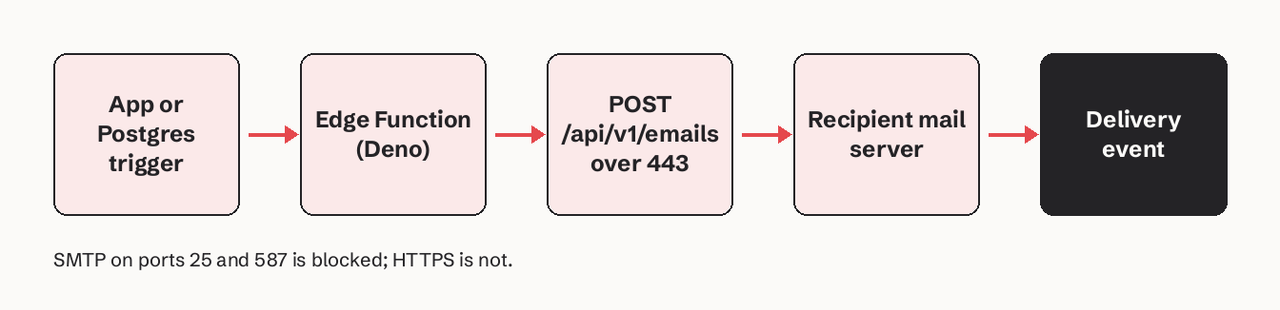
TL;DR: To send email from a Supabase Edge Function, call an email provider's HTTP API with fetch, because Edge Functions block outgoing connections on ports 25 and 587, so SMTP clients will not connect. With SendHQ that is one POST https://sendhq.cc/api/v1/emails with your API key read from a Supabase secret and an Idempotency-Key header so a retried call never sends twice. Then read the email's events to confirm it was delivered, not only accepted.
Want the whole flow working today? Create a SendHQ account, verify your domain, and follow the steps below.
The short answer: create a function with supabase functions new send-email, store SENDHQ_API_KEY with supabase secrets set, have the function fetch the SendHQ emails endpoint with a JSON body (from, to, subject, html, text), deploy it with supabase functions deploy, and call it from your app with supabase.functions.invoke or from Postgres with pg_net. The rest of this guide gives the exact code for each step, how to verify delivery, and the errors you will actually hit.
Why can't I use SMTP from a Supabase Edge Function?
You can't use SMTP on the usual ports because Supabase lists "Outgoing connections to ports 25 and 587 are not allowed" under its Edge Functions limits. Port 25 is server-to-server relay and 587 is the standard submission port (see our SMTP port guide), so libraries like Nodemailer pointed at a normal SMTP host time out. An HTTP API call over 443 is the supported path, and it is also faster inside a function that has a 2 second CPU budget and a 150 second request idle timeout.
Supabase's own SMTP is not an alternative for app email either. Its Auth SMTP docs say the built-in server only delivers to members of the project's team and is currently limited to 2 messages per hour. It is meant for testing templates, not production.
What SendHQ does for this setup
SendHQ is an email API that takes a single JSON request per message, which is exactly what an Edge Function can make. For this job specifically:
- One endpoint, plain fetch.
POST https://sendhq.cc/api/v1/emailswithAuthorization: Bearer <key>. No SDK to bundle, so nothing counts against the function size limit. The 201 response returnsid,providerMessageIdandthreadId(API reference). - Retry-safe sends. An
Idempotency-Keyof up to 200 characters makes a repeated request replay the stored response withIdempotent-Replayed: trueinstead of sending again. Change the payload under the same key and you get a409(sending docs). Edge Functions and database triggers both retry, so this matters. - Delivery you can read. Each email moves through
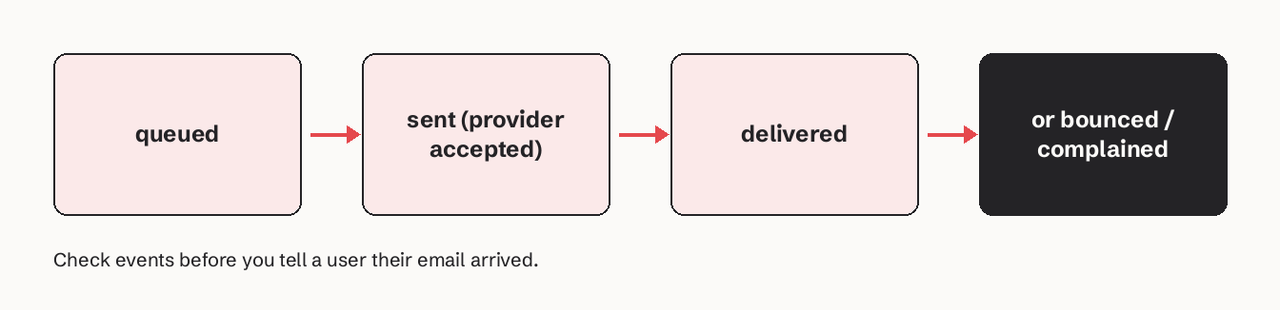
queued,sent,delivered,bounced,complainedorfailed, andGET /api/v1/emails/:id/eventsreturns the events. - Supabase Auth emails too. SendHQ documents a Send Email hook integration for sign-up, magic link and password reset mail, and addresses that hard-bounce are suppressed automatically.
- Price. Starter is $9/month for 50,000 emails and Scale is $39/month for 200,000 (pricing). Sending requires an active plan; there is no free allowance, including to your own address. Say so up front so you don't hit a
402mid-test.
What you need
- A Supabase project and the Supabase CLI (latest version), plus Docker if you want to run functions locally.
- A SendHQ workspace with an active plan, a verified sending domain and an API key. The
fromaddress must be on that verified domain; our DKIM, SPF and DMARC guide covers the DNS side. - Deno-flavoured TypeScript. Edge Functions run on Deno, and
fetchis built in.
Step-by-step: send your first email
- Create the function. From your project directory:
   supabase init        # only if the project isn't initialised yet
   supabase functions new send-email
This creates supabase/functions/send-email/index.ts.
- Store the API key as a secret. Locally, Edge Functions read
supabase/functions/.env, loaded onsupabase start. Add the file to.gitignore.
   # supabase/functions/.env
   SENDHQ_API_KEY=your_sendhq_key
   EMAIL_FROM="Acme <hello@mail.example.com>"
For production, push the same values:
   supabase secrets set --env-file supabase/functions/.env
   supabase secrets list
Supabase says deployed functions read a new secret immediately, with no redeploy. Secret names can't start with SUPABASE_ (reserved), and a project can hold up to 100 secrets of up to 48 KiB each (secrets docs).
- Write the handler. Replace
index.tswith:
   const apiKey = Deno.env.get("SENDHQ_API_KEY")!;
   const from = Deno.env.get("EMAIL_FROM")!;

   Deno.serve(async (req) => {
     if (req.method !== "POST") return new Response("Method not allowed", { status: 405 });

     const { to, subject, html, text, key } = await req.json();
     if (!to || !subject || (!html && !text) || !key) {
       return Response.json({ error: "to, subject, html or text, and key are required" }, { status: 400 });
     }

     const res = await fetch("https://sendhq.cc/api/v1/emails", {
       method: "POST",
       headers: {
         Authorization: `Bearer ${apiKey}`,
         "Content-Type": "application/json",
         // Stable per logical email: an order ID, a user ID plus event, etc.
         "Idempotency-Key": key,
       },
       body: JSON.stringify({ from, to: [to], subject, html, text }),
     });

     const data = await res.json();
     return Response.json(data, { status: res.status });
   });
The caller passes key, something stable such as receipt-${orderId}. That way a retry from the app or the database reuses it and SendHQ replays the first result instead of mailing the customer twice. Read more on why idempotency keys matter for email APIs.
- Run it locally.
   supabase start
   supabase functions serve send-email
Then call it with a JWT (the anon or a user token) as the CLI prints:
   curl -i -X POST 'http://127.0.0.1:54321/functions/v1/send-email' \
     -H 'Authorization: Bearer <SUPABASE_ANON_KEY>' \
     -H 'Content-Type: application/json' \
-d '{"to":"you@example.com","subject":"Test","text":"It works.","key":"local-test-1"}'- Deploy.
supabase functions deploy send-email
Keep JWT verification on (the default) for a function that sends mail. Only use --no-verify-jwt for a function that checks its own signature, such as the Auth hook below.
- Lock down who it can email. As written, any signed-in user could email any address. In production, look up the recipient on the server (the user's own email from
auth.getUser(), or a row in your table) instead of trustingtofrom the request body.
Supabase's own walkthrough of the Edge Functions workflow this guide relies on: creating a function with the CLI, serving it locally, deploying it, invoking it from app code, and loading secrets from a .env file with supabase secrets set.
How do I call the function from my app or a database trigger?
From your app, use the Supabase client. It sends the signed-in user's JWT automatically:
const { data, error } = await supabase.functions.invoke("send-email", {
  body: { to: user.email, subject: "Your receipt", text: "Thanks for your order.", key: `receipt-${order.id}` },
});
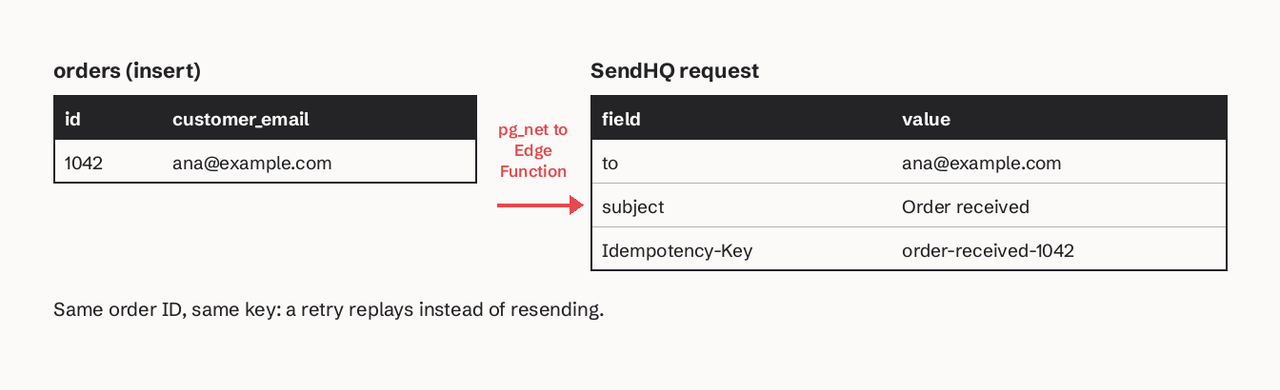
From Postgres, use the pg_net extension. net.http_post is asynchronous and the request only starts after the transaction commits, so it is safe inside a trigger (pg_net docs). Its default timeout is 2000 ms.
create extension if not exists pg_net with schema extensions;

create or replace function public.email_on_order()
returns trigger language plpgsql security definer as $$
begin
  perform net.http_post(
    url := 'https://<project-ref>.supabase.co/functions/v1/send-email',
    headers := jsonb_build_object(
      'Content-Type', 'application/json',
      'Authorization', 'Bearer ' || (select decrypted_secret from vault.decrypted_secrets where name = 'service_key')
    ),
    body := jsonb_build_object(
      'to', new.customer_email,
      'subject', 'Order received',
      'text', 'We received order ' || new.id,
      'key', 'order-received-' || new.id
    )
  );
  return new;
end $$;

create trigger orders_email after insert on public.orders
for each row execute function public.email_on_order();
Keep the key in Supabase Vault, not in the function body. Because the idempotency key is derived from the row ID, a re-fired trigger can't double-send.
How do I send Supabase Auth emails through the function?
Use the Send Email hook. Supabase Auth then calls your function instead of sending confirmation, magic link and password reset mail itself. The function verifies the Standard Webhooks signature with SEND_EMAIL_HOOK_SECRET, builds the link from email_data.token_hash, and sends it with Idempotency-Key: supabase-${token_hash} so a retried hook never sends twice. The full handler is in our Supabase Auth emails guide. Deploy it with --no-verify-jwt, because the hook signature replaces the JWT check. For copy, start from our password reset email examples.
How do I confirm the email was delivered?
A 201 means SendHQ accepted the message, not that it reached the inbox. Take the id from the response and read its events:
curl https://sendhq.cc/api/v1/emails/em_123/events \
  -H "Authorization: Bearer $SENDHQ_API_KEY"
Or get the full timeline with bounce and complaint reasons from GET /api/v1/emails/em_123/delivery. You want to see delivered. A bounced status is a permanent failure, and the address is suppressed so later sends to it are refused. See how to handle email bounces. To react automatically instead of polling, point a SendHQ webhook at a second Edge Function.
Common errors and fixes
| Status / message | Cause | Fix |
|---|---|---|
| Connection timeout from an SMTP client | Ports 25 and 587 are blocked in Edge Functions | Switch to the HTTPS API call above |
401 | Wrong or missing SENDHQ_API_KEY | Check supabase secrets list; locally, check supabase/functions/.env |
402 subscription_required | Workspace has no active plan | Choose a plan, then send; don't retry |
403 "A verified From domain is required" | from isn't on a verified domain | Verify the domain or fix EMAIL_FROM |
409 | Same Idempotency-Key, different payload, or a concurrent request | Use a new key for a new email; keep the payload identical on retries |
422 | Validation error or a suppressed recipient | Fix the input; don't retry a suppressed address |
429 daily_limit_reached | Daily sending ladder reached | Wait until resets_at (midnight UTC); the message was not queued |
502 / 503 | Transient failure | Retry with backoff and jitter, same key, same body |
504 from Supabase | Function didn't respond within 150 s | Don't hold the request open; send and return |
These come from SendHQ's errors and retries docs. The rule of thumb: never auto-retry 400, 401, 402, 409 or 422.
FAQ
Can I use Nodemailer in a Supabase Edge Function?
Not against a normal SMTP host on port 25 or 587, because Supabase blocks outgoing connections on those ports. Use an HTTP email API with fetch instead.
How do I store the API key as a secret?
Put it in supabase/functions/.env for local work and run supabase secrets set --env-file supabase/functions/.env for production. Read it with Deno.env.get("SENDHQ_API_KEY"). Never ship it to the browser.
Do I need to redeploy after changing a secret?
No. Supabase says deployed functions read a new secret immediately.
Can I send to more than one recipient?
Yes. One SendHQ message takes up to 100 combined To, Cc and Bcc addresses, and POST /api/v1/emails/batch takes up to 100 separate messages, which is better for personalised mail.
Is Supabase's built-in email enough for production?
No. Supabase's built-in SMTP only delivers to your project team and is currently limited to 2 messages per hour. Supabase says it is not meant for production.
Next step
You now have a function that sends with one fetch, can't double-send, and can be checked for delivery. Start sending with SendHQ: verify your domain, set SENDHQ_API_KEY, and deploy send-email.