
Deliverability
DKIM Record Example: 8 Real Formats With Every Tag Decoded
A DKIM record example is a TXT at selector._domainkey.example.com like "v=DKIM1; k=rsa; p=...". See 8 real formats and how to check each.
Published · Updated
TL;DR: A DKIM record is a DNS TXT record at selector._domainkey.yourdomain.com whose value looks like v=DKIM1; k=rsa; p=MIIBIjANBgkq..., where p= holds the public key. Some providers (Microsoft 365, Amazon SES, SendHQ) ask you to publish CNAMEs that point to a TXT they host instead. SendHQ gives you three DKIM CNAMEs per domain and checks them for you, so you never paste a key by hand.
Want DKIM set up without copying keys around? Create a SendHQ account, add your domain, and publish the three DKIM CNAMEs it shows you (or use one-click Domain Connect where your DNS provider supports it).
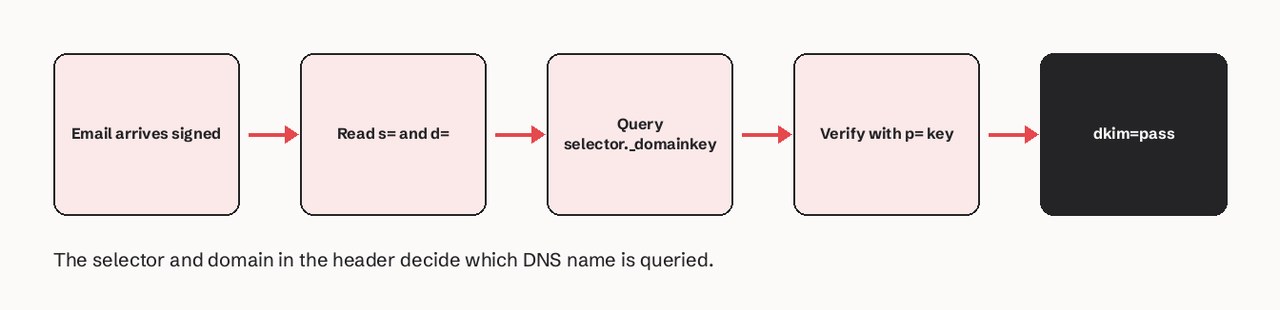
A DKIM record example looks like this: the name is google._domainkey.example.com, the type is TXT, and the value is v=DKIM1; k=rsa; p=<base64 public key>. The part before ._domainkey is the selector, which matches the s= value in the DKIM-Signature header of each email, and the domain after it matches d=. Only p= is required by RFC 6376; v= defaults to DKIM1 and k= defaults to rsa. An empty p= means the key is revoked. Use a 2048-bit RSA key: RFC 8301 says signers must use at least 1024 bits and should use at least 2048. Below are eight real-shaped examples, from Google Workspace and Microsoft 365 to a split 2048-bit TXT, an Ed25519 key and a revoked key, each with the dig command to check it.
Keys in the examples are shortened with ... so they fit on the page. Always copy the full value your provider generates.
What does a DKIM record look like?
A DKIM record has three parts: a name (selector._domainkey.domain), a type (TXT, or a CNAME that points to a TXT), and a value made of tag=value; pairs.
What does each tag in a DKIM record mean?
| Tag | Required? | Default | What it does | Example |
|---|---|---|---|---|
v= | No (recommended) | DKIM1 | Version; must be the first tag when present | v=DKIM1 |
k= | No | rsa | Key type: rsa or ed25519 (RFC 8463) | k=rsa |
p= | Yes | none | Base64 public key; empty means revoked | p=MIIBIjANBg... |
h= | No | all allowed | Hash algorithms the key may be used with | h=sha256 |
s= | No | * | Service types; email is the one defined | s=email |
t= | No | none | Flags: y testing mode, s strict subdomain | t=s |
n= | No | empty | Notes for humans, ignored by software | n=rotated-2026-11 |
Source: RFC 6376 section 3.6.1, read 2026-11-20.
Don't confuse these with the tags in the DKIM-Signature header. In the header, h= is the list of signed header fields and s= is the selector; in the DNS record, h= is hash algorithms and s= is service type.
1. Basic DKIM TXT record (2048-bit RSA)
Scenario: you run your own signer (OpenDKIM, a mail server, an app library) and generated the key pair yourself.
; name                              type  value
mail2026._domainkey.example.com.    TXT   "v=DKIM1; k=rsa; p=MIIBIjANBgkqhkiG9w0BAQEFAAOCAQ8AMIIBCgKCAQEAx3...IDAQAB"
What it shows: the minimum useful record. A 2048-bit RSA public key in base64 is about 392 characters, longer than one 255-character DNS string, so most DNS panels split it for you (example 5).
Adapt it: pick a selector that says what signs and when (mail2026, app-2026q4) instead of default, so rotation is obvious later. Check it:
dig +short TXT mail2026._domainkey.example.com
2. Google Workspace DKIM record
Scenario: your team sends from Gmail on Google Workspace. The default selector is google, and Google's value is formatted as "v=DKIM1; k=rsa; p=key" (Google Workspace help).
google._domainkey.example.com. TXT "v=DKIM1; k=rsa; p=MIIBIjANBgkqhkiG9w0BAQEFAAOCAQ8AMIIBCgKCAQEAm9...QIDAQAB"
What it shows: Google gives you the key, so it is a TXT. In the Admin console you pick 2048 or 1024 bits; choose 2048 unless your DNS host can't store it, then click Start authentication after the record resolves.
Adapt it: if google._domainkey is already used (for example by an older key), choose a different prefix selector in the Admin console before generating the key.
3. Microsoft 365 DKIM CNAME records
Scenario: you send from Exchange Online with a custom domain. Microsoft 365 uses two CNAMEs; only one selector is active at a time and the other is used after rotation (Microsoft Learn).
selector1._domainkey.contoso.com.  CNAME  selector1-contoso-com._domainkey.contoso.n-v1.dkim.mail.microsoft.
selector2._domainkey.contoso.com.  CNAME  selector2-contoso-com._domainkey.contoso.n-v1.dkim.mail.microsoft.
What it shows: the hostnames are always selector1._domainkey and selector2._domainkey; the target uses your domain with dashes, your *.onmicrosoft.com prefix and a partition letter. The letter (n above) varies, so copy the exact values from the Defender portal or Get-DkimSigningConfig; the values above are for illustration.
dig +short CNAME selector1._domainkey.contoso.com
4. Amazon SES Easy DKIM records
Scenario: you send through Amazon SES and let it manage keys. Easy DKIM gives you three CNAMEs in the form <token>._domainkey.example.com pointing to <token>.dkim.amazonses.com, with a 2048-bit key by default (AWS Easy DKIM docs).
abcd1234efgh5678._domainkey.example.com.  CNAME  abcd1234efgh5678.dkim.amazonses.com.
ijkl9012mnop3456._domainkey.example.com.  CNAME  ijkl9012mnop3456.dkim.amazonses.com.
qrst7890uvwx1234._domainkey.example.com.  CNAME  qrst7890uvwx1234.dkim.amazonses.com.
What it shows: the selector is a random token, not a word. Your mail is signed with s=<token> and d=example.com, so DKIM aligns with your From domain for DMARC.
If you want to bring your own key to SES instead (BYODKIM), you publish a TXT at selector._domainkey.example.com with p=yourPublicKey, RSA between 1024 and 2048 bits (AWS BYODKIM docs).
5. 2048-bit key split into several TXT strings
Scenario: your DNS host or zone file rejects a value longer than 255 characters. A single DNS character-string holds at most 255 octets, so a long value is stored as several quoted strings in one record, and resolvers join them with no space (RFC 6376 section 3.6.2.2).
mail2026._domainkey.example.com. IN TXT ( "v=DKIM1; k=rsa; "
  "p=MIIBIjANBgkqhkiG9w0BAQEFAAOCAQ8AMIIBCgKCAQEAx3...first-part"
  "...second-partIDAQAB" )
What it shows: three strings, one record. Two common breakages: a space or line break pasted inside p=, and the split saved as two separate TXT records (verifiers then see two competing answers).
# joined value: there should be exactly one answer
dig +short TXT mail2026._domainkey.example.com | tr -d '" \n'; echo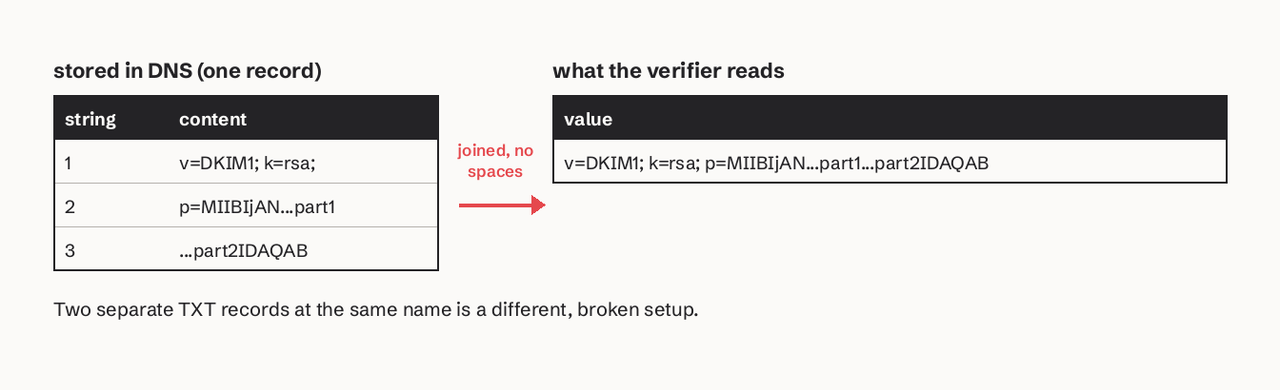
6. Ed25519 DKIM record
Scenario: you want the shorter, faster key type defined in RFC 8463. This is the RFC's own test key:
brisbane._domainkey.football.example.com. TXT "v=DKIM1; k=ed25519; p=11qYAYKxCrfVS/7TyWQHOg7hcvPapiMlrwIaaPcHURo="
What it shows: an Ed25519 public key is 32 bytes, 44 base64 characters, so it never needs splitting. Not every receiver verifies Ed25519 yet, so RFC 8463 setups sign each message twice: once with Ed25519 and once with RSA under a second selector. Never publish Ed25519 alone.
7. Revoked DKIM key
Scenario: a private key leaked, or you retired a selector and want receivers to reject anything still signed with it. RFC 6376 says an empty p= means the key has been revoked.
old2025._domainkey.example.com. TXT "v=DKIM1; p="
What it shows: a verifier that finds this record fails the signature as revoked, which is clearer than deleting the record (that returns "no key"). To revoke safely: publish and switch to the new selector first, keep the old key live through your retry window, then empty its p=.
8. Testing-mode and strict records
Scenario: you are rolling out a new signer and want receivers to know it's a test, or you want to stop subdomains signing for the parent.
; testing: receivers should not treat failures differently from unsigned mail
new2026._domainkey.example.com.  TXT  "v=DKIM1; k=rsa; t=y; p=MIIBIjANBg...IDAQAB"

; strict: the i= domain in signatures must equal d=, no subdomains
app._domainkey.example.com.      TXT  "v=DKIM1; k=rsa; t=s; s=email; h=sha256; p=MIIBIjANBg...IDAQAB"
What it shows: t=y is for rollout only; remove it when signatures verify. s=email and h=sha256 narrow what the key may be used for. Leave them out when unsure; the defaults are fine.
How SendHQ handles DKIM for your domain
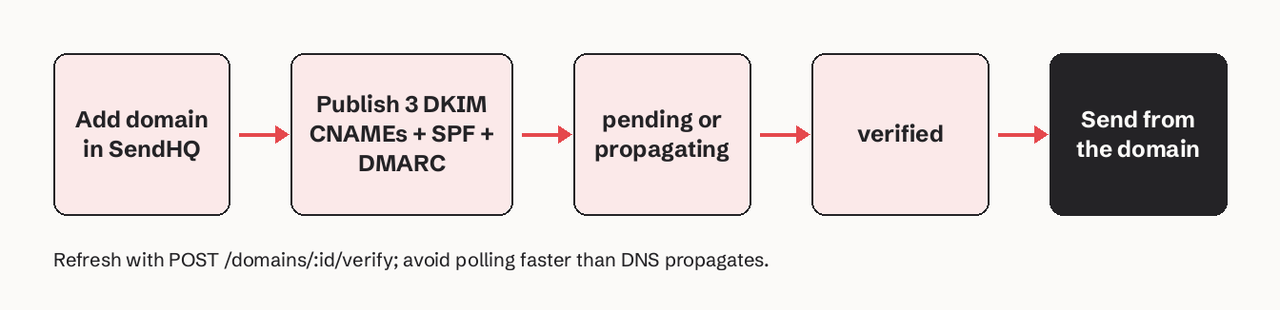
SendHQ uses the CNAME pattern, so you never generate, paste or rotate a key yourself. Per the SendHQ domain docs:
- Records: SendHQ provisions three DKIM CNAMEs, an SPF TXT policy, a DMARC TXT policy and a verification TXT value for each domain.
- States you can read:
pending(a required value is confirmed absent),checking(a resolver result is unavailable),propagating(resolvers don't agree yet) andverified. These come back from the API too, andPOST /domains/:id/verifyforces a fresh check. - Cloudflare: add the records as DNS only (grey cloud), then click Verify. A Domain Connect consent link appears where the DNS provider supports the template.
- SPF and DMARC conflicts: SendHQ reports a merged SPF value or the DMARC value to keep; it does not silently overwrite your existing policy.
What SendHQ does not do: it doesn't let you bring your own DKIM key or choose Ed25519. If you need a specific selector or key type, sign with your own MTA. Plans start at $9/month for 50,000 emails and 25 verified domains (pricing).
Which DKIM record example should you use?
| Your setup | Record type | Example |
|---|---|---|
| SendHQ | 3 CNAMEs from the dashboard | How SendHQ handles DKIM |
| Own mail server or library | TXT, 2048-bit RSA | 1 and 5 |
| Google Workspace | TXT at google._domainkey | 2 |
| Microsoft 365 | 2 CNAMEs, selector1/selector2 | 3 |
| Amazon SES Easy DKIM | 3 CNAMEs to dkim.amazonses.com | 4 |
| Modern signer, extra key | Ed25519 TXT next to RSA | 6 |
| Retiring a key | TXT with empty p= | 7 |
Each sending service gets its own selector. You can have many DKIM records on one domain; what you can't have is two different records at the same selector name.
How long should a DKIM key be?
A DKIM RSA key should be 2048 bits. RFC 8301 requires at least 1024 bits and recommends at least 2048, and it forbids signing with rsa-sha1. Google Workspace and Amazon SES Easy DKIM both default to 2048. Use 1024 only when a DNS host truly can't store the longer value, and move off it when you can. Ed25519 keys are 256 bits and count as strong, but must be paired with RSA.
How do I check a DKIM record?
Read s= and d= from the DKIM-Signature header of a real email you sent, then query that exact name:
# TXT published directly
dig +short TXT google._domainkey.example.com
# CNAME setups: follow the CNAME to the key
dig TXT abcd1234efgh5678._domainkey.example.com +noall +answer
Then look at the receiving mailbox's Authentication-Results header for dkim=pass header.d=example.com. A record existing in DNS doesn't prove mail is signed with it; see our guide on how to check for DKIM.
FAQ
What does a DKIM record look like?
It is a TXT record at selector._domainkey.example.com with a value like v=DKIM1; k=rsa; p=MIIBIjANBgkq...IDAQAB. The selector is chosen by your sender, and p= is the base64 public key.
What does each tag in a DKIM record mean?
v= is the version (DKIM1), k= the key type (rsa or ed25519), p= the public key, h= the allowed hash algorithms, s= the service type, t= flags (y testing, s strict) and n= free-text notes. Only p= is required.
Is a DKIM record a TXT or CNAME record?
The key is always stored as TXT. You publish a CNAME when the provider hosts and rotates the key for you, as Microsoft 365, Amazon SES Easy DKIM and SendHQ do.
How long should a DKIM key be?
2048-bit RSA. RFC 8301 sets 1024 bits as the minimum and 2048 as the recommendation.
How do I revoke a DKIM key?
Publish the record with an empty key, v=DKIM1; p=. Switch signing to a new selector first and keep the old key live until queued and retried mail has cleared, unless the key leaked.
What is a DKIM selector?
The label before ._domainkey, sent as s= in every signature so receivers know which key to fetch. More in our DKIM selector entry.
Related
- DKIM setup guide for product email
- How to check for DKIM
- DKIM signature explained
- DKIM, SPF and DMARC together
- GoDaddy DKIM setup
Skip the key copying. Start sending with SendHQ: add your domain, publish three DKIM CNAMEs, and see verified before your first API send.