
Product engineering
HTML Email Invoice Template: 7 Outlook-Safe Examples
Copy-paste HTML invoice email templates built on tables and inline CSS so they render in Outlook and Gmail, with a plain-text part and the API call that sends them.
Published · Updated
TL;DR: A reliable HTML email invoice template is built from nested tables with inline styles, a fixed 600px content width and no flexbox, because classic Outlook for Windows renders mail with Microsoft Word. Send it as multipart/alternative with a plain-text part, and link to the PDF instead of relying on the body alone. Below are seven copy-paste examples, from the base skeleton to the API call that sends it.
An HTML email invoice template is an email body that shows the invoice number, dates, line items, totals and a payment link in a layout every major client can render. The pattern that survives Outlook 2007 to 2019, Gmail and Apple Mail is the same one email developers have used for years: a role="presentation" table for the layout, a second table for the line items, styles written inline on each cell, and bgcolor and width attributes as fallbacks. Pair the HTML with a plain-text version of the same invoice, send it from a verified domain with DKIM, and keep the PDF as an attachment or a link for the customer's records.
Why do invoice emails break in Outlook?
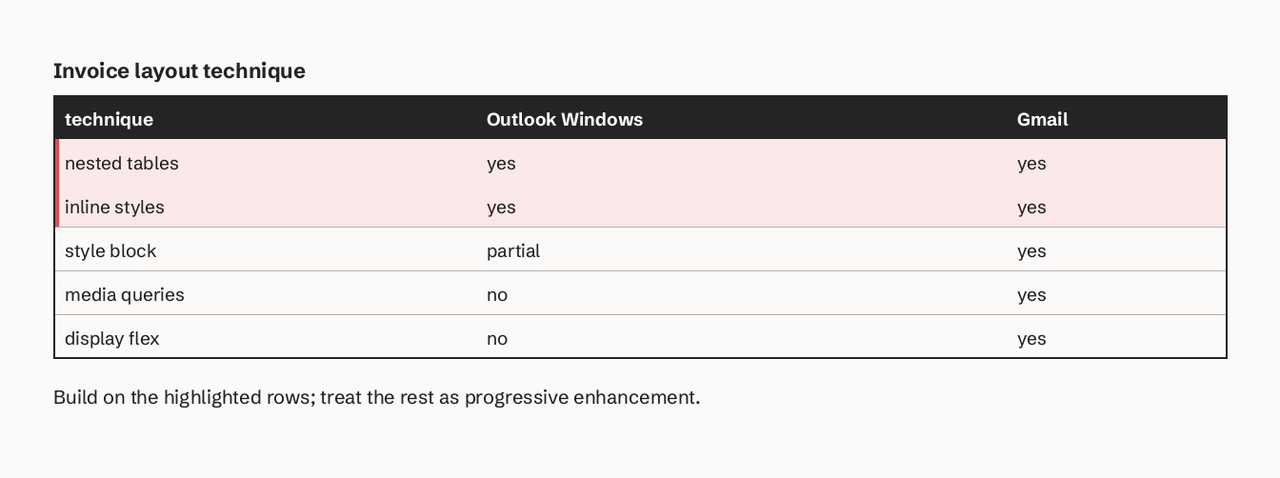
Outlook breaks invoice layouts because Outlook 2007 and later for Windows uses the Word rendering engine to display HTML mail. Microsoft documents that this engine supports only a subset of HTML 4.01 and a subset of CSS Level 1 (Microsoft: Word 2007 HTML and CSS rendering in Outlook)). In practice that means:
display: flexand grid are ignored. Can I Email lists no flex support in Outlook for Windows 2007, 2010, 2013, 2016 or 2019 (caniemail: display flex).max-widthon adivis ignored, so adivlayout stretches to the window. A<table width="600">holds its width.- Background colors on
divs are unreliable;bgcoloron atdworks. - Padding on
panddivis inconsistent; padding ontdis not.
Gmail is more forgiving. Google supports <style> blocks with class, element and ID selectors, and media queries on width, orientation and resolution (Gmail CSS support). So the strategy is: inline the styles Outlook needs, and put mobile tweaks in a <style> block that Gmail and Apple Mail will read.
What should a transactional invoice email include?
A transactional invoice email should let the customer pay or file it without opening anything else. Include:
- Your legal business name and a reply-to address that reaches a person.
- Invoice number and issue date, both in the subject line too ("Invoice INV-1042 from Acme, due 30 Nov").
- Due date and amount due, in the first screen.
- Line items with quantity, unit price and line total.
- Subtotal, tax (with rate) and total, with the currency.
- A payment link or button, plus bank or alternative payment details.
- A link to the PDF or the hosted invoice page.
- Billing address and any tax ID your jurisdiction requires.
Invoices are transactional mail, so they should not carry marketing content or go through your newsletter tool. Our guide to transactional vs marketing email explains why mixing the two puts invoice delivery at risk.
1. The base skeleton (Outlook-safe wrapper)
Use this as the outer shell for every example below. The outer table fills the window and paints the background; the inner 600px table is the card.
<!DOCTYPE html>
<html lang="en">
<head>
  <meta charset="utf-8">
  <meta name="viewport" content="width=device-width, initial-scale=1">
  <meta name="x-apple-disable-message-reformatting">
  <title>Invoice INV-1042</title>
  <style>
    @media screen and (max-width: 620px) {
      .card { width: 100% !important; }
      .pad { padding: 20px !important; }
    }
  </style>
</head>
<body style="margin:0;padding:0;background-color:#f4f5f7;">
  <!-- preheader: shows in the inbox preview, hidden in the body -->
  <div style="display:none;max-height:0;overflow:hidden;">
    Invoice INV-1042 for $1,284.00 is due 30 Nov 2026.
  </div>
  <table role="presentation" width="100%" cellpadding="0" cellspacing="0" border="0" bgcolor="#f4f5f7">
    <tr>
      <td align="center" style="padding:24px 12px;">
        <table role="presentation" class="card" width="600" cellpadding="0" cellspacing="0" border="0" bgcolor="#ffffff" style="width:600px;border:1px solid #e3e6ea;">
          <tr>
            <td class="pad" style="padding:32px;font-family:Arial,Helvetica,sans-serif;font-size:15px;line-height:22px;color:#1f2933;">
              <!-- invoice content goes here -->
            </td>
          </tr>
        </table>
      </td>
    </tr>
  </table>
</body>
</html>
What it shows: role="presentation" tells screen readers the table is layout, not data. The width attribute and the inline width:600px both exist because Outlook reads the attribute and modern clients read the style. The media query only runs where <style> is supported, which is fine: Outlook desktop is not a phone.
Adapt it: change the two hex colors and the font stack. Keep the font a system font; web fonts fall back to Times New Roman in Outlook unless you add a fallback stack.
2. Line-item invoice with totals
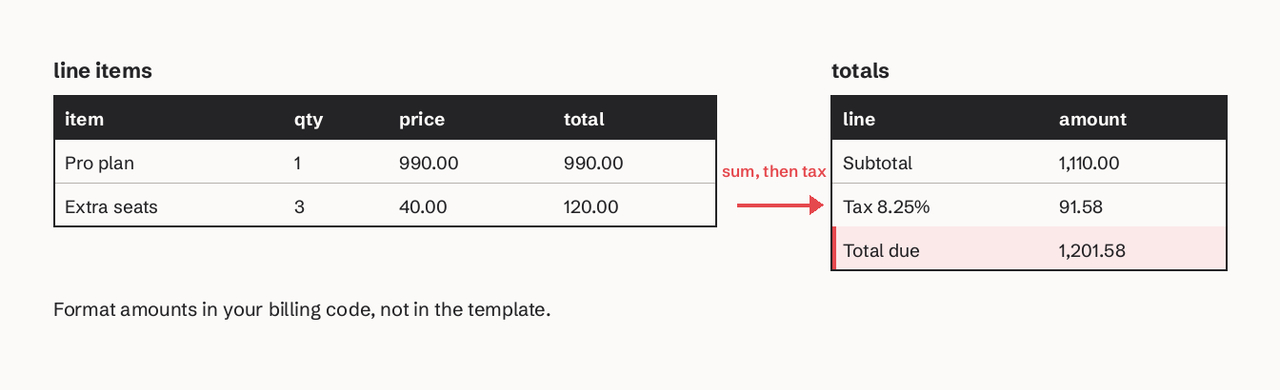
This is the core of any invoice email. The line items are a real data table, so they keep their th cells and lose role="presentation".
<h1 style="margin:0 0 4px;font-size:22px;line-height:28px;">Invoice INV-1042</h1>
<p style="margin:0 0 24px;color:#52606d;">Issued 31 Oct 2026 · Due 30 Nov 2026</p>
<table width="100%" cellpadding="0" cellspacing="0" border="0" style="border-collapse:collapse;">
<tr>
<th align="left" style="padding:8px 0;border-bottom:2px solid #1f2933;font-size:13px;">Item</th>
<th align="right" style="padding:8px 0;border-bottom:2px solid #1f2933;font-size:13px;">Qty</th>
<th align="right" style="padding:8px 0;border-bottom:2px solid #1f2933;font-size:13px;">Price</th>
<th align="right" style="padding:8px 0;border-bottom:2px solid #1f2933;font-size:13px;">Total</th>
</tr>
<tr>
<td style="padding:10px 0;border-bottom:1px solid #e3e6ea;">Pro plan, November</td>
<td align="right" style="padding:10px 0;border-bottom:1px solid #e3e6ea;">1</td>
<td align="right" style="padding:10px 0;border-bottom:1px solid #e3e6ea;">$990.00</td>
<td align="right" style="padding:10px 0;border-bottom:1px solid #e3e6ea;">$990.00</td>
</tr>
<tr>
<td style="padding:10px 0;border-bottom:1px solid #e3e6ea;">Extra seats</td>
<td align="right" style="padding:10px 0;border-bottom:1px solid #e3e6ea;">3</td>
<td align="right" style="padding:10px 0;border-bottom:1px solid #e3e6ea;">$40.00</td>
<td align="right" style="padding:10px 0;border-bottom:1px solid #e3e6ea;">$120.00</td>
</tr>
<tr>
<td colspan="3" align="right" style="padding:10px 0 2px;color:#52606d;">Subtotal</td>
<td align="right" style="padding:10px 0 2px;">$1,110.00</td>
</tr>
<tr>
<td colspan="3" align="right" style="padding:2px 0;color:#52606d;">Sales tax (8.25%)</td>
<td align="right" style="padding:2px 0;">$91.58</td>
</tr>
<tr>
<td colspan="3" align="right" style="padding:10px 0;font-weight:bold;">Total due (USD)</td>
<td align="right" style="padding:10px 0;font-weight:bold;font-size:18px;">$1,201.58</td>
</tr>
</table>What it shows: right-aligned number columns, a heavier rule under the header, and colspan for the totals so labels line up with the amounts. border-collapse is on Gmail's supported property list, and the per-cell borders keep the look in Outlook.
Adapt it: generate the rows in your template engine and format money server-side. Never compute totals in the email; the email shows the numbers your billing system stored.
3. Pay-now button that works in Outlook
A button built from a div or a styled a alone loses its padding in Outlook. A table cell with bgcolor keeps the colored block clickable-looking in every client.
<table role="presentation" cellpadding="0" cellspacing="0" border="0" style="margin:24px 0;">
  <tr>
    <td align="center" bgcolor="#0b5fff" style="border-radius:6px;">
      <a href="https://billing.example.com/pay/INV-1042"
         style="display:inline-block;padding:12px 28px;font-family:Arial,Helvetica,sans-serif;font-size:16px;font-weight:bold;color:#ffffff;text-decoration:none;border-radius:6px;">
        Pay $1,201.58
      </a>
    </td>
  </tr>
</table>
<p style="margin:0;font-size:13px;color:#52606d;">
  Or pay by bank transfer: Acme Inc, account 000123456, routing 110000000, reference INV-1042.
</p>
What it shows: the td carries the color (Outlook honors bgcolor), the link carries the padding for every other client, and the amount sits in the button text so the customer knows what they are paying. The fallback line covers customers whose finance team pays by transfer.
Adapt it: put the amount and invoice number into the payment URL's server-side record, not the query string, so the link cannot be edited into a different amount.
4. Payment receipt (paid invoice)
Once the invoice is paid, send a receipt instead of re-sending the invoice. Change the header, drop the button and state the payment method.
<h1 style="margin:0 0 4px;font-size:22px;line-height:28px;">Payment received</h1>
<p style="margin:0 0 24px;color:#52606d;">
  Thanks. We received $1,201.58 for invoice INV-1042 on 4 Nov 2026.
</p>
<table role="presentation" width="100%" cellpadding="0" cellspacing="0" border="0">
  <tr>
    <td style="padding:6px 0;color:#52606d;">Paid with</td>
    <td align="right" style="padding:6px 0;">Visa ending 4242</td>
  </tr>
  <tr>
    <td style="padding:6px 0;color:#52606d;">Receipt number</td>
    <td align="right" style="padding:6px 0;">RCPT-7781</td>
  </tr>
  <tr>
    <td style="padding:6px 0;color:#52606d;">Amount</td>
    <td align="right" style="padding:6px 0;font-weight:bold;">$1,201.58</td>
  </tr>
</table>
<p style="margin:24px 0 0;">
  <a href="https://billing.example.com/receipts/RCPT-7781.pdf" style="color:#0b5fff;">Download the PDF receipt</a>
</p>
What it shows: a two-column key/value table, which reads well on a phone without any media query. For a fuller receipt layout you can start from our receipt email template.
5. Overdue reminder
A reminder reuses the line-item table from example 2 and changes only the opening. Keep it factual: amount, how late, how to pay.
<p style="margin:0 0 8px;padding:10px 14px;background-color:#fff4e5;border-left:4px solid #f0a020;">
  Invoice INV-1042 for $1,201.58 was due on 30 Nov 2026 and is now 7 days overdue.
</p>
<p style="margin:16px 0;">
  Hi Priya, if you have already paid, you can ignore this email. Otherwise you can pay
  in a minute with the button below, or reply to this email if anything on the invoice looks wrong.
</p>
<!-- reuse the pay-now button from example 3 -->
<!-- reuse the line-item table from example 2 -->
What it shows: the p with a background and left border is fine here because losing the color in an old client loses nothing important. Invite replies: an overdue invoice is often a dispute, and a reply-to that reaches a person resolves it faster.
6. The plain-text part
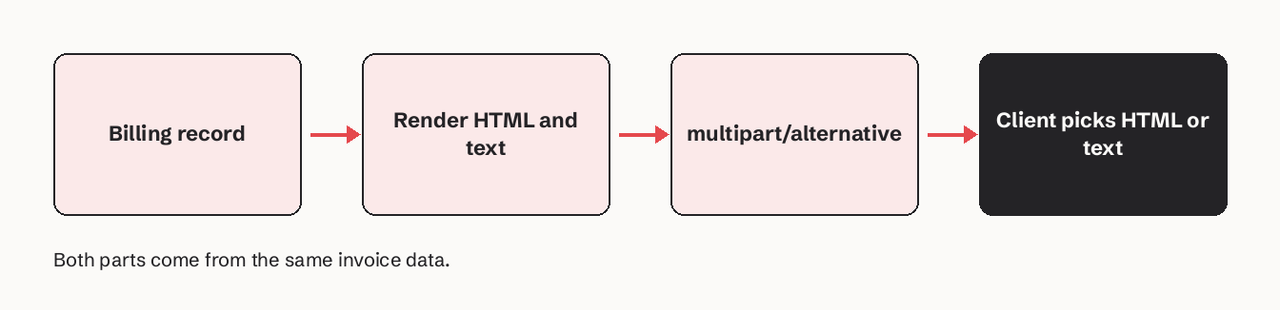
Every invoice email should carry a text/plain version. RFC 2046 defines multipart/alternative with the parts in increasing order of faithfulness, so the plain text comes first and the HTML last, and the client shows the richest part it can (RFC 2046). The text part is what some screen readers, watches and strict corporate filters read.
Invoice INV-1042 from Acme Inc
Issued 31 Oct 2026, due 30 Nov 2026

Pro plan, November      1 x $990.00    $990.00
Extra seats             3 x $40.00     $120.00
                           Subtotal  $1,110.00
                  Sales tax (8.25%)     $91.58
                    Total due (USD)  $1,201.58

Pay online: https://billing.example.com/pay/INV-1042
PDF: https://billing.example.com/invoices/INV-1042.pdf

Questions? Reply to this email.
Acme Inc, 1 Market St, San Francisco, CA 94105
What it shows: the same facts as the HTML, aligned with spaces, with full URLs because text mail has no link text.
7. Sending the invoice from code
Render both parts from the same invoice record, then send them in one API call. This uses SendHQ's REST API; the same shape works with any Resend-style API.
curl https://sendhq.cc/api/v1/emails \
  -H "Authorization: Bearer $SENDHQ_API_KEY" \
  -H "Content-Type: application/json" \
  -H "Idempotency-Key: invoice-INV-1042-issued" \
  -d '{
    "from": "Acme Billing <billing@acme.example>",
    "to": ["priya@customer.example"],
    "reply_to": "accounts@acme.example",
    "subject": "Invoice INV-1042 from Acme, $1,201.58 due 30 Nov",
    "html": "<!DOCTYPE html><html>...example 1 with examples 2 and 3 inside...</html>",
    "text": "Invoice INV-1042 from Acme Inc\nIssued 31 Oct 2026, due 30 Nov 2026\n..."
  }'
And from Node.js 18+ with the built-in fetch:
const res = await fetch("https://sendhq.cc/api/v1/emails", {
  method: "POST",
  headers: {
    Authorization: `Bearer ${process.env.SENDHQ_API_KEY}`,
    "Content-Type": "application/json",
    // one key per invoice event: a retry can never send a second copy
    "Idempotency-Key": `invoice-${invoice.number}-issued`,
  },
  body: JSON.stringify({
    from: "Acme Billing <billing@acme.example>",
    to: [invoice.customerEmail],
    subject: `Invoice ${invoice.number} from Acme, ${invoice.totalFormatted} due ${invoice.dueFormatted}`,
    html: renderInvoiceHtml(invoice),
    text: renderInvoiceText(invoice),
  }),
});
if (!res.ok) throw new Error(`send failed: ${res.status} ${await res.text()}`);
What it shows: the idempotency key is tied to the invoice event, not to the request, which matters for billing mail. On SendHQ a key can be up to 200 characters, an identical retry replays the stored response with Idempotent-Replayed: true, and a changed payload under the same key returns 409 instead of sending a different invoice (SendHQ sending docs). SendHQ will generate a text alternative from your HTML if you omit text, but its docs note that an authored one is more reliable, which is why example 6 exists.
If you want the template stored server-side with typed variables, previews and versioned releases rather than a string in your codebase, SendHQ hosted templates do that and record which template release each invoice was sent with. You can create an account and send to your own address from a verified domain to test the layout. For a full walkthrough of the Node.js side, see sending transactional email from Node.js.
Which example should you use?
| You need to send | Start from | Add |
|---|---|---|
| A new invoice | 1 + 2 + 3 | 6 for the text part |
| A payment confirmation | 1 + 4 | PDF receipt link |
| A late-payment nudge | 1 + 5 + 2 | 3 for the button |
| A minimal invoice for a one-off job | 1 + 2 | Bank details line from 3 |
| Any of the above from code | 7 | Idempotency key per event |
Should I attach a PDF invoice or put it in the email body?
Do both, with the body as the main channel. The HTML body is what the customer reads and pays from; the PDF is what their accountant files. A link to a hosted PDF keeps the message small and lets you fix a mistake after sending, while an attachment survives if your link expires and some finance teams require one. If you attach, remember the cost is per recipient: on SendHQ, attachment transfer is counted as stored bytes multiplied by recipient destinations (SendHQ billing), and every provider has a message size limit. Whichever you choose, never put information in the PDF only: amount, due date and payment link belong in the body.
How do I test the template before sending invoices?
Test the template on the clients your customers use, then test delivery:
- Validate that no layout depends on
divwidths, flexbox or grid (search the HTML fordisplay:flex). - Preview in classic Outlook for Windows, Outlook.com, Gmail web, Gmail on Android and iOS Mail, or use a rendering service such as Litmus or Email on Acid.
- Send to your own inbox and read the message source: confirm it is multipart/alternative with both parts.
- Check authentication on the received message: SPF, DKIM and DMARC should all pass. Gmail requires a DKIM key of at least 1024 bits for personal accounts and recommends 2048 (Google sender guidelines).
- Before launch, run through a transactional email production checklist.
FAQ
How do I make an HTML invoice email render in Outlook?
Use nested tables for every layout block, inline styles on td elements, width and bgcolor attributes alongside CSS, and system fonts. Avoid flexbox, grid, div widths and CSS positioning, because Outlook for Windows renders with the Word engine, which supports only a subset of HTML 4.01 and CSS1.
Should I attach a PDF invoice or put it in the email body?
Put the key facts and payment link in the HTML body, and add the PDF as a link or an attachment for records. The body gets read and paid from; the PDF gets filed. Never hide the amount or due date inside the PDF alone.
What should a transactional invoice email include?
Invoice number, issue and due dates, line items, subtotal, tax and total with currency, a payment link plus alternative payment details, your legal name and address, a link to the PDF, and a reply-to address that reaches a person.
How do I send an HTML invoice email from code?
Render an HTML part and a plain-text part from the same invoice record, then POST both to your email API with a from address on a verified domain and an idempotency key tied to the invoice event, as in example 7. Check delivery events afterwards rather than treating an accepted request as delivered.
Can I use responsive design in an invoice email?
Yes, as an enhancement. Gmail and Apple Mail support media queries, so a fluid card and stacked columns work on phones, while Outlook desktop keeps the fixed 600px width. Our responsive email design template guide covers the pattern in detail.
Why does my invoice email go to spam?
The usual causes are a sending domain without SPF, DKIM and DMARC alignment, sending invoices from the same stream as marketing mail, and a message that is one large image. Send invoices from a dedicated transactional address on an authenticated domain and keep the content as real HTML text.