
Engineering
IMAP vs SMTP: What's the Difference, and Which Does Your App Need?
SMTP sends and relays email; IMAP reads and syncs mail stored on a server. Ports, auth, limits, and IMAP polling vs inbound webhooks for apps and agents.
Published · Updated
TL;DR: SMTP sends email: it carries a message from your client or app to a mail server and from server to server until it reaches the recipient's mailbox. IMAP reads email: it lets a client list, fetch, flag and sync messages that are already stored on a server. A normal mail client uses both; an application that only sends needs SMTP (or a sending API), and an application that must react to incoming mail is often better served by an inbound webhook than by an IMAP connection.
IMAP vs SMTP is not a choice between two alternatives, because they do opposite jobs. SMTP (Simple Mail Transfer Protocol, RFC 5321) is a push protocol for moving a message toward its destination: submission from a client on port 587 or 465, and relay between servers on port 25. IMAP (Internet Message Access Protocol, currently IMAP4rev2 in RFC 9051, August 2021) is an access protocol: the server keeps the mailbox, and clients connect on port 993 to search it, download messages or parts of them, and sync read flags and folders across devices. SMTP cannot show you an inbox, and IMAP cannot send a new message. For developers the real decision is different: when an app or AI agent needs to read and send mail, do you run IMAP plus SMTP against a mailbox, or use an email API with inbound webhooks? This page covers both questions.
IMAP vs SMTP at a glance
| Criterion | IMAP | SMTP |
|---|---|---|
| Job | Access and sync mail stored on a server | Submit and relay outgoing mail |
| Direction | Server to client (pull) | Client to server, server to server (push) |
| Current standard | IMAP4rev2, RFC 9051 (2021) | RFC 5321 (2008); submission RFC 6409 |
| Secure port | 993 (implicit TLS); 143 with STARTTLS | 465 (implicit TLS) or 587 (STARTTLS) for submission; 25 for relay |
| Connection pattern | Long-lived session, often kept open with IDLE | Short session per message or batch |
| Keeps state | Yes: folders, flags, UIDs on the server | No: hands the message off and forgets it |
| Auth at Gmail and Microsoft 365 | OAuth 2.0 (XOAUTH2); basic auth removed | OAuth 2.0; Microsoft is retiring basic auth for SMTP AUTH |
| What can go wrong for an app | Dropped sessions, missed or duplicate messages, UIDVALIDITY resets | Rejected logins, sending caps, bounces you only see later |
The short version: SMTP moves the message, IMAP lets you work with it after it lands.
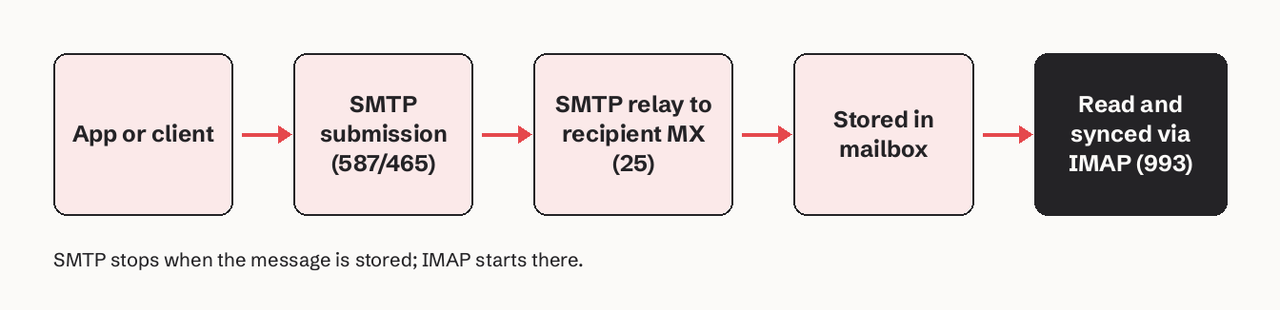
What is the difference between IMAP and SMTP?
The difference is direction and state. SMTP is a delivery protocol: a client opens a session, says who the message is from (MAIL FROM), who it is for (RCPT TO), sends the content (DATA) and disconnects. The receiving server either accepts the message with a 250 reply, defers it with a 4xx code, or rejects it with a 5xx code, and then the sender's part is over. Our SMTP commands reference walks through every step of that exchange.
IMAP is a mailbox protocol. The server is the master copy of the mailbox, and every client sees the same state. When you read a message on your phone, the phone sets the \Seen flag on the server, and your laptop shows it as read the next time it syncs. IMAP can fetch just the headers or one MIME part, search on the server, and move messages between folders. See our IMAP glossary entry for the command set.
A useful way to keep them apart: SMTP has no idea what a "folder" or "unread" is, and IMAP has no command that delivers mail to someone else's server.
Do I need both IMAP and SMTP?
You need both when a single program has to read a mailbox and send from it. That is every desktop and mobile mail client: Thunderbird, Apple Mail and Outlook all ask for an "incoming server" (IMAP or POP3) and an "outgoing server" (SMTP).
You need only SMTP when your app sends and never reads: password resets, receipts, alerts. Many teams skip raw SMTP here too and call a sending API over HTTPS, which returns a message ID and structured errors instead of SMTP reply codes.
You need only IMAP (or a provider API) when your app reads but never sends, such as an archiver or a support-ticket importer.
What ports do IMAP and SMTP use?
IMAP uses port 993 for implicit TLS and port 143 for a plaintext connection upgraded with STARTTLS. SMTP uses 587 (STARTTLS) or 465 (implicit TLS) for authenticated submission, and port 25 for server-to-server relay between mail servers. RFC 8314 (January 2018) says clients should prefer implicit TLS: 993 for IMAP, 995 for POP3 and 465 for submission.
| Service | Gmail host | Port | Encryption |
|---|---|---|---|
| IMAP | imap.gmail.com | 993 | Implicit TLS |
| POP3 | pop.gmail.com | 995 | Implicit TLS |
| SMTP | smtp.gmail.com | 465 | Implicit TLS |
| SMTP | smtp.gmail.com | 587 | STARTTLS |
Source: Google, IMAP, POP, and SMTP for Gmail, last updated 3 November 2026. For the full trade-off between 25, 465 and 587, read SMTP port 587 vs 465 vs 25.
How do authentication and limits differ?
Both protocols authenticate with SASL (AUTHENTICATE in IMAP, AUTH in SMTP), but the big mailbox providers have closed the password route:
- Gmail: IMAP, POP and SMTP all support OAuth 2.0 through the SASL
XOAUTH2mechanism. Gmail no longer supports third-party apps that need your Google username and password; app passwords exist for accounts with 2-Step Verification but Google calls them "not recommended". Since January 2025, IMAP is always on for personal accounts. - Microsoft 365 (Exchange Online): Basic authentication for POP and IMAP was removed on 1 October 2022 in most clouds. SMTP AUTH still works, but Microsoft has announced the retirement of basic auth for it and keeps updating the timeline (Microsoft Learn).
Limits are different in kind. SMTP limits are about volume: Gmail allows 2,000 messages a day from a paid Workspace account and 500 a day from a personal or trial account, with up to 100 recipients per message sent by POP or IMAP clients over SMTP, counted over a rolling 24 hours and shared by every client on the account. IMAP limits are about sessions: a Gmail IMAP session lasts about 24 hours, or about one hour (the access token's life) when you authenticated with OAuth, and an account can have up to 15 clients connected at once before you see "Too many simultaneous connections".
Can an application receive email without IMAP?
Yes. IMAP is one of three common ways for software to get incoming mail, and it is the only one that makes your code poll or hold a connection open:
- IMAP against a mailbox. Works with any provider. Your process logs in, selects
INBOX, and either polls on a timer or usesIDLEto wait for new mail. - A provider API with push. The Gmail API, for example, publishes mailbox changes to a Cloud Pub/Sub topic. You must grant publish rights to
gmail-api-push@system.gserviceaccount.comand callwatchagain at least every 7 days, and each notification carries only an email address and ahistoryId, so you still fetch the changes yourself (Google, push notifications). - Inbound routing to a webhook. You point a domain's MX records at an inbound email service, which parses each message (headers, text, HTML, attachments) and POSTs it to your HTTPS endpoint as JSON. There is no mailbox to log in to and nothing to poll.
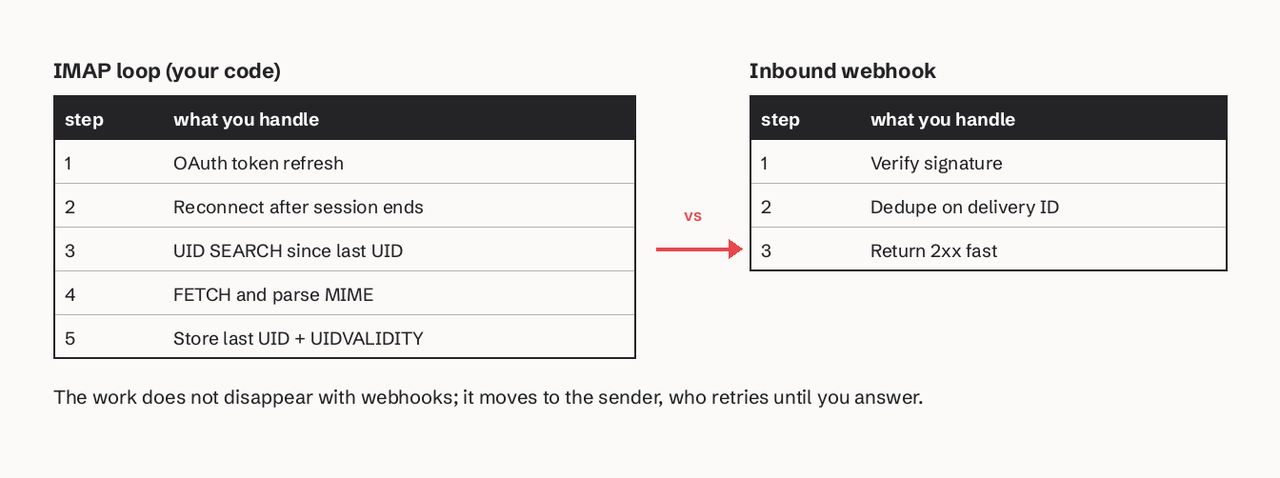
IMAP polling plus SMTP vs an email API with webhooks
This is the comparison that matters if you are building a support bot, a ticketing integration or an AI agent with its own address. Each approach is solid; they fail in different ways.
| Criterion | IMAP + SMTP on a mailbox | Email API + inbound webhook |
|---|---|---|
| Latency to see new mail | Seconds with IDLE; poll interval otherwise | Seconds after the message is accepted |
| Connection to maintain | Yes, re-issue IDLE at least every 29 minutes and reconnect when sessions end | No; you run an HTTPS endpoint |
| Auth | OAuth per mailbox at Gmail and Microsoft 365 | One scoped API key plus a webhook signing secret |
| Duplicate or missed messages | Your job: track UID and UIDVALIDITY | Retries reuse the delivery ID; dedupe on it |
| Threading replies | You set In-Reply-To and References yourself | Same headers, often grouped for you |
| Sending volume | Mailbox caps (500 or 2,000 a day on Gmail) | Provider and domain reputation limits |
| Delivery visibility | SMTP 250 only means "accepted"; bounces arrive later as email | Delivered, bounced and complained events per recipient |
| Works with an existing human mailbox | Yes | Only for addresses routed to the service |
When IMAP plus SMTP is the right call
Use IMAP and SMTP when the mail lives in a mailbox you do not control, such as a customer's Gmail or Microsoft 365 account that your app connects to on their behalf. It is also fine for low-volume internal tools where one service account reads one shared inbox.
The parts that bite are bookkeeping. An IMAP UID is a 32-bit number that only ever increases within a mailbox, but it is only meaningful together with the mailbox's UIDVALIDITY value. If the server rebuilds the mailbox, RFC 9051 requires UIDVALIDITY to increase, and every UID you stored is now meaningless, so a careful client re-syncs instead of trusting its saved position. IDLE came from RFC 2177 (1997) and is part of the base protocol in IMAP4rev2; RFC 2177 tells clients to re-issue it at least every 29 minutes or risk being logged off.
A minimal Python loop that reads new mail by UID and replies over SMTP:
import imaplib
import smtplib
from email import message_from_bytes, policy
from email.message import EmailMessage

# Read new messages over IMAP (implicit TLS on 993).
imap = imaplib.IMAP4_SSL("imap.example.com", 993)
imap.login(USER, PASSWORD)  # Gmail and Microsoft 365 require OAuth (XOAUTH2) instead
imap.select("INBOX")
uidvalidity = int(imap.response("UIDVALIDITY")[1][0])
if uidvalidity != saved_uidvalidity:
    last_uid = 0  # mailbox was rebuilt: stored UIDs no longer apply

_, data = imap.uid("SEARCH", None, f"UID {last_uid + 1}:*")
for uid in (int(u) for u in data[0].split()):
    if uid <= last_uid:
        continue  # "n:*" always matches the newest message, even if it is old
    _, parts = imap.uid("FETCH", str(uid), "(BODY.PEEK[])")
    incoming = message_from_bytes(parts[0][1], policy=policy.default)

    # Reply over SMTP submission (STARTTLS on 587).
    reply = EmailMessage()
    reply["From"] = "agent@example.com"
    reply["To"] = incoming["Reply-To"] or incoming["From"]
    reply["Subject"] = "Re: " + (incoming["Subject"] or "")
    reply["In-Reply-To"] = incoming["Message-ID"]
    reply["References"] = " ".join(filter(None, [incoming["References"], incoming["Message-ID"]]))
    reply.set_content("Thanks, we received your message.")
    with smtplib.SMTP("smtp.example.com", 587) as smtp:
        smtp.starttls()
        smtp.login(USER, PASSWORD)
        smtp.send_message(reply)
    last_uid = uid  # persist last_uid and uidvalidity after each message
imap.logout()
BODY.PEEK[] fetches the message without setting \Seen, so a crash before the reply does not silently mark it as handled.
When an API plus webhooks is the right call
Use an email API with inbound webhooks when the addresses are yours (support@, agent-42@yourdomain.com) and software, not a person, is the main reader. The endpoint receives one signed POST per message, so there is no session to keep alive and no UID state to lose, and outbound sends come back with per-recipient delivery, bounce and complaint events instead of a bare 250 OK. The trade-off is that you must run a public HTTPS endpoint, verify signatures, answer fast and dedupe retries. Our guide to inbound webhooks without duplicate replies covers that pattern.
That is the case SendHQ is built for. It routes inbound mail for your verified domain to an inbox, parses the MIME, threads it with your outbound replies using Message-ID, In-Reply-To and References, and sends a signed email.received webhook; deliveries that do not get a 2xx within 10 seconds are retried eight times over about 27 hours with the same webhook-id (SendHQ webhooks docs). If your agent needs its own address to read and send from, create a SendHQ account and route one test domain before you wire up a production inbox.
Leo Notenboom explains why IMAP treats the server as the master copy of your mail, why that keeps multiple devices in sync, and why SMTP is the protocol that both sends from your device and relays mail from server to server.
Choose IMAP if, choose SMTP if
- Choose IMAP if you need to read, search, flag or sync mail that is already in a mailbox, especially one owned by a user who connects it to your app.
- Choose SMTP if you need to send or relay mail and your volume fits the account's limits, or you are sending through a relay service that gives you SMTP credentials.
- Choose both if you are building a mail client or a bot that lives inside an existing mailbox.
- Choose an email API with inbound webhooks if you own the domain, software is the reader, and you need delivery events, retries and threading without maintaining IMAP sessions.
Is POP3 still worth using?
POP3 (RFC 1939) is still supported but rarely the right choice. It downloads the inbox to one client and can delete the server copy, it does not sync flags or other folders, and it has no push mechanism, so every check is a poll. It survives for single-device setups and for services that import mail from another account. For anything that more than one device or process touches, use IMAP. Our POP3 explainer has the command details.
FAQ
Is IMAP for incoming or outgoing email?
IMAP is for incoming and stored email. It lets a client read, search and organize messages on the server and keeps flags and folders in sync across devices. It has no command for sending a new message to another server.
Can SMTP receive email?
SMTP servers receive mail from other SMTP servers during delivery; that is how a message reaches the recipient's mail server. But SMTP gives the recipient no way to read a mailbox. Reading happens over IMAP, POP3, webmail or a provider API.
Is IMAP or SMTP more secure?
Neither is more secure by itself. Both run over TLS (993 for IMAP; 465 or 587 for SMTP submission) and both support OAuth 2.0 at Gmail and Microsoft 365. Server-to-server SMTP on port 25 uses opportunistic STARTTLS, which domains can harden with MTA-STS.
Why does my mail client need two server names?
Because receiving and sending are separate services. The incoming server (often imap. something) holds your mailbox, and the outgoing server (often smtp. something) accepts mail you send. They can run on the same machine but listen on different ports.
Can an AI agent use IMAP and SMTP?
Yes, with the same constraints as any app: OAuth per mailbox at the big providers, session limits, UID tracking and mailbox sending caps. For an agent with its own address on your domain, an email API with inbound webhooks removes the polling and gives the agent delivery events to act on.
Why do my sent emails not show up in the Sent folder?
SMTP only delivers; it does not save a copy anywhere you can read. Unless your provider files submitted mail for you, the client has to upload a copy to the Sent folder itself with the IMAP APPEND command after sending, and scripts that send with raw SMTP usually skip that step.