
Engineering
10 Best SMTP Testing Tools (Compared by What They Prove)
Swaks, OpenSSL s_client, Mailpit, smtp4dev, MxToolbox, CheckTLS and more, ranked by what a passing test proves, with the exact command and price for each.
Published · Updated
TL;DR: For command-line SMTP testing, use Swaks (full transaction with STARTTLS and AUTH) and OpenSSL s_client (TLS and certificate). For browser checks, MxToolbox (open relay, PTR) and CheckTLS (TLS grade). To test an app without emailing real users, run Mailpit or smtp4dev locally, or use Mailtrap's hosted sandbox. Each tool proves a different layer, so pick by the question you are asking.
The best SMTP testing tools are Swaks, OpenSSL s_client, Telnet or Netcat, MxToolbox, CheckTLS, mail-tester.com, Mailpit, smtp4dev, Mailtrap Email Sandbox and the Amazon SES mailbox simulator. They are not interchangeable. An SMTP test tool either talks to a real server (to prove it accepts connections, offers STARTTLS, authenticates you and accepts a message) or it pretends to be a server (to catch your application's mail before it reaches anyone). Telnet proves port 25 is open and nothing more. Swaks proves the whole conversation. A sandbox like Mailpit proves your code generates the right message. Every tool below is free or has a free tier except paid Mailtrap plans, and every price and version was checked on November 14, 2026.
How we judged these SMTP test tools
We ranked each tool by what a passing result actually proves, then by how fast you get that proof:
- Layer covered: TCP connection, banner and EHLO, STARTTLS and certificate, AUTH, envelope (MAIL FROM, RCPT TO), message accepted, content and spam score.
- Scriptable: can it run in CI or a shell loop, not only in a browser?
- Safe for real users: does it ever deliver to a real inbox?
- Cost and license: free, open source, or a paid plan with a limit.
- Maintenance: a release in the last year, so it handles current TLS versions.
We left out tools that only advertise "deliverability scores" without showing the SMTP transcript, because a number without the session does not tell you what failed.
SMTP testing tools at a glance
| Tool | Type | Proves | STARTTLS / AUTH | Price | Delivers to real inboxes? |
|---|---|---|---|---|---|
| Swaks | CLI | Full SMTP transaction | Yes / Yes | Free, GPLv2 | Only if you point it at one |
| OpenSSL s_client | CLI | TLS handshake, certificate chain | Yes / manual | Free | Only by hand |
| Telnet or Netcat | CLI | Port open, banner, plain commands | No / manual | Free | Only by hand |
| MxToolbox SMTP test | Online | Connect, open relay, PTR, response time | Reported / No | Free | No |
| CheckTLS TestReceiver | Online | Receiving server TLS security, 0-100 grade | Yes / No | Free test, paid plans | No, never sends |
| mail-tester.com | Online | Content, SPF/DKIM/DMARC, spam score | n/a | 3 free tests per 24 h | It is the recipient |
| Mailpit | Local sandbox | Your app's message as sent | Yes / Yes | Free, MIT | No, captures everything |
| smtp4dev | Local sandbox | Your app's message, SMTP session log | Yes / Yes | Free, BSD-3-Clause | No unless you add relay rules |
| Mailtrap Email Sandbox | Hosted sandbox | Your app's message, shared with a team | Yes / Yes | Free 50 tests/mo, from $17/mo | No |
| Amazon SES mailbox simulator | Provider test addresses | Delivery, bounce, complaint events | n/a | Normal SES pricing | No, simulated |
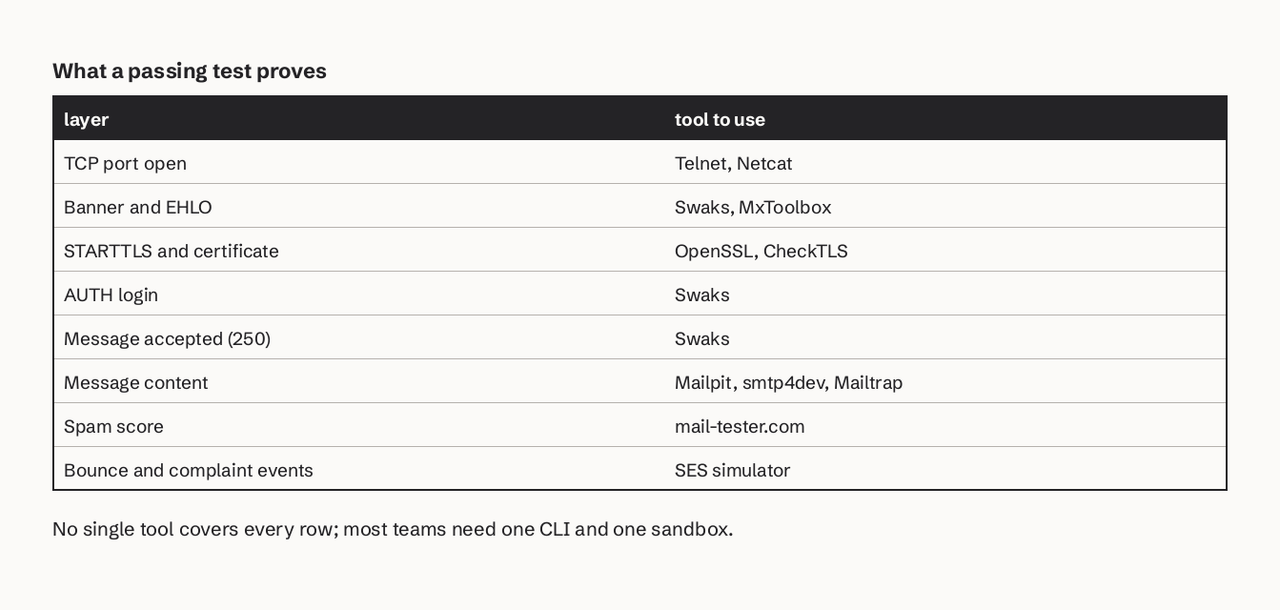
1. Swaks
Swaks ("Swiss Army Knife for SMTP") is a scriptable, transaction-oriented SMTP test tool by John Jetmore, free under the GNU GPLv2. The current version is 20240103.0 (Swaks home page). It speaks SMTP, ESMTP and LMTP and supports STARTTLS, authentication, pipelining, PROXY and XCLIENT.
- Best for: proving the full path: connect, EHLO, STARTTLS, AUTH, MAIL FROM, RCPT TO, DATA, with every line of the session printed.
- Pricing: free.
- Verified detail:
-tlsrequires STARTTLS and exits if the server does not offer it;--tls-on-connectswitches to implicit TLS and changes the default port from 25 to 465;--quit-after RCPTstops before DATA so you can test a recipient without sending a message (Swaks reference). - Limits: a Perl script, so Windows users need WSL or a Perl install. It reports what the server said, not why.
Test submission on port 587 with STARTTLS and login, without sending a message:
swaks --server smtp.example.com --port 587 -tls \
  --auth LOGIN --auth-user app@example.com \
  --from app@example.com --to you@example.com \
  --quit-after RCPT
Swaks prompts for the password when you omit --auth-password, which keeps it out of your shell history. Remove --quit-after RCPT to send a real test message to an inbox you own.
2. OpenSSL s_client
OpenSSL s_client is the TLS client built into OpenSSL, and with -starttls smtp it upgrades an SMTP connection exactly as a mail client does (OpenSSL s_client manual).
- Best for: certificate errors: expired certificates, hostname mismatches, missing intermediate certificates and weak protocol versions.
- Pricing: free; already installed on most Linux and macOS systems.
- Verified detail:
-crlftranslates your Enter key into CR+LF, which some SMTP servers require before they accept a typed command. - Limits: after the handshake you type SMTP commands by hand, including base64-encoded AUTH credentials. Use it to inspect TLS, then switch to Swaks for the transaction.
openssl s_client -starttls smtp -crlf -connect smtp.example.com:587 -servername smtp.example.com
For port 465 (implicit TLS), drop -starttls smtp. Our guide to SMTP SSL vs TLS explains which port expects which.
3. Telnet or Netcat
Telnet and Netcat (nc) open a raw TCP connection, so they answer one question: can this machine reach that server on that port, and what does the server say first?
- Best for: firewall and ISP checks. Many residential and cloud networks block outbound port 25.
- Pricing: free. On Windows, Telnet Client is an optional feature you have to enable first.
- Verified detail: Microsoft's Exchange guide uses
OPEN mail1.fabrikam.com 25and expects a220banner; a blocked path returns "Could not open connection to the host, on port 25: Connect failed" (Microsoft Learn). - Limits: no TLS, so you cannot test STARTTLS, port 465 or AUTH on any modern submission server. Backspace does not work in a Telnet session; a typo returns
500 5.3.3 Unrecognized command.
How do you find the destination server and test port 25?
Look up the domain's MX record, then connect to the host it returns on port 25:
nslookup -type=mx example.com
nc -v mx1.example.com 25
A 220 banner means the port is open and the server is listening. Then type EHLO yourhost.example.com and read the 250 lines to see which extensions (STARTTLS, SIZE, AUTH) it advertises. Our SMTP commands reference lists every command and the success and error messages each one returns.
4. MxToolbox SMTP Diagnostics
MxToolbox's Email Server Test connects to your mail server over SMTP, runs a simple open relay test, checks the server has a reverse DNS (PTR) record and measures response times (MxToolbox SMTP diagnostics).
- Best for: a quick outside-in check of a receiving server, from a network that does not block port 25.
- Pricing: free for individual lookups; monitoring is a paid product.
- Verified detail: it flags a missing PTR record, which many receivers treat as a spam signal for the sending IP.
- Limits: it tests the server, not your credentials. It cannot log in, so it cannot tell you why your app's AUTH fails.
5. CheckTLS TestReceiver
CheckTLS TestReceiver walks through every step a sending server takes against a recipient address, records every command and byte, and stops before sending: it "never actually sends an email" (CheckTLS TestReceiver).
- Best for: proving a receiving domain enforces sound TLS: certificate signer, key length, cipher strength and hostname match.
- Pricing: the single test is free; batch testing, baselines and monitoring need a subscription.
- Verified detail: results include a Confidence Factor from 0 to 100 that weighs every MX host by preference.
- Limits: receiving side only. It does not test your outbound submission server or authentication.
6. mail-tester.com spam score
mail-tester.com gives you a one-time address; you send a message to it from your real setup and get a scored report on its authentication and content.
- Best for: the last check before a launch: does a real message from your production path pass SPF, DKIM and DMARC and look clean to spam filters?
- Pricing: 3 free tests in any 24 hours, then paid test packs (mail-tester FAQ).
- Limits: it scores one message from one path. A good score does not predict inbox placement at Gmail or Microsoft, which depend on your sending history. Check your records first with our email DNS checker.
7. Mailpit, the MailHog successor
Mailpit is a local SMTP server and web interface that captures every message your application sends, so nothing reaches a real inbox. It is MIT licensed and actively maintained: v1.33.1 shipped on November 7, 2026 (Mailpit on GitHub).
- Best for: development and CI. Point your app's SMTP settings at it and read every password reset, receipt and invite in a browser.
- Pricing: free.
- Verified detail: SMTP with optional STARTTLS or SSL/TLS and authentication (including an "accept any" mode), a REST API for integration tests, an HTML compatibility check, a spam check through SpamAssassin or Rspamd, and a "Chaos" feature that returns configurable SMTP errors so you can test your retry logic. It keeps the most recent 500 messages by default (Mailpit docs).
- Limits: it proves your message, not your production server. A message Mailpit accepts can still be rejected by a real provider.
docker run -d --name=mailpit -p 8025:8025 -p 1025:1025 axllent/mailpit
# SMTP: localhost:1025   Web UI: http://localhost:8025
Mailpit is the maintained successor many teams moved to from MailHog, whose last release (v1.0.1) was in August 2020.
8. smtp4dev (open-source .NET server)
smtp4dev is a fake SMTP server for Windows, Linux and macOS built on .NET, licensed BSD-3-Clause, with version 3.16.1 released on November 6, 2026 (smtp4dev on GitHub).
- Best for: teams that want to see the raw SMTP conversation as well as the message: it logs every session, inspects MIME parts and serves captured mail over IMAP and POP3.
- Pricing: free.
- Verified detail: implicit TLS and STARTTLS with an auto-generated self-signed certificate, multiple mailboxes with routing rules, and scripted error simulation.
- Limits: relay rules can forward captured mail to real addresses, so review them before sharing an instance. The project's own docs warn Docker users not to expose it publicly.
docker run --rm -it -p 5000:80 -p 2525:25 -p 110:110 rnwood/smtp4dev
# SMTP: localhost:2525   Web UI: http://localhost:5000
The port mapping comes from the smtp4dev installation guide.
9. Mailtrap Email Sandbox
Mailtrap Email Sandbox is a hosted fake SMTP inbox: your staging app sends to Mailtrap's SMTP credentials and the messages land in a shared web inbox instead of with customers.
- Best for: QA teams that need several people to review the same staging email without running a server.
- Pricing: Free is $0 for 50 test emails a month, 1 sandbox and 10 stored emails; Basic is $17 a month ($14 billed yearly) for 500; Team is $42 a month for 5,000; Business is $123 a month for 50,000 (Mailtrap pricing, November 14, 2026).
- Limits: the free plan's 50 emails disappear in one afternoon of CI runs. Mailpit or smtp4dev give you unlimited local capture for free if one person or one pipeline is the audience.
10. Amazon SES mailbox simulator
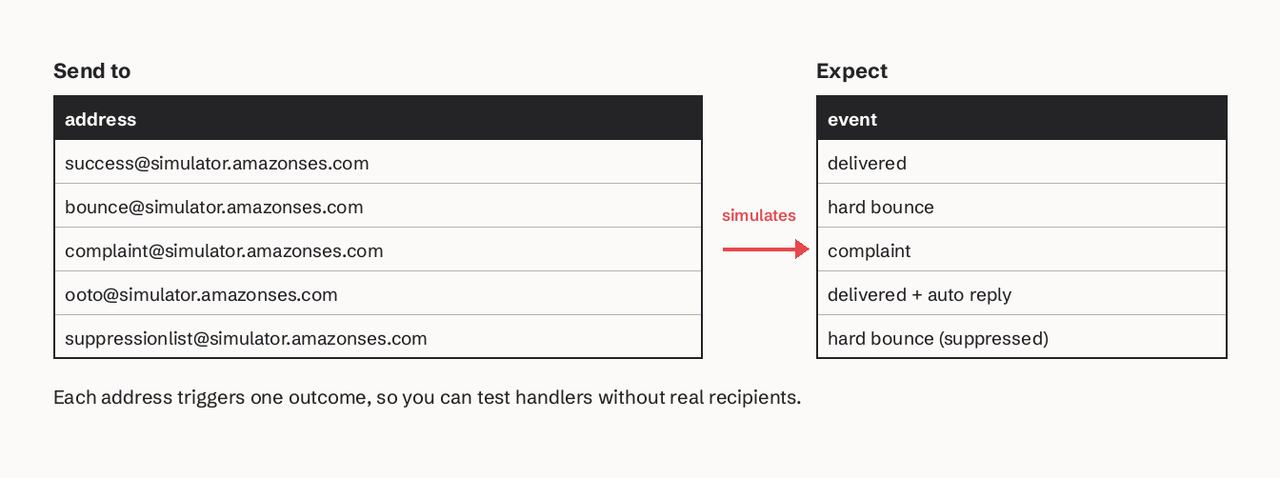
The Amazon SES mailbox simulator is a set of addresses that simulate outcomes instead of delivering: success@, bounce@, ooto@, complaint@ and suppressionlist@simulator.amazonses.com (Amazon SES docs).
- Best for: testing your bounce and complaint handling end to end, through the same provider and webhooks you use in production.
- Pricing: normal SES sending price; simulator mail does not count against your daily sending quota, though it is limited by your maximum send rate.
- Verified detail: it works while your account is still in the SES sandbox, and labels such as
bounce+order-123@simulator.amazonses.comlet you match each simulated bounce to the message that caused it. - Limits: SES only, and it simulates the recipient, so it does not test your content or inbox placement.
How do I test SMTP authentication and STARTTLS?
Test STARTTLS and authentication together with Swaks on port 587, then inspect the certificate with OpenSSL if the TLS step fails. Run the steps in this order so each failure points at one layer:
- Reach the port:
nc -v smtp.example.com 587. No220banner means a firewall, a wrong host or a blocked port, not your credentials. - Check STARTTLS is offered:
swaks --server smtp.example.com --port 587 --quit-after EHLOand look for250-STARTTLS. - Negotiate TLS:
swaks --server smtp.example.com --port 587 -tls --quit-after STARTTLS. A failure here is a certificate or protocol problem; run the OpenSSL command from section 2 to see the chain. - Authenticate: add
--auth LOGIN --auth-user you@example.com --quit-after AUTH. A535reply means the server rejected your username or password (or wants an app password). - Send to yourself: remove
--quit-afterand use--towith an inbox you own, then read the received headers.
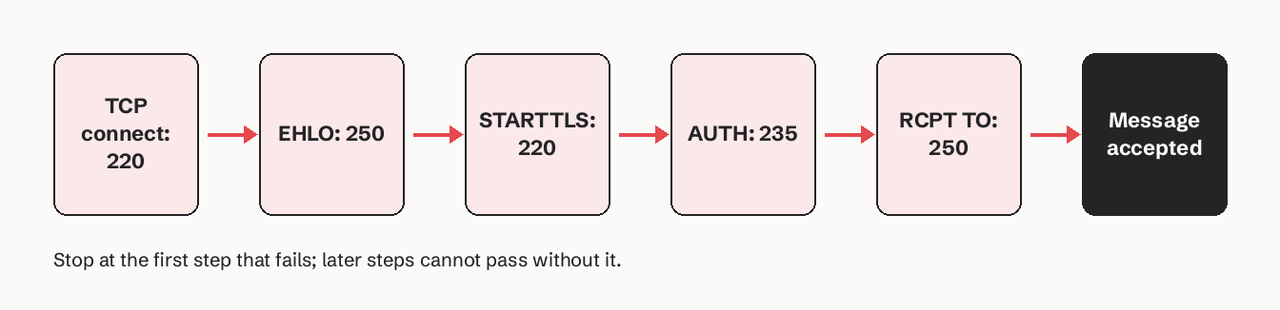
If AUTH fails only from your application, compare its port and TLS mode with the ones Swaks used: an app set to implicit TLS on port 587 fails the handshake, because port 587 expects STARTTLS. Our port 587 vs 465 vs 25 guide covers which mode each port uses, and SMTP authentication explains the AUTH mechanisms.
What is the difference between an SMTP tester and an email sandbox?
An SMTP tester is a client: it connects to a real server and proves that server works. An email sandbox is a server: it pretends to be your provider and captures what your application sends. Use a tester (Swaks, OpenSSL, MxToolbox, CheckTLS) when mail is not leaving or not arriving. Use a sandbox (Mailpit, smtp4dev, Mailtrap) when you are building or changing the emails your product sends. Most teams need one of each.
How do I test sending without emailing real users?
Route non-production environments to a sandbox and give production-path tests only addresses that cannot reach a person. Three ways that work:
- Local or CI: set your SMTP host to Mailpit (
localhost:1025) or smtp4dev (localhost:2525). Nothing can leave. - Shared staging: use a hosted sandbox such as Mailtrap so QA can review messages.
- Real provider path: send to simulator addresses (
success@simulator.amazonses.com,bounce@...) so you exercise the real API, events and webhooks without a real recipient.
If your app sends through an HTTP email API instead of SMTP, the same idea applies. SendHQ's integration trial enforces it for you: until a plan is active, a workspace can deliver only to the account's own email or a mailbox-simulator address, and each send shows its delivery, bounce or complaint event, so a test can't reach a customer by mistake (SendHQ quickstart). Start a SendHQ workspace if that is the path you are testing.
How to choose an SMTP test tool
| If you need to... | Use |
|---|---|
| Prove a server accepts your login and a message | Swaks |
| Debug a certificate or TLS version error | OpenSSL s_client |
| Check whether port 25 is blocked | Telnet or Netcat |
| Check a server from outside your network | MxToolbox |
| Audit a recipient domain's TLS | CheckTLS |
| Score a real message before launch | mail-tester.com |
| Capture app email locally or in CI | Mailpit or smtp4dev |
| Share staging email with a QA team | Mailtrap Email Sandbox |
| Test bounce and complaint handling | Amazon SES mailbox simulator |
When a test returns an error code instead of a 250, look it up in our SMTP error codes guide before changing settings.
FAQ
What is the best tool to test an SMTP server?
Swaks is the best single tool for testing an SMTP server because it runs the whole transaction (connect, EHLO, STARTTLS, AUTH, MAIL FROM, RCPT TO, DATA) from one command and prints every reply. Pair it with OpenSSL s_client for certificate problems.
Which SMTP testing tools are free?
Swaks, OpenSSL, Telnet, Netcat, Mailpit and smtp4dev are free and open source. MxToolbox's SMTP test and CheckTLS's single test are free online. mail-tester.com allows 3 free tests per 24 hours, and Mailtrap's Email Sandbox has a free plan with 50 test emails a month.
How do I send a test email from the command line?
Install Swaks and run swaks --to you@example.com --server smtp.example.com --port 587 -tls --auth LOGIN --auth-user you@example.com. It prompts for the password, sends a short test message and prints the full session.
Can I test SMTP online without installing anything?
Yes, for the receiving side. MxToolbox tests a server's connection, open relay status and PTR record, and CheckTLS grades its TLS. Neither can log in with your credentials, so testing submission on port 587 with AUTH still needs a local tool such as Swaks.
Is MailHog still maintained?
MailHog's last release, v1.0.1, was published in August 2020. Mailpit offers the same SMTP capture and web interface with current releases (v1.33.1 in November 2026), so it is the usual replacement.
Why does Telnet connect on port 25 but my app fails on port 587?
Port 25 and port 587 are different services. Port 587 normally requires STARTTLS and authentication, which Telnet cannot perform. Test port 587 with Swaks using -tls and --auth to see the step that fails.