
Deliverability
Amazon SES Error Codes: API and SMTP Reference with Fixes
Amazon SES error codes in one table: MessageRejected, 454 Throttling, 554 not verified and more, with the exact message, cause, fix and retry rule.
Published · Updated
TL;DR: Amazon SES returns two families of errors: API exceptions such as MessageRejected, SendingPausedException and TooManyRequestsException, and SMTP reply codes such as 454 Throttling failure and 554 Message rejected: Email address is not verified. Retry only throttling, 4xx SMTP and 5xx server errors; fix everything else first. If you would rather not run SES yourself, SendHQ gives you one REST API with structured errors that say what to do next, with no AWS account, IAM credentials or production access request.
Start sending with SendHQ, or read the errors and retries docs first.
What do Amazon SES error codes mean? When a send fails, SES returns an error, does not send the email and does not bill you for it (AWS docs). Through the API or an AWS SDK you get an exception name plus a message; through SMTP you get a three-digit reply code plus text. The most common ones are an unverified sender or recipient (MessageRejected / 554), a quota or rate limit (ThrottlingException / 454), a paused account (SendingPausedException) and bad credentials (535). The table below lists every send-related code from the AWS documentation as read on 2026-11-23, with the fix and whether a retry is safe.
Amazon SES error codes lookup table
| Error (API or SMTP) | Exact message or meaning | Cause | Fix | Retry? |
|---|---|---|---|---|
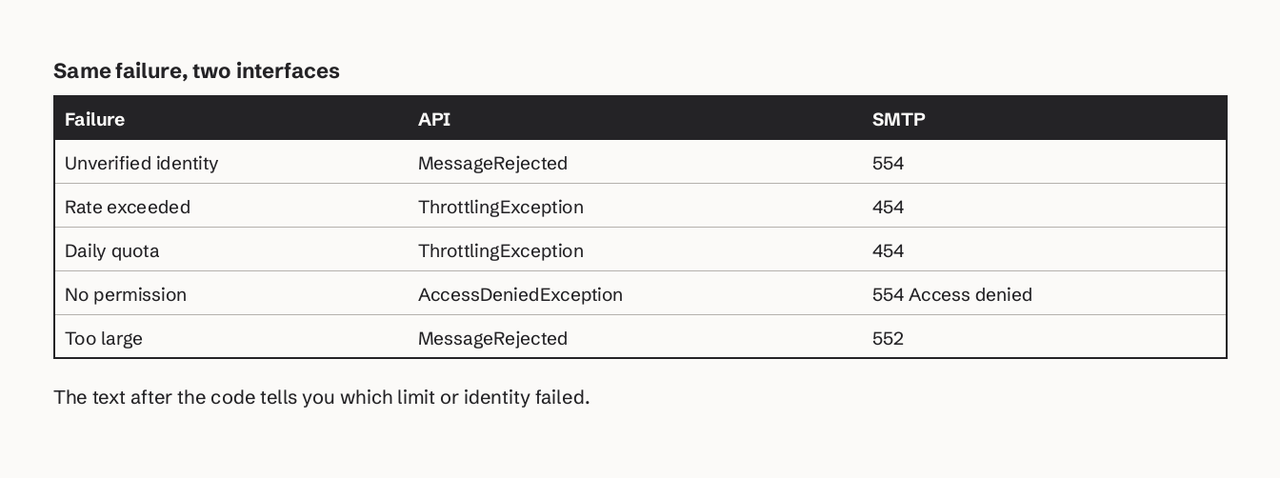
MessageRejected / 554 Message rejected | Email address is not verified. The following identities failed the check in region ... | From, Sender or Return-Path not verified in this Region; in the sandbox, the recipient too | Verify the identity in the same Region, or leave the sandbox | No |
MessageRejected | The message can't be sent because it contains invalid content | Bad MIME, non-ASCII address, missing recipients | Fix the message | No |
MailFromDomainNotVerifiedException | Mail FROM domain is not verified | SES cannot read the MX record of the custom MAIL FROM domain | Publish the MX record, or turn custom MAIL FROM off | No |
SendingPausedException | Account is paused | SES paused sending after a review | Read the AWS notification, fix bounce or complaint causes, request review | No |
AccountSuspendedException | Ability to send email has been permanently restricted | Account suspended | Contact AWS Support | No |
TooManyRequestsException (429) | Too many requests have been made to the operation | Request rate | Back off and retry | Yes |
ThrottlingException | Daily message quota exceeded | 24-hour quota used up | Wait for the rolling window, or request a quota increase | Later |
ThrottlingException | Maximum sending rate exceeded | Per-second rate exceeded | Slow down, retry with backoff | Yes |
454 Throttling failure | Daily message quota exceeded / Maximum sending rate exceeded | Same as above, over SMTP | Same as above | Yes |
454 Temporary authentication failure | SES could not validate SMTP credentials | Often an unencrypted connection | Use TLS or STARTTLS, then retry | Yes |
421 | Too many concurrent SMTP connections | Connection pool too large | Fewer parallel connections | Yes |
451 | Temporary service failure / Timeout waiting for data from client | SES-side issue or idle client | Retry; send data promptly | Yes |
530 | Authentication required | Client did not authenticate | Enable SMTP AUTH | No |
535 | Authentication Credentials Invalid | AWS keys used instead of SMTP credentials | Create SMTP credentials in IAM | No |
535 | Account not subscribed to SES | The AWS account is not signed up for SES | Enable SES on the account | No |
552 | Message is too long. | Over 40 MB (10 MB on the v1 API) | Shrink attachments | No |
553 | Invalid email address / address unknown | Syntax error in MAIL FROM or RCPT TO | Wrap the address in <> | No |
554 Access denied | User ... is not authorized to perform ses:SendRawEmail | IAM or sending authorization policy | Grant ses:SendRawEmail | No |
AccessDeniedException (403) | You don't have permission to perform this action | IAM policy | Add the permission | No |
InternalFailure (500) / ServiceUnavailable (503) | Internal server issue / temporarily unavailable | SES side | Retry with backoff, deduplicate | Yes, carefully |
Sources: SES sending errors, SendEmail errors (API v2), SMTP response codes, Common errors.
How SendHQ handles the same failures
SendHQ is an email API for products and AI agents. It sends through its own managed sending infrastructure, so you do not need an AWS account, IAM credentials or production access for your own account (migration guide). What that changes for errors:
- One JSON envelope. Every failure is
{"error": {"code", "message", "status"}}, so your code switches on a stablecodeinstead of parsing SDK exception names or SMTP text. - Limits say when to come back. A
429withdaily_limit_reachedincludesresets_atand aRetry-Afterheader;hourly_limit_reachedwaits for the next UTC hour. - Pauses explain themselves. A
423withaccount_pausedincludes the measuredbounce_rateandcomplaint_rateand the limits they crossed. - Retries are safe. Send an
Idempotency-Key(up to 200 characters); the same key with the same payload replays the stored response instead of sending twice (sending docs).
{
  "error": {
    "code": "invalid_request",
    "message": "A verified From domain is required",
    "status": 403
  }
}
Where SendHQ stops: there is no SMTP relay and no SES-compatible endpoint, so SMTP senders have to move to the HTTP API, and it verifies domains only, not single addresses.
What does "MessageRejected: Email address is not verified" mean?
It means SES checked the From, Sender or Return-Path address (or FromEmailAddress) and found no verified identity for it in the Region you called. In the sandbox it also fires for every unverified recipient. The message lists the failing identities and ends with ... if there are too many to show.
554 Message rejected: Email address is not verified. The following identities failed the check in region US-EAST-1: sender@example.com
Fixes, in order:
- Check the Region. Identities are verified per Region, so a domain verified in
us-east-1fails ineu-west-1. - Verify the domain rather than the single address, so every address on it works.
- If the failing identity is the recipient, your account is still in the sandbox. Request production access (below) or send to the mailbox simulator, for example
success@simulator.amazonses.com.
What causes 454 Throttling failure?
454 Throttling failure means you went over your sending quota, over SMTP. There are two versions:
454 Throttling failure: Maximum sending rate exceeded: too many messages per second. Short bursts are tolerated, sustained excess is not.454 Throttling failure: Daily message quota exceeded: you used the rolling 24-hour quota. Quotas count recipients, not messages, so one email to 10 people uses 10.
The API equivalent is ThrottlingException with the same text. A third variant, Maximum SigV2 SMTP sending rate exceeded, means your SMTP credentials were created before 10 January 2019 with the old signature version: delete them and create new ones in IAM. See our Amazon SES sending limits guide for the numbers per account state.
Check where you stand with the CLI:
aws sesv2 get-account --region us-east-1
# SendQuota: Max24HourSend, MaxSendRate, SentLast24Hours
How do I get out of the SES sandbox?
New SES accounts start in the sandbox in each Region: 200 messages per 24 hours, 1 message per second, and verified recipients only (quotas). To leave it, request production access in the console (Get set up, then Request production access) or from the CLI:
aws sesv2 put-account-details \
  --production-access-enabled \
  --mail-type TRANSACTIONAL \
  --website-url https://example.com \
  --use-case-description "Password resets and receipts for signed-up users" \
  --region us-east-1
AWS says it responds to the first request within 96 hours (production access). Describe how recipients opt in and how you handle bounces and complaints; vague requests are the ones that come back with questions.
Which SES errors are safe to retry?
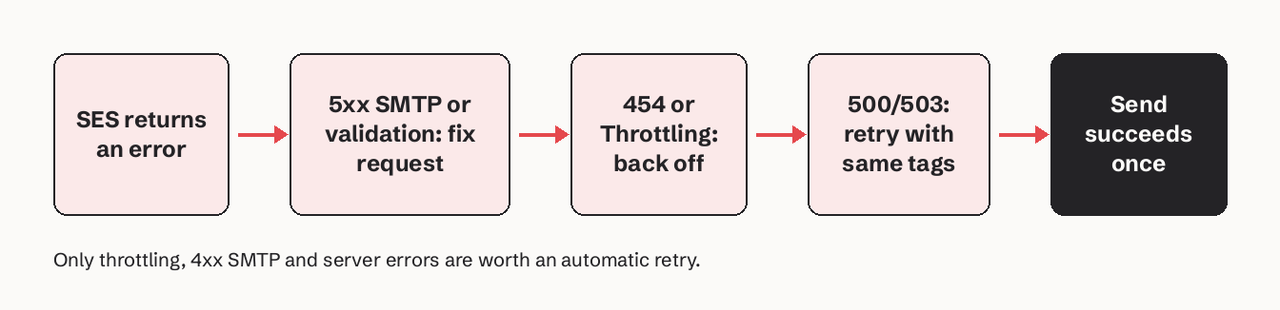
Safe to retry with backoff: ThrottlingException for send rate, TooManyRequestsException, every 4xx SMTP code (421, 451, 454), InternalFailure and ServiceUnavailable. AWS recommends waiting 5, 10 and then 30 seconds, then 20 minutes before starting over (SMTP issues). AWS SDKs already retry ThrottlingException for you over HTTPS.
Not safe to retry until you change something: MessageRejected, MailFromDomainNotVerifiedException, SendingPausedException, AccountSuspendedException, AccessDeniedException and every 5xx SMTP code.
One trap: AWS notes that a SendEmail request can time out or return a server error after SES already accepted the message, and a retry then sends a second email with a different message ID. Tag messages and deduplicate on your side. Idempotency keys solve the same problem on APIs that support them.
import time, boto3
from botocore.exceptions import ClientError

ses = boto3.client("sesv2", region_name="us-east-1")
RETRYABLE = {"TooManyRequestsException", "ThrottlingException", "InternalFailure", "ServiceUnavailable"}

def send(params, attempts=4):
    for i in range(attempts):
        try:
            return ses.send_email(**params)
        except ClientError as e:
            code = e.response["Error"]["Code"]
            if code not in RETRYABLE or i == attempts - 1:
                raise  # fix the request: MessageRejected, AccessDenied, etc.
            time.sleep(2 ** i * 5)
SMTP connection errors that return no code
Some SES SMTP failures never reach a reply code:
- Timeouts on port 25 from EC2. EC2 restricts port 25 by default. Use 587 or 465 (or 2587 and 2465) instead.
- Connection drops mid-session. Set the network interface MTU to 1500, and open a new connection after a fixed number of messages because SES replaces the servers behind its load balancer.
- Firewall allowlists. SES SMTP IPs change; allowlist
amazonses.com, not addresses.
For codes from receiving servers (after SES accepted the message), see our SMTP error codes reference and the 550 guide.
FAQ
Where do I see SES errors after a message was accepted?
Errors in this table happen at send time. Bounces and complaints come later as events through a configuration set (SNS, EventBridge or Firehose). An accepted message is not a delivered one.
Why does SES say my address is not verified when it is?
Almost always the Region: you verified it in one Region and call another endpoint. Check the region in the error text against your client configuration.
Is MessageRejected always about verification?
No. It is also returned for invalid content, such as non-ASCII characters in an address (use Punycode for the domain) or a malformed raw MIME message.
Do failed SES sends cost money?
No. AWS does not bill a send that returns an error.
What is the SES error for an account under review?
Sending is paused: SendingPausedException on the API. AWS emails the account owner with the reason.
Skip the SES error handling
If you are wiring SES up only to send transactional email, most of this table is infrastructure you have to own: Regions, IAM, SMTP credentials, the sandbox and SNS for events. SendHQ gives you one REST endpoint, verified-domain sending and errors that carry the code and the time to retry. Read the Amazon SES migration guide, then start sending with SendHQ.