
Deliverability
What Is Backscatter Email? Causes, Examples and Fixes
Backscatter email is bounce messages for mail you never sent, caused by spammers forging your address. Learn to spot it, stop it and avoid causing it.
Published · Updated
TL;DR: Backscatter email is bounce messages (and auto-replies) that land in your inbox for mail you never sent. A spammer put your address in the sender field, a badly configured server accepted the spam, failed to deliver it, and "returned" it to you. You stop it with SPF, DKIM and DMARC at p=reject; mail servers stop causing it by rejecting during the SMTP session instead of bouncing later. If you send from an app or agent with SendHQ, every real bounce is a recorded event, so a bounce with no matching send is backscatter by definition.
Sending product or agent email and want to know which bounces are really yours? Create a SendHQ workspace and see each send's delivery, bounce or complaint event.
Backscatter email (also called misdirected bounces, blowback, outscatter or collateral spam) is an automated non-delivery report sent to an innocent address that was forged as the sender of spam. Microsoft defines it simply as "non-delivery reports... that you receive for messages you didn't send" (Microsoft Learn). It happens because SMTP lets anyone write any address in MAIL FROM and From:. When the receiving server accepts the message first and only later discovers that the mailbox does not exist or the content is spam, it sends the bounce to the forged address: yours. The fix has two sides. As a victim, enforce DMARC so receivers reject spoofed mail outright. As a server operator, reject at SMTP time or silently drop, never bounce mail you already accepted.
Why does backscatter matter?
Backscatter matters because it costs you time, storage and sometimes reputation, for mail you had nothing to do with. A concrete scenario: a spammer sends 200,000 messages with billing@yourstartup.com as sender to an old, dirty list. If 3% of those land on servers that accept first and bounce later, that is 6,000 bounces in your billing inbox in a day, mixed in with the one real bounce from a customer whose invoice never arrived.
The term goes back to 1997, when a spammer forged the domain joes.com and the flood of bounces and angry replies knocked the owner's site offline. That gave us "Joe job", as Al Iverson recounts in the video below.
There is a second side. A server that sends backscatter can end up on Backscatterer.org, a DNS blocklist run by UCEPROTECT that lists every IP it sees sending misdirected bounces, auto-replies or sender callouts for the next 4 weeks. When we read it, it listed 11,620 IPs.
How does backscatter work?
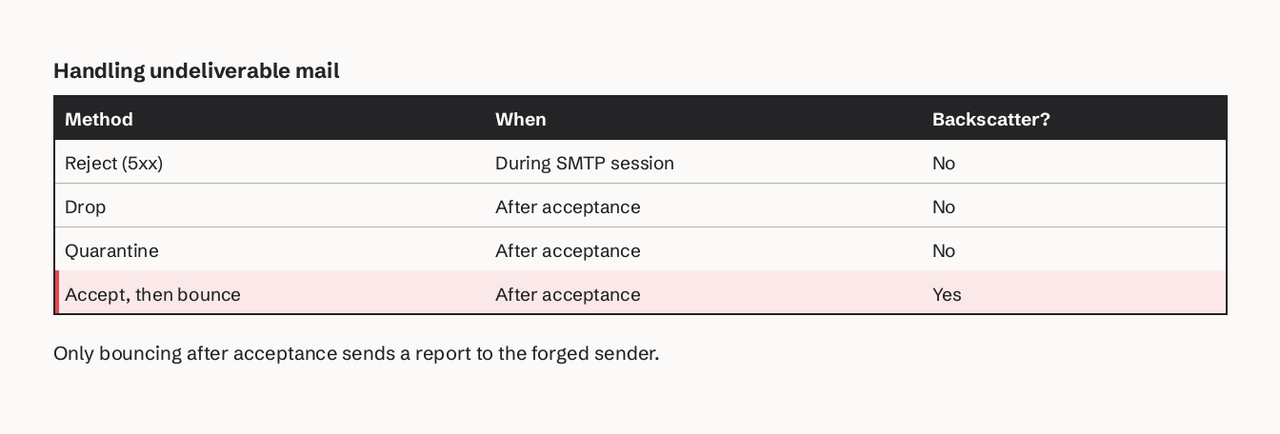
Backscatter works through the gap between accepting a message and deciding it is bad. Mail servers can handle an undeliverable message in four ways (Wikipedia)): reject it during the SMTP session, drop it silently, quarantine it, or accept it and bounce it later. Only the last one creates backscatter.
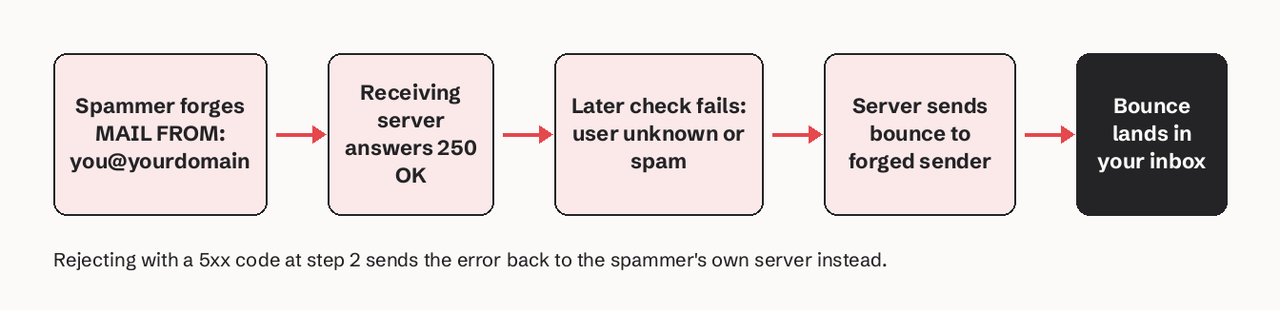
- The spammer connects to
mx.victim-recipient.comand sendsMAIL FROM:<billing@yourstartup.com>. - The server answers
250 OKto everything, includingRCPT TO:<nosuchuser@...>, and queues the message. - After the connection closes, a recipient lookup, antivirus or spam scan fails.
- The server builds a delivery status notification (RFC 3464 format, sent with an empty
MAIL FROM:<>per RFC 5321) addressed to the forged sender. - You receive "Undelivered Mail Returned to Sender" for a message you never wrote.
Out-of-office replies cause the same thing. RFC 3834 tells auto-responders to reply to the Return-Path and never to a null sender, but a forged Return-Path still points at you.
Worked example: is this bounce real or backscatter?
The way to tell is to read the original message attached to the bounce. Here is a typical backscatter bounce, trimmed:
From: MAILER-DAEMON@mail.some-isp.example
To: billing@yourstartup.com
Subject: Undelivered Mail Returned to Sender
Content-Type: multipart/report; report-type=delivery-status

Final-Recipient: rfc822; xk4q9@some-isp.example
Status: 5.1.1
Diagnostic-Code: smtp; 550 5.1.1 User unknown

--- attached original headers ---
Received: from unknown (HELO pc-7731) ([203.0.113.88])
Message-ID: <8f2a.1a7c@pc-7731>
From: "Billing" <billing@yourstartup.com>
Subject: Claim your prize
Check four things:
| Check | Genuine bounce of your mail | Backscatter |
|---|---|---|
| Did you send to that recipient? | Yes, in your send log | No record |
Sending IP in Received: | Your provider's IPs | Random IP, here 203.0.113.88 |
Message-ID domain | Your provider's format | Made up, here pc-7731 |
| Content | Your template | Spam |
Score here: 0 of 4 match, so it is backscatter. The Postfix Backscatter Howto uses the same signals: forged Received: and Message-ID headers in the returned original are what you filter on.
Backscatter vs a normal bounce
A normal bounce is the system telling you that your message failed; it is useful and you should act on it (suppress the address, fix DNS). Backscatter is a bounce of someone else's message that only carries your address. Treating backscatter as real bounces is a mistake in both directions: you might suppress nothing useful, and you might start ignoring all bounces, including real ones. Our bounce handling guide covers what to do with genuine bounces, and the SMTP error codes reference explains the status codes inside them.
How do I stop backscatter?
You stop backscatter in two layers: make spoofing your domain fail, and filter the bounces that still arrive.
- Publish SPF and sign with DKIM on every domain and subdomain you send from. Our DKIM, SPF and DMARC guide walks through each record.
- Move DMARC to `p=reject`. Under RFC 7489, receivers that honour DMARC reject unauthenticated mail claiming your domain during the session, so no bounce is generated. Start at
p=none, check reports, then tighten; see p=none vs quarantine vs reject. - Filter null-sender mail to addresses that never send. Bounces arrive with
MAIL FROM:<>. If an address likebilling@only sends from your provider, mail to it with a null sender and an unknown original is noise. - Use Backscatterer.org in safe mode if you run your own server: query
ips.backscatterer.orgonly whenMAIL FROMis<>or postmaster, as their usage page recommends. Postfix example:
# /etc/postfix/check_backscatterer
<>          reject_rbl_client ips.backscatterer.org
postmaster  reject_rbl_client ips.backscatterer.org
Will DMARC alone do it? It removes most of it, not all: at p=reject, receivers that check DMARC refuse spoofed mail at SMTP time, but old servers that ignore DMARC can still bounce, and DMARC covers only the From: domain, not a forged envelope sender. Expect a large drop, then filter the rest.
- In Microsoft 365, the Advanced Spam Filter has a setting to mark backscatter as spam, though Microsoft says most environments do not need it.
How to make sure your own server is not a source
Reject during the SMTP session. Validate recipients at RCPT TO (Postfix: reject unknown local recipients via local_recipient_maps), run spam and virus checks before you answer the final 250 to DATA where you can, and when a check can only run after acceptance, drop or quarantine instead of bouncing. Never auto-reply to mail that failed SPF or DMARC.
Where SendHQ fits
SendHQ is an email API for product teams and AI agents, and it helps with the half of this problem that is about your own sending:
- Only verified domains can send. A SendHQ workspace sends from domains you have verified with SPF and DKIM records, which is the base DMARC enforcement needs.
- Every real bounce is tied to a send. Each message has its own delivery, bounce or complaint events, so you can check a suspicious bounce against your send log in one lookup. No matching send means backscatter.
- Suppressions are visible, so a genuine hard bounce stops further sends to that address without you parsing NDRs.
What it does not do: SendHQ does not filter backscatter arriving in your company mailbox (Google Workspace or Microsoft 365 does that), and it cannot stop a spammer forging your domain. DMARC p=reject does that. You can diagnose real bounces with our bounce diagnostics tool.
Al Iverson of Valimail explains why you receive bounces and angry replies for mail you never sent, where the "Joe job" term came from, and the two fixes: enforce DMARC at quarantine or reject, and have mail admins reject during the SMTP session instead of sending delayed bounces.
FAQ
What is backscatter email?
Backscatter email is bounce messages and auto-replies sent to you for messages you never sent, because a spammer forged your address as the sender and a receiving server bounced the spam back to it.
Why am I getting bounce messages for emails I never sent?
Someone is spoofing your address or domain in spam. It does not by itself mean your account was hacked. Check your Sent folder and your provider's send log; if the bounced messages are not there, it is backscatter. Change your password anyway if anything looks odd.
How do I stop backscatter?
Publish SPF, sign with DKIM, move DMARC to p=reject, and filter null-sender (MAIL FROM:<>) messages whose original you did not send. Server operators should also reject at SMTP time instead of bouncing later.
How do I get off the Backscatterer.org list?
Stop the server from sending misdirected bounces, auto-replies and sender callouts. Backscatterer.org lists an IP for 4 weeks after it last sees backscatter, so once your server rejects at SMTP time the listing expires on its own. Check the IP on their Test/Remove page.
Does DMARC stop backscatter?
It stops most of it. Receivers that enforce DMARC reject spoofed mail from your domain at p=reject, so they never bounce it. Servers that ignore DMARC, and forgeries of only the envelope sender, can still cause some.
Is backscatter dangerous?
Usually it is a nuisance, not a breach. The risk is volume, missed real bounces, and phishing hidden inside fake bounce messages, so do not open attachments in bounces you do not recognise.
Want every real bounce of your app's email tied to the message that caused it? Start a SendHQ workspace and send your first email from a verified domain.