
Deliverability
8 Best DMARC Monitoring Tools for Small Teams (Compared)
The best DMARC monitoring tools for small teams: free tiers, report limits, retention and prices for dmarcian, EasyDMARC, URIports, parsedmarc and more.
Published · Updated
TL;DR: For a small product team, start by sending through SendHQ, which publishes your SPF, DKIM and DMARC records at domain setup and shows bounce and complaint evidence per sender, then add one DMARC report processor. URIports (USD 6/month for 100,000 reports) and Postmark's free weekly digest are the cheapest good options, Cloudflare DMARC Management is free if your DNS is on Cloudflare, and parsedmarc is the self-hosted choice.
Create a SendHQ account to get a verified sending domain with DKIM, SPF and DMARC records generated for you, then point your rua reports at one of the tools below.
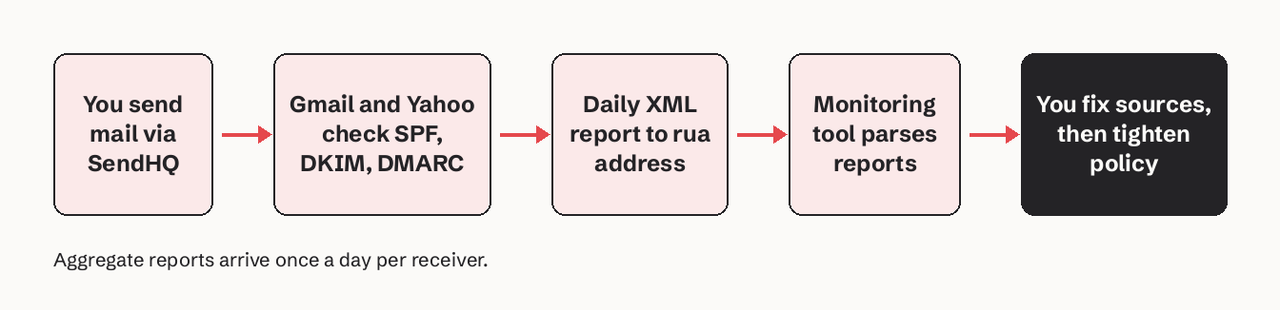
DMARC monitoring tools collect the aggregate (RUA) XML reports that Gmail, Microsoft, Yahoo and other receivers send to the address in your DMARC record, and turn them into a list of every source sending mail as your domain, with SPF, DKIM and alignment results for each. You need one because the raw reports are zipped XML files, one per receiver per day, and nobody reads them by hand. The best DMARC monitoring tool for most small teams is the one whose free or entry tier covers your monthly message volume and keeps enough history to see a full billing cycle: that is usually Postmark's free digest, Cloudflare's free dashboard, or URIports at USD 6/month.
All prices below were read on the vendors' own pricing pages on 2026-11-16.
How we judged these DMARC report tools
We ranked each tool on what a small team actually hits first:
- Volume limit: how many DMARC-capable messages or reports per month the free or entry plan processes.
- Retention: how long report history is kept. You want at least 30 days to compare a full month before tightening policy.
- Failure (RUF) reports: whether it parses the per-message forensic reports, which few receivers still send.
- Self-hosting and export: whether you can keep the data (CSV/JSON export, or run it yourself).
- Price at entry level, from the vendor's pricing page.
Summary table: DMARC monitoring tools compared
| Tool | Entry price | Monthly volume at entry | Retention at entry | Free option | Best for |
|---|---|---|---|---|---|
| SendHQ | $9/mo Starter | 50,000 emails sent | Delivery events, 30-day stats | No | Sending side: records + bounce/complaint evidence |
| URIports | USD 6/mo (annual) | 100,000 reports | 30 days | Sand plan USD 15/yr | Cheapest paid processor |
| Postmark DMARC | Free, then $14/mo per domain | Top 10 sources free | 7 days free, 60 days paid | Yes | Weekly email digest |
| Cloudflare DMARC Management | Free on all plans | Not stated | Not stated | Yes | Domains already on Cloudflare DNS |
| dmarcian | $19.99/mo (annual) | 100,000 messages | 3 months | Personal, non-business only | Teams that want a long-standing DMARC specialist |
| EasyDMARC | $35.99/mo (annual) | 100,000 emails | 3 months | Trial | RUA + RUF with alerts |
| Valimail Monitor | Free | Not stated | Not stated | Yes | Identifying sending services by name |
| parsedmarc | Free, open source | Your hardware | Your storage | Yes | Self-hosting |
1. SendHQ
SendHQ is an email API for sending and receiving email from products and AI agents, and it handles the sending half of DMARC for the mail it sends. When you add a domain, SendHQ provisions three DKIM CNAMEs, an SPF TXT policy, a DMARC TXT policy and a verification TXT value (SendHQ domains docs). If you already have an SPF or DMARC record, it reports a recommended merged SPF value or the DMARC value to retain instead of silently overwriting yours.
- Best for: product teams that want their transactional mail aligned from day one and want per-sender evidence when something goes wrong.
- What it shows: delivery, bounce, complaint and reject events per message, with the SMTP diagnostic, plus breakdowns by sending domain and From address (
GET /deliverability/domains,GET /deliverability/senders) (deliverability docs). - Pricing: Starter is $9/month for 50,000 emails and 25 verified domains (pricing).
- Limit, plainly: SendHQ does not process DMARC aggregate (RUA) reports. It will not show you a third-party service or a spoofer sending as your domain. Pair it with one of the processors below for that.
Why it is first: a DMARC report tool tells you which sources fail alignment. If the mail you send yourself is already aligned through DKIM on your own domain, the reports get short and the remaining failures are real problems. You can check your current records with the free email DNS checker.
2. URIports
URIports is a Netherlands-hosted monitoring service for DMARC, TLS-RPT, MTA-STS and CSP reports.
- Best for: small teams that want a full report processor for the price of a coffee.
- Pricing: Pebble is USD 6/month billed annually (USD 7 monthly) for 100,000 reports a month, 5 domains and 30-day retention. The Sand plan for personal projects is USD 15/year with 3 domains and 10,000 reports (URIports pricing).
- Verified detail: every plan includes JSON and CSV exports, DMARC failure report encryption and webhook notifications with templates for Slack, Microsoft Teams and Discord.
- Where it stops: 30-day retention on the two lower plans; 90 days starts at the USD 120/month Mountain plan.
3. Postmark DMARC Digests
Postmark's DMARC tool is one of the oldest free options and needs no dashboard login on the free tier.
- Best for: one personal or side-project domain where a weekly email is enough.
- Pricing: the free tier sends weekly email reports covering the top 10 mail sources with 5 IPs each and 7 days of data. DMARC Digests costs $14/month per domain for all sources and IPs, 60 days of history, a web dashboard and user management (Postmark DMARC).
- Where it stops: per-domain pricing adds up past two or three domains.
4. Cloudflare DMARC Management
Cloudflare DMARC Management lists every source sending email as your domain and the SPF, DKIM and DMARC results for each source.
- Best for: domains whose DNS is already on Cloudflare.
- Pricing: available on all Cloudflare plans, including free (Cloudflare docs).
- Where it stops: it requires Cloudflare DNS. Reviewers also point out it has no alerting, so you have to log in to notice a problem (see the video below).
An independent reviewer explains when a paid DMARC report tool is worth it over Cloudflare's free DMARC Management: Cloudflare requires its own DNS, and its free dashboard sends no alerts, so you must log in to check alignment.
5. dmarcian Basic and Plus
dmarcian sells tiered subscriptions, from a personal account up to enterprise.
- Best for: organisations that want a year or more of history with a vendor focused on this one job.
- Pricing: Basic costs $19.99 a month billed yearly ($24 month to month) for 2 domains, 100,000 messages and 3 months of history. Plus is $199 a month yearly for 8 domains, one million messages and 1 year. The $0 Personal account allows 1,250 messages, 1 month of history and non-business use only (dmarcian pricing).
- Verified detail: ships an SPF Surveyor, a DKIM Inspector and Validator, a BIMI builder and TLS reporting.
- Where it stops: a company domain cannot use the Personal account, so the real entry point is Basic.
6. EasyDMARC
EasyDMARC bundles DMARC monitoring with hosted DNS tooling and, on higher tiers, deliverability testing.
- Best for: teams that want aggregate and failure reports plus proactive alerts in one place.
- Pricing: DMARC Plus is $35.99/month billed annually ($44.99 monthly) for 100,000 emails, 2 domains and 3 months of history, with RUA and RUF reports. DMARC Premium is $71.99/month annually for 4 domains and 1 year (EasyDMARC pricing).
- Where it stops: proactive alerts and EasySPF start at Premium.
7. Valimail Monitor
Valimail Monitor is a free tier from Valimail; T. Herr of Valimail is a co-editor of the new DMARC standard, RFC 9989.
- Best for: finding out which named services (CRM, help desk, billing) send as your domain.
- Pricing: Monitor is free to sign up; Enforce pricing is on request (Valimail pricing).
- Where it stops: moving to enforcement with Valimail is a sales conversation, not a self-serve price.
8. parsedmarc (self-hosted)
parsedmarc is an open source Python module and CLI that parses DMARC reports and sends them to dashboards you run.
- Best for: engineers who want the data on their own infrastructure.
- Pricing: free; you pay for the server and storage.
- Verified detail: version 11.3.0 parses aggregate reports in the RFC 7489 schema and the new RFC 9990 schema, failure reports (RFC 6591 and RFC 9991) and SMTP TLS reports (RFC 8460). It reads from IMAP, Microsoft Graph or the Gmail API and writes to Elasticsearch, OpenSearch, Splunk or PostgreSQL, with premade Kibana and Grafana dashboards (parsedmarc docs). It needs Python 3.11 or newer.
A minimal run against a reports mailbox looks like this:
# parsedmarc.ini
[general]
save_aggregate = True
output = /var/lib/parsedmarc

[imap]
host = imap.example.com
user = dmarc@example.com
password = <app-password>

[mailbox]
watch = True
pip install parsedmarc
parsedmarc -c parsedmarc.ini- Where it stops: you own upgrades, storage and retention, and the project is maintained by one developer.
Can I self-host DMARC report processing?
Yes. parsedmarc is the standard self-hosted option: it is a free, open source parser that pulls reports from a mailbox and feeds Elasticsearch, OpenSearch, Splunk or PostgreSQL. Use it when report data must stay on your own infrastructure or you already run one of those stacks. Budget time for running the mailbox, the index and its retention.
How many DMARC reports can free plans process?
Free plans differ more in what they show than in raw volume:
| Free option | Limit |
|---|---|
| dmarcian Personal | 1,250 DMARC-capable messages/month, 2 domains, non-business only |
| Postmark free | Top 10 sources, 5 IPs each, 7 days, weekly email |
| URIports Sand (USD 15/yr, near free) | 10,000 reports/month, 3 domains |
| Cloudflare DMARC Management | No published cap; needs Cloudflare DNS |
| parsedmarc | Limited only by your hardware |
Do I need a DMARC monitoring tool?
You need DMARC itself if you send more than 5,000 messages a day to Gmail: since February 1, 2024 Google requires a DMARC record for those senders, though the policy can be p=none (Google sender guidelines). You need a monitoring tool when you want to move past p=none, because the reports are the only way to see every service sending as your domain before you start quarantining its mail. A team with one sending service and an aligned DKIM signature can get by with a free tool; a team with a CRM, billing system, help desk and product mail needs a paid one.
When should I move from p=none to quarantine?
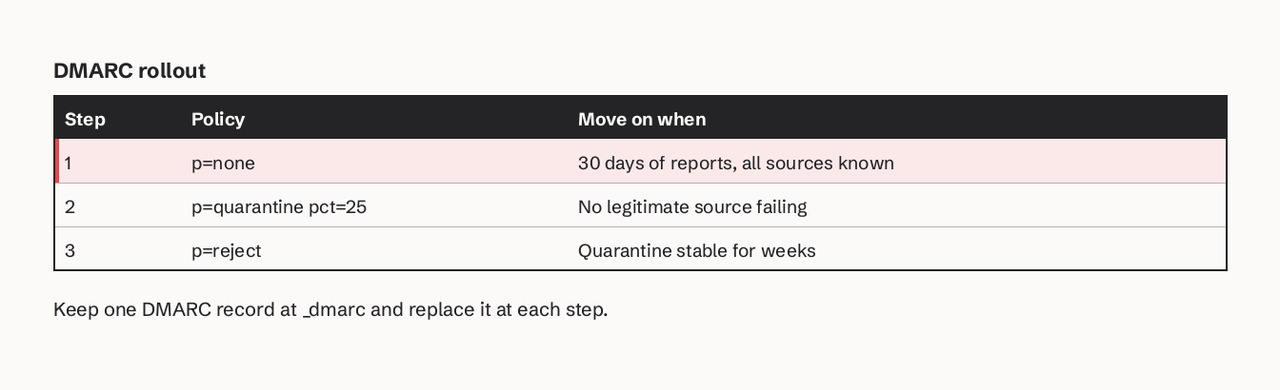
Move to p=quarantine when at least 30 days of aggregate reports show every legitimate source passing DMARC through aligned SPF or DKIM, and the only failures left are sources you do not recognize. A typical path:
_dmarc.example.com TXT "v=DMARC1; p=none; rua=mailto:dmarc@example.com"
_dmarc.example.com TXT "v=DMARC1; p=quarantine; pct=25; rua=mailto:dmarc@example.com"
_dmarc.example.com TXT "v=DMARC1; p=reject; rua=mailto:dmarc@example.com"
Each step is a replacement of the single record, not an extra one. Our guide to DMARC p=none, quarantine and reject covers the timing, and DMARC aspf alignment explains why forwarded mail fails SPF alignment.
How to choose a DMARC monitoring tool
- Send aligned mail first. Put your product mail on a provider that signs with DKIM on your own domain; SendHQ does this at domain setup.
- One domain, small budget: Postmark's free digest, or Cloudflare if your DNS is there.
- Several domains, want alerts: URIports Pebble at USD 6/month is the lowest-cost full processor here.
- Need a year of history or failure reports with alerts: dmarcian Plus or EasyDMARC Premium.
- Data must stay in-house: parsedmarc.
You can send reports to two tools at once by listing two addresses in rua, for example a free dashboard and parsedmarc while you compare them. Also keep exactly one SPF record; our SPF lookup limit guide explains what breaks when you add too many senders.
What changed recently
DMARC became an IETF Standards Track protocol in May 2026: RFC 9989 obsoletes RFC 7489 and RFC 9091 (RFC 9989), and aggregate reports have a new schema (RFC 9990). Check that your tool parses both formats; parsedmarc 11.3.0 already does.
FAQ
What is the best free DMARC monitoring tool?
For a business domain, Cloudflare DMARC Management is the best free option if your DNS is on Cloudflare; otherwise Postmark's free weekly digest. dmarcian's free plan is limited to non-business use. If you can run a server, parsedmarc is free and has no volume cap.
What is the difference between a DMARC report tool and a DMARC analysis tool?
They are the same category. Both receive RUA reports at your rua address and turn them into sources, pass rates and alignment results; "analysis" usually means the tool also suggests fixes per source.
Does SendHQ read my DMARC reports?
No. SendHQ creates the DMARC, SPF and DKIM records for your sending domain and reports delivery, bounces and complaints for mail sent through it. It does not process RUA reports, so use one of the tools above for those.
How long should DMARC report retention be?
At least 30 days, so you can see monthly senders such as invoicing runs before tightening policy. Plans range from 7 days (Postmark free) to 1 year (dmarcian Plus, EasyDMARC Premium).
Are DMARC failure (forensic) reports still useful?
Less than before: many large receivers do not send them because they can contain message content. EasyDMARC, URIports and parsedmarc parse them when they arrive; treat them as a bonus, not a reason to choose a tool.
Ready to send aligned mail from your own domain? Create a SendHQ account, add your domain, and SendHQ generates the DKIM, SPF and DMARC records to publish.