
Inbound email
Parsing Email: 8 Best Email Parsers for Developers and Teams (Compared)
Parsing email turns raw MIME into sender, body, attachments and thread fields. Eight email parsers compared: inbound APIs, no-code tools and prices.
Published · Updated
TL;DR: For parsing email inside a product or an AI agent, SendHQ is the first pick: it receives mail on your own domain, parses the MIME, stores attachments, threads replies and fires a signed email.received webhook, from $9/month with sending included. Postmark Inbound, Mailgun Routes, SendGrid Inbound Parse and CloudMailin are the other developer options; Parseur, Mailparser and Email Parser by Zapier are the no-code tools for pulling fields into spreadsheets.
Create a SendHQ account to get an inbound address on your verified domain and receive your first parsed email in minutes.
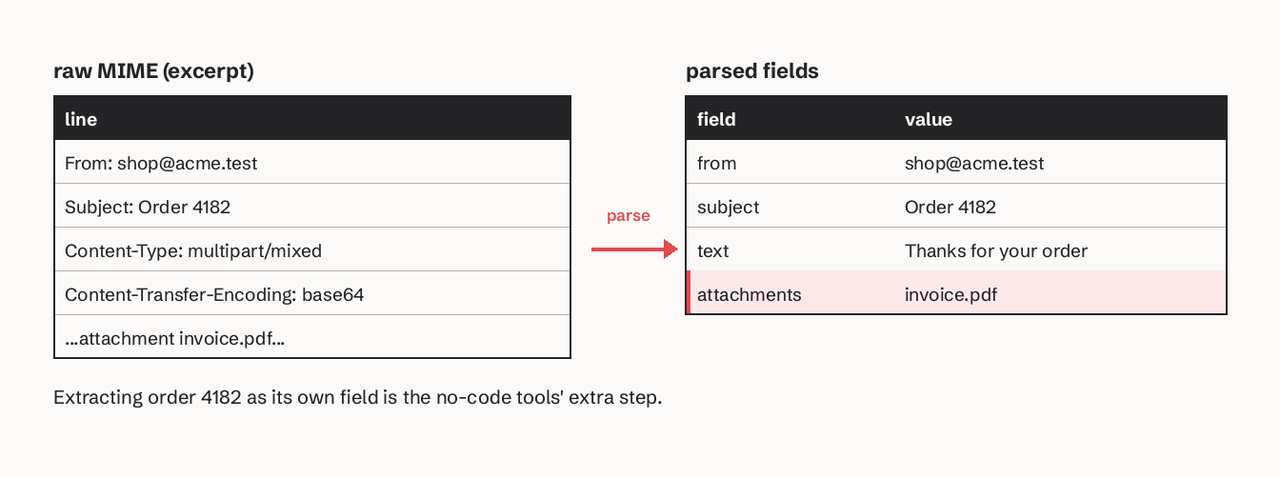
Parsing email is the process of turning a raw email message (headers plus MIME parts, as defined in RFC 5322 and the MIME RFCs) into structured data: sender, recipients, subject, text and HTML bodies, attachments, and the headers that link a reply to its thread. There are two kinds of mail parser. Inbound email APIs (SendHQ, Postmark, Mailgun, SendGrid, CloudMailin) receive the message for you and hand your code JSON or form data. No-code extractors (Parseur, Mailparser, Zapier) read a forwarded email and pull specific fields, such as an order number, into a sheet or an app. Developers and AI agents usually want the first kind; operations teams processing vendor emails often want the second.
All prices below were read on each vendor's own pricing page on 2026-11-17.
What is email parsing and how does it work?
Email parsing works in three steps. A mail server accepts the message for an address on your domain (through your MX records). A MIME parser splits it into headers, body parts and attachments, decoding base64 and quoted-printable content and character sets. Then the result is delivered to your application, as a webhook payload, an API object or a spreadsheet row.
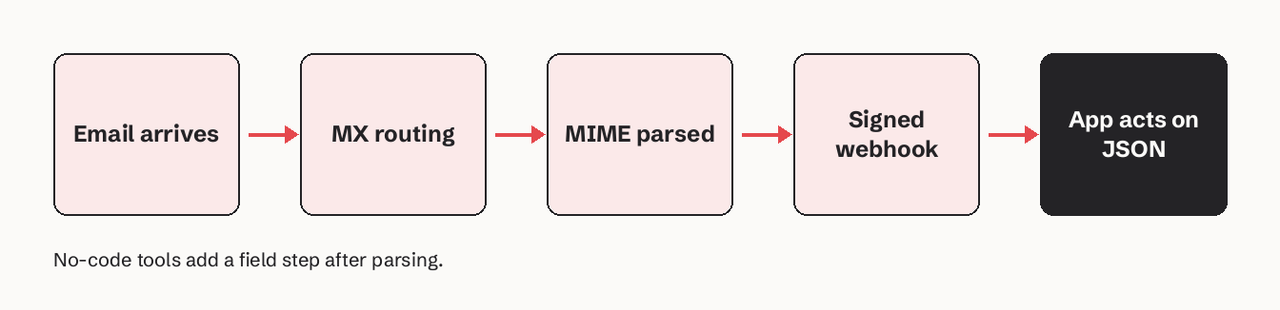
The hard parts are not the headers. They are nested multipart messages, inline images, non-UTF-8 encodings, forwarded messages inside messages, and replies that quote the whole previous thread. That is why most teams stop parsing raw MIME themselves.
How we judged these mail parsers
- Who it is for: code (webhook or API) or no-code (templates and spreadsheets).
- What you get back: full body and headers, attachments, reply stripping, threading.
- Reliability of delivery to your code: signed webhooks and retry schedule.
- Sending in the same tool: whether you can reply from the same address and account.
- Entry price, from the vendor's own page.
Summary table: email parsers compared
| Tool | Type | Entry price | What it returns | Reply handling | Best for |
|---|---|---|---|---|---|
| SendHQ | Inbound + outbound API | $9/mo Starter, 50,000 emails | Stored email object, attachments, email.received webhook | Threads by Message-ID, In-Reply-To, References | Products and AI agents that receive and reply |
| Postmark Inbound | Inbound API | $16.50/mo Pro, 10,000 emails | JSON with TextBody, HtmlBody, Headers, Attachments | StrippedTextReply (English, plain text) | Apps that need reply text only |
| Mailgun Routes | Inbound API | Free plan, 1 inbound route | Form fields incl. body-plain, stripped-text | stripped-text, stripped-signature | Rule-based routing |
| SendGrid Inbound Parse | Inbound webhook | Part of a SendGrid account | multipart/form-data or raw MIME | None; parse yourself | Teams already on SendGrid |
| CloudMailin | Inbound API | Free, 10,000 emails/mo | HTTP POST to your endpoint | Not stated on plans page | Inbound-only workloads |
| Parseur | No-code, AI | Free, 20 pages/mo | Extracted fields to sheets and apps | Not the focus | Documents and order emails |
| Mailparser | No-code, rules | $29.95/mo, 250 credits | Extracted fields | Not the focus | Rule-based field extraction |
| Email Parser by Zapier | No-code, templates | Mailbox on parser.zapier.com | Highlighted fields to Zapier | Not the focus | Simple fixed-format emails |
1. SendHQ (inbound and outbound API)
SendHQ is an email API for products and AI agents that sends and receives email on your own verified domain, so the parser and the reply path are one system. You create an inbox on your domain; incoming mail is passed to SendHQ through Cloudflare Email Routing, matched to an active inbox, parsed as safe MIME, and stored with its attachments kept private (SendHQ inbound docs).
What SendHQ does for email parsing, specifically:
- Webhook on arrival: an
email.receivedevent withdata.inbox_id, signed with the Standard Webhooks scheme (webhook-id,webhook-timestamp,webhook-signature, HMAC-SHA256). Answer with a 2xx within 10 seconds; failures retry after 1 minute, 5 minutes, 30 minutes, 2 hours, 5 hours, 10 hours and 10 hours, eight attempts over about 27 hours (webhooks docs). - Threading: inbound and outbound messages are joined using Message-ID, In-Reply-To and References, and the thread endpoint returns them in order.
- Search and triage: the email list searches subjects, bodies, addresses and attachment filenames, and classifies received mail as
primary,updatesorspam. - Agents: the SendHQ MCP server gives an AI agent 109 typed tools to read, search and reply to that mail, locally or through the hosted connector.
- Pricing: Starter is $9/month for 50,000 emails and 25 verified domains, and every plan includes inbound email (pricing).
- Limit, plainly: SendHQ does not extract custom fields (an order number from a vendor template) into a spreadsheet. It gives your code the whole message; use a no-code tool below if nobody will write code.
Verify and handle the webhook in Node.js:
import { Webhook } from "standardwebhooks";

app.post("/hooks/sendhq", express.raw({ type: "application/json" }), async (req, res) => {
  const wh = new Webhook(process.env.SENDHQ_WEBHOOK_SECRET.replace("whsec_", ""));
  const event = wh.verify(req.body, req.headers); // throws if the signature is wrong
  if (event.type === "email.received") {
    const email = await fetch(`https://sendhq.cc/api/v1/emails/${event.data.email_id}`, {
      headers: { Authorization: `Bearer ${process.env.SENDHQ_API_KEY}` },
    }).then((r) => r.json());
    await handleInbound(email); // your logic: ticket, agent task, reply
  }
  res.sendStatus(200);
});
Record the webhook-id and ignore repeats: a retry keeps the same ID and events can arrive out of order.
2. Postmark Inbound
Postmark Inbound posts each received email as JSON to your webhook, with TextBody, HtmlBody, Headers, Attachments and a StrippedTextReply field (Postmark docs).
- Best for: apps that only need the new text of a reply.
- Pricing: inbound email processing is listed on the Pro plan, $16.50/month for 10,000 emails, extra at $1.30 per 1,000 (Postmark pricing).
- Verified detail:
StrippedTextReplyis limited to English replies with a plain-text part. Failed posts retry 10 times from 1 minute to 6 hours, and a 403 response stops retries.
3. Mailgun Routes
Mailgun receives mail through routes with filters and actions, and posts fields including body-plain (always present), stripped-text and stripped-signature, signed with HMAC (Mailgun docs).
- Best for: teams that want rule-based routing (forward, store, post) before code runs.
- Pricing: the free plan includes 1 inbound route, Basic includes 5, and higher plans list full inbound routing (Mailgun pricing).
- Verified detail: Mailgun tries to create a text version when a message has only HTML; the stripped fields are best effort and are absent when that fails.
4. SendGrid Inbound Parse
SendGrid Inbound Parse is a webhook: you point an MX record for a hostname at mx.sendgrid.net (priority 10) and SendGrid posts each message to your URL (Twilio SendGrid docs).
- Best for: teams already sending through SendGrid who are comfortable writing their own multipart handler.
- Setup warning: if the receiving hostname equals your authenticated sending domain, Twilio says to turn off Automatic Security, otherwise messages loop between the CNAME and MX records.
- Pricing: part of a SendGrid account; there is no separate Inbound Parse price on the setup page.
- Verified detail: the default payload is
multipart/form-data. Unless you select "POST the raw, full MIME message", attachments are not URL-encoded and code that reads only URL-encoded content can drop them.
5. CloudMailin
CloudMailin is an inbound-first service that receives mail and posts it to your HTTP endpoint.
- Best for: receive-only workloads with modest volume.
- Pricing: a free plan with 10,000 emails a month; paid plans list $25, $45, $85 and $200 a month (CloudMailin plans).
- Verified detail: plans are sized by inbound emails per month, with a maximum message size per plan.
6. Parseur (AI document extraction)
Parseur is a no-code document and email parser with an AI parsing engine that sends extracted fields to spreadsheets and apps.
- Best for: operations teams turning order, lead or invoice emails into rows.
- Pricing: free tier up to 20 pages a month; paid tiers go to 3,000, 1 million and 10 million pages a month (Parseur pricing).
- Verified detail: volume is counted in pages processed, not emails, so an email with a PDF attachment can use more than one.
- Where it stops: it is built for business users mapping documents to columns; there is no sending, threading or reply path back to the customer, so a support or agent workflow still needs a separate mail provider.
7. Mailparser (rule-based extraction)
Mailparser extracts fields from emails with parsing rules you set up per inbox.
- Best for: fixed-format emails where rules beat AI guesses.
- Pricing: Monthly Starter is $29.95 for 250 parsing credits and 20 inboxes (Mailparser pricing).
- Verified detail: some features are paid add-ons, including duplicate detection and auto-retry of failed webhooks ($2.91/month each), and multifactor authentication ($4.99/month).
- Where it stops: credits run out fast on high-volume inboxes: 250 credits is roughly eight messages a day, so it suits invoices and lead notifications, not customer replies.
8. Email Parser by Zapier
Email Parser by Zapier gives you a mailbox such as zap123@robot.zapier.com; you send it a sample email, highlight the text to extract, and later emails are parsed the same way (parser.zapier.com).
- Best for: simple, identical notification emails feeding a Zap.
- Pricing: the parser mailbox is set up on parser.zapier.com; the Zaps that move the data run on your Zapier plan.
- Verified detail: template matching depends on the email layout staying the same.
Should I parse email with regex, a MIME library, an inbound API or an LLM?
Use regex only on a field you already extracted (an order number in a known body), never on the raw message. Use a MIME library when mail already lands in your own mailbox. Use an inbound API when you need to receive mail on your domain reliably. Use an LLM after parsing, on clean text, to classify or extract meaning.
| Approach | Good at | Breaks on |
|---|---|---|
| Regex | One known pattern in clean text | Encodings, multipart, quoted replies |
| MIME library | Full control, no vendor | Running mail servers, retries, storage |
| Inbound API (SendHQ) | Receiving, parsing, attachments, threads, webhooks | Custom field extraction without code |
| LLM | Meaning, intent, loose formats | Cost per email, needs parsed text first |
In Python, the standard library parses MIME correctly if you set the policy; without it you get the legacy compat32 behaviour (Python docs):
from email import policy
from email.parser import BytesParser

with open("message.eml", "rb") as f:
    msg = BytesParser(policy=policy.default).parse(f)

print(msg["From"], msg["Subject"], msg["In-Reply-To"])
body = msg.get_body(preferencelist=("plain", "html"))
print(body.get_content() if body else "")
for part in msg.iter_attachments():
    print(part.get_filename(), part.get_content_type())
Which email parsers handle attachments and replies?
All five developer APIs deliver attachments. SendHQ stores them privately and searches attachment filenames; SendGrid needs the raw MIME option to keep them safe. For replies, Postmark (StrippedTextReply) and Mailgun (stripped-text) strip the quoted thread; SendHQ links replies into one thread by their headers so an agent sees the whole conversation.
How do I parse incoming email into JSON with a webhook?
- Verify your domain in SendHQ and create an inbox, for example
support@yourapp.com(inbound docs). - Add a webhook endpoint for
email.receivedwithPOST /api/v1/webhooksand keep thewhsec_secret on the server. - Verify the signature on the raw body, then fetch the email with
GET /api/v1/emails/:id. - Return 2xx within 10 seconds and do slow work in a queue.
- Deduplicate on
webhook-id, then reply in the same thread from the same domain.
How to choose an email parser
- You are building a product or an AI agent that receives and replies: SendHQ, because receive, parse, thread and send share one API, one domain and one bill.
- You only need the reply text, in English: Postmark Inbound.
- You need routing rules before code: Mailgun Routes.
- You only receive, at low volume: CloudMailin's free plan.
- Nobody will write code: Parseur for messy formats, Mailparser or Zapier for fixed ones.
Not sure of the monthly cost at your volume? Try the email cost calculator, or read our transactional email API guide.
FAQ
What is an email parser?
An email parser is software that turns an email into structured data: sender, recipients, subject, bodies, attachments and selected fields. Inbound APIs hand it to code; no-code parsers send fields to spreadsheets and apps.
How much do email parser tools cost?
From free to about $30 a month at entry level: CloudMailin is free for 10,000 emails a month, Parseur is free for 20 pages, SendHQ is $9/month with sending included, Postmark Pro is $16.50 and Mailparser Starter is $29.95.
Can I parse email for free?
Yes. Python's email package and similar libraries are free if mail already reaches a mailbox you control. CloudMailin's free plan and Parseur's free tier cover small volumes.
Is email parsing secure?
It is when the webhook is signed and verified. Check the signature on the raw body, reject old timestamps, and keep attachments out of public storage. SendHQ signs every delivery and keeps attachments private.
Can AI agents parse email?
Yes. Give the agent parsed email rather than raw MIME. With the SendHQ MCP server, an agent can list, search and read received email and reply in the thread from your verified domain.
Ready to receive parsed email on your own domain? Create a SendHQ account, verify a domain, create an inbox, and add an email.received webhook.