
Deliverability
Email Deliverability Testing Tools: 16 Checks Worth Using
Email deliverability testing tools cover DNS checks, spam tests, inbox placement seeds, postmaster dashboards and bounce logs. See what each catches.
Published · Updated
TL;DR: Use free DNS checkers (SendHQ's email DNS checker, MxToolbox, Learn and Test DMARC) to prove SPF, DKIM and DMARC before you send, a content test such as mail-tester.com or SendHQ's deliverability score before each template ships, a seed-list inbox placement test such as GlockApps when mail goes missing, and Google Postmaster Tools plus Microsoft SNDS to watch reputation afterwards. SendHQ gives you the last layer in one API: per-message delivery, bounce and complaint events, and an automatic pause before a bad sender identity damages the rest.
Create a SendHQ account to send from a verified domain and see every delivery, bounce and complaint event per message.
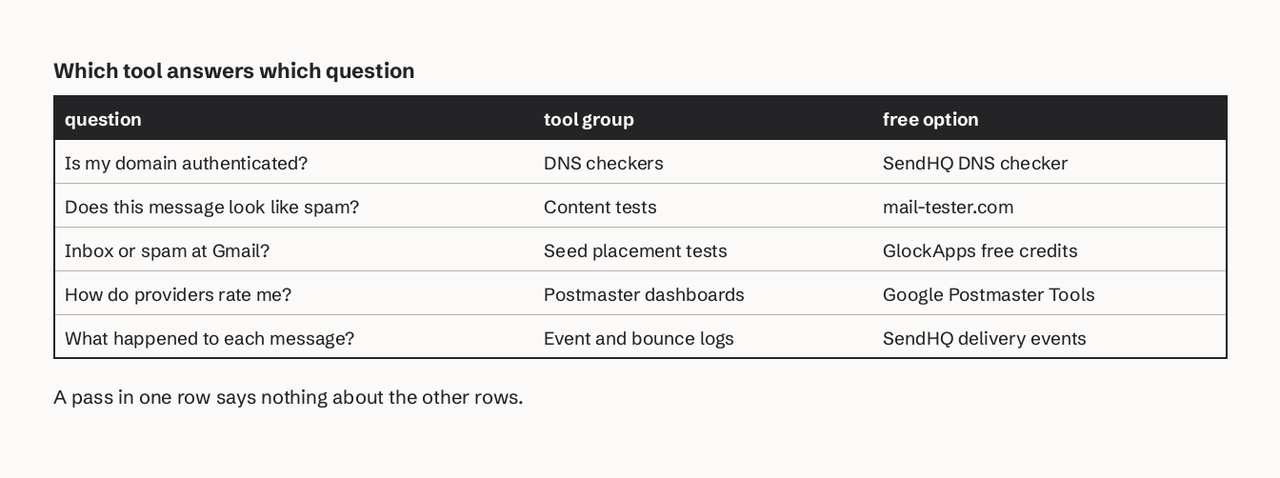
Email deliverability testing tools are not one category. They answer five different questions: is my domain authenticated (DNS checkers), does this message look like spam (content tests), where does it land at Gmail, Outlook and Yahoo (inbox placement tests built on seed lists), how do mailbox providers rate me over time (postmaster dashboards and blocklist lookups), and what happened to each real message (bounce and event logs). Most of the checks are free. Inbox placement testing is the one that usually costs money: GlockApps paid plans start at $59 a month billed annually ($708 a year), read on November 25, 2026. A clean result in one group never proves the others, so a sender that is serious about deliverability uses at least one tool from each.
What SendHQ checks for you, free and in the API
SendHQ is an email API for products and AI agents, and it puts deliverability checks on both sides of the send. Before sending, its free email tools run in the browser with no account:
- [Email DNS checker](https://sendhq.cc/tools/email-dns-checker): looks up public SPF, DKIM, DMARC and MX records through two DNS-over-HTTPS resolvers and shows when they disagree or a lookup fails.
- [SPF checker](https://sendhq.cc/tools/spf-checker): the SPF mechanism list with a visible DNS lookup budget, the usual reason an SPF record silently fails.
- BIMI checker: the BIMI record and its DMARC prerequisite, without claiming a logo will be shown.
- Email preflight checker: HTML, plain text, links and accessibility checks in your browser. It makes no network request, so drafts are never uploaded.
- [Bounce diagnostics](https://sendhq.cc/tools/bounce-diagnostics): paste a server response and get the three-digit and enhanced status codes, with permanent, temporary and unknown kept apart.
After sending, the API reports delivery, bounce, complaint, reject, open and click events for each message (SendHQ deliverability docs). GET /emails/:id/delivery returns one message's timeline with the bounce type and SMTP diagnostic, and POST /api/v1/deliverability/score scores a subject, HTML and text from 0 to 100 with what to change, storing and sending nothing.
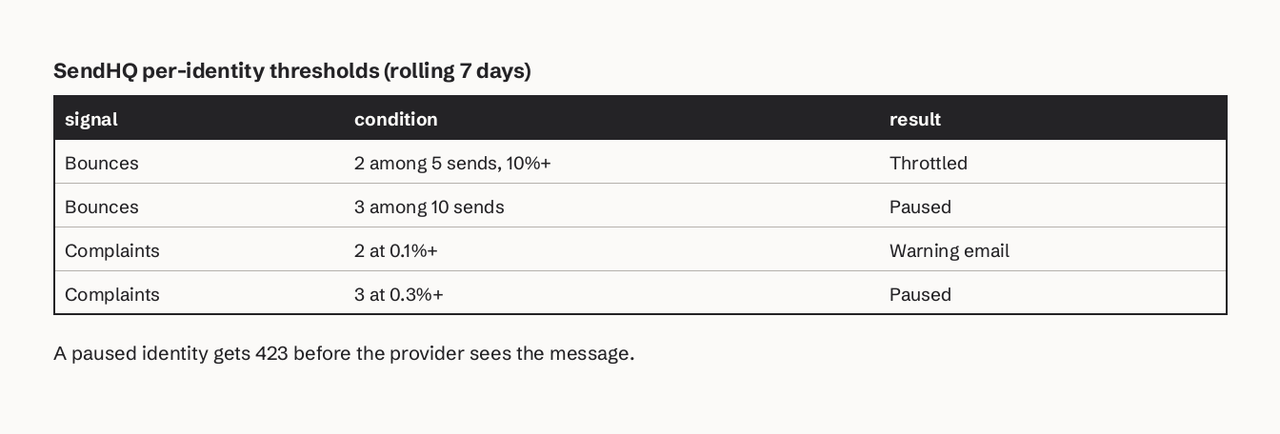
SendHQ also tests your traffic continuously. Each From address has its own circuit breaker over a rolling seven days: two bounces among five sends at a 10% or higher bounce rate throttle it, three among ten pause it, and three complaints at 0.3% or higher pause it. A paused identity gets a 423 before anything reaches the provider, so a broken bulk stream can't keep sending while you investigate.
What SendHQ does not do: it has no seed-list inbox placement test and does not read your Gmail Postmaster data. Use the tools below for those. The Starter plan is $9 a month for 50,000 emails (SendHQ pricing).
How do I test SPF, DKIM and DMARC before sending?
Run a DNS checker on the sending domain, then send one real message to a tester that reports the authentication results it saw. The DNS lookup proves the records are published; the test message proves they pass and align for mail your system actually sends.
- SendHQ email DNS checker: free, no account. Best first check because it compares two resolvers, which catches records that have not propagated yet.
- MxToolbox SuperTool: free lookups for SPF, DKIM, DMARC, MX and PTR. Worth it for the breadth of record types in one box.
- Learn and Test DMARC: free. You send an email to its tester address and it visualizes how a receiver evaluates SPF, DKIM and DMARC alignment step by step, which makes alignment failures obvious.
- dmarcian DMARC inspector: free lookup that explains each tag of a published DMARC record.
A quick check from the terminal gives the same raw answers:
dig +short TXT example.com              # SPF lives here: v=spf1 ...
dig +short TXT _dmarc.example.com       # DMARC policy: v=DMARC1; p=...
dig +short TXT s1._domainkey.example.com  # DKIM key for selector s1
Our SPF, DKIM and DMARC guide covers what each record must contain.
Which deliverability checks are free?
Most of them. The free set covers authentication, content, blocklists and mailbox provider reputation:
- mail-tester.com: send a message to a one-time address and get a score covering SpamAssassin, SPF, DKIM, DMARC and blocklists. 3 free tests per 24 hours (FAQ). Best for a quick content and header check on a real message.
- MxToolbox blacklist check: tests a sending IP against more than 100 DNS blocklists. Worth running when bounces mention a block.
- Spamhaus IP and domain reputation checker: looks up an IP or domain on Spamhaus lists, which many receivers use directly.
- Cisco Talos reputation center: IP and domain reputation as seen by Cisco's mail security products.
- Amazon SES mailbox simulator: send to
success@,bounce@,ooto@,complaint@orsuppressionlist@simulator.amazonses.comto test that your bounce and complaint handling works, without hurting reputation. - Mailtrap Email Sandbox: captures test mail before it reaches anyone; the free plan allows 50 test emails a month. Best for checking templates in staging.
Content tests have a limit worth stating: a 10/10 score from mail-tester.com describes one message on one path. It does not predict Gmail placement, which depends on your sending history. Our SpamAssassin scores reference explains the rules behind those scores.
Which tools test inbox placement?
Inbox placement tools send your message to a seed list, a set of test mailboxes at Gmail, Outlook, Yahoo and other providers, then report which folder each copy reached. This is the only test that shows placement directly, and it is mostly paid.
- GlockApps: seed-list spam tests across major providers plus DMARC analytics. Free plan with a small number of spam test credits; Essential $59/month, Growth $99/month and Enterprise $129/month, billed annually ($708, $1,188 and $1,548 a year), read November 25, 2026.
- Mailtrap deliverability tools: Mailtrap's own list of 23 tools is a good map of the paid placement market if you need enterprise options.
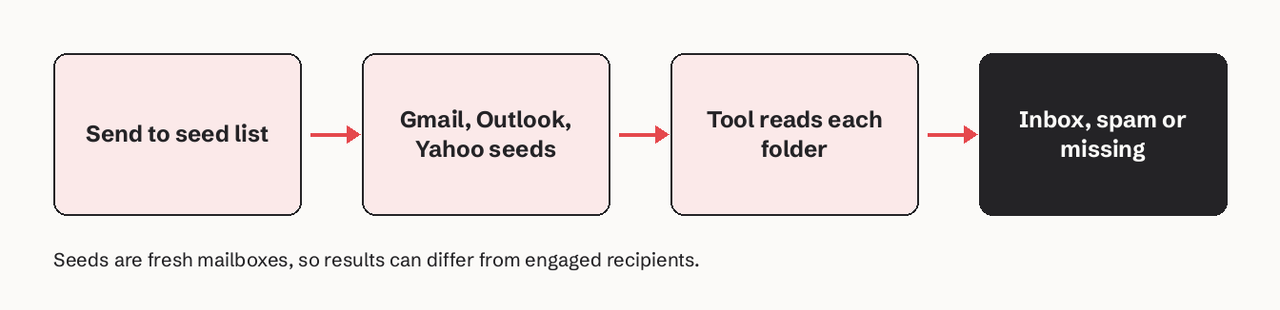
Read placement results with care. Seed mailboxes have no history of opening your mail, while your real recipients do, so a seed in spam is a warning, not a verdict. Pair it with the postmaster data below.
How do I monitor Gmail reputation?
Use Google Postmaster Tools. Verify the domain that signs your DKIM (or your SPF Return-Path domain) and it shows compliance status, spam rate, delivery errors and authentication results for mail to personal Gmail accounts, typically updated within 24 hours (Google help). Google's sender guidelines require a user-reported spam rate below 0.30% (sender guidelines). Our Google Postmaster Tools guide walks through setup and each dashboard.
The other mailbox providers have their own sources:
- Microsoft SNDS: free IP-level data for Outlook.com plus the Junk Email Reporting Program. Sign in with a Microsoft account and request access to your IPs. A new portal went live in September 2026, and periodic ownership reattestation is no longer required.
- Yahoo Sender Hub: Yahoo's requirements, including a spam rate below 0.3%, valid forward and reverse DNS, and for bulk senders one-click unsubscribe and unsubscribes honored within 2 days.
Dashboards need volume. If you use a shared sending IP through an email API, SNDS shows the provider's IP, not yours, and Postmaster may show no data on low-volume days. That is when per-message events matter most.
Bounce and event logs: the test that never stops
Every message you send is a deliverability test, and the bounce log is its result. A hard bounce with 550 5.1.1 says the mailbox does not exist; 421 4.7.0 or 451 4.7.1 usually says a receiver is rate limiting or deferring you. Watch three numbers per sender: bounce rate, complaint rate, and the share of mail stuck in deferral.
With SendHQ, read the events instead of guessing:
curl https://sendhq.cc/api/v1/emails/$EMAIL_ID/delivery \
  -H "Authorization: Bearer $SENDHQ_API_KEY"

curl https://sendhq.cc/api/v1/deliverability/senders \
  -H "Authorization: Bearer $SENDHQ_API_KEY"
The first returns one message's timeline with the bounce type and SMTP diagnostic; the second breaks delivery outcomes down by From address. For a bounce you do not recognise, paste the diagnostic into the free bounce diagnostics tool or read our email bounce handling guide.
Start here: a testing path for a new sending domain
- Check SPF, DKIM, DMARC and MX with the SendHQ email DNS checker.
- Send one message to Learn and Test DMARC and confirm both SPF and DKIM align with your From domain.
- Run the template through the SendHQ preflight checker, then one mail-tester.com test.
- Test your bounce and complaint handling against the SES mailbox simulator.
- Verify the domain in Google Postmaster Tools and request SNDS access if you send from your own IPs.
- Ramp volume slowly (see our domain warm-up guide) and watch bounce and complaint rates per sender every day.
- Buy a seed-list test only when the free signals disagree or a provider's mail goes missing.
FAQ
What is the best free email deliverability test?
There is no single one. For authentication, the SendHQ email DNS checker or MxToolbox; for a full message check, mail-tester.com (3 free tests per 24 hours); for Gmail reputation, Google Postmaster Tools. Together they cover most problems at no cost.
Can a tool guarantee my email lands in the inbox?
No. Placement depends on each recipient's provider, your history and the recipient's own behaviour. Tools show evidence: records, scores, seed results, reputation and bounce data. Any tool that promises inbox placement is overstating what it measures.
How often should I run deliverability tests?
Check DNS whenever you change a provider or a record, run a content test before each new template, and watch bounce and complaint rates every day. Seed placement tests are worth running before a large send and when one provider starts losing mail.
What spam rate is too high?
Google and Yahoo both require a user-reported spam rate below 0.3%. Many senders aim for below 0.1%. SendHQ sends the owner a warning email at two complaints and a 0.1% complaint rate, and pauses the identity at three complaints and 0.3%.
Do I need a seed-list test if I use an email API?
Usually not at first. An email API's per-message events plus Postmaster Tools catch most issues. Add a seed test when Gmail or Outlook recipients report missing mail and your bounce log is clean, because that pattern points at spam-folder placement.
Ready to see every delivery, bounce and complaint for your own mail? Create a SendHQ account, verify your domain and send your first email from the API.