
Deliverability
How to Test SMTP With Telnet (and What to Use on 587 and 465)
Test SMTP with telnet on port 25 by typing EHLO, MAIL FROM, RCPT TO and DATA. For 587 and 465, use openssl s_client or swaks with AUTH.
Published · Updated
TL;DR: To test SMTP with telnet, run telnet mail.example.com 25, wait for the 220 banner, then type EHLO, MAIL FROM, RCPT TO, DATA, your message, a line with a single ., and QUIT. Telnet only works on plain-text port 25; for port 587 (STARTTLS) or 465 (implicit TLS) use openssl s_client or swaks. If you send through an HTTP email API such as SendHQ, you test with an API call and read delivery events instead of an SMTP session.
Building product or agent email and tired of guessing what happened to a message? Create a SendHQ workspace and see each send's delivery, bounce or complaint event.
A telnet SMTP test opens a raw TCP connection to a mail server and lets you type the same commands a mail server would send, reading each numeric reply as it comes back. A 220 banner proves the port is reachable, 250 replies to EHLO list what the server supports, and 250 after the final . proves the server accepted the message. Accepted is not delivered, so a full test ends with checking the recipient mailbox or the provider's event log. Microsoft's Exchange documentation uses exactly this method to test inbound and outbound mail flow (Microsoft Learn).
What you need before you start
- A telnet client. Windows:
dism /online /Enable-Feature /FeatureName:TelnetClient(admin prompt) orEnable-WindowsOptionalFeature -Online -FeatureName TelnetClientin PowerShell. macOS:brew install telnet. Debian or Ubuntu:sudo apt install telnet; Fedora or RHEL:sudo dnf install telnet. opensslfor any TLS port (installed on almost every Linux and macOS system).- The hostname of the SMTP server you want to test, and a recipient address you own.
- A network that allows outbound port 25. Many ISPs and cloud providers block it; Google Cloud, for example, blocks egress to port 25 (Google Cloud firewall docs).
How do I test SMTP with telnet?
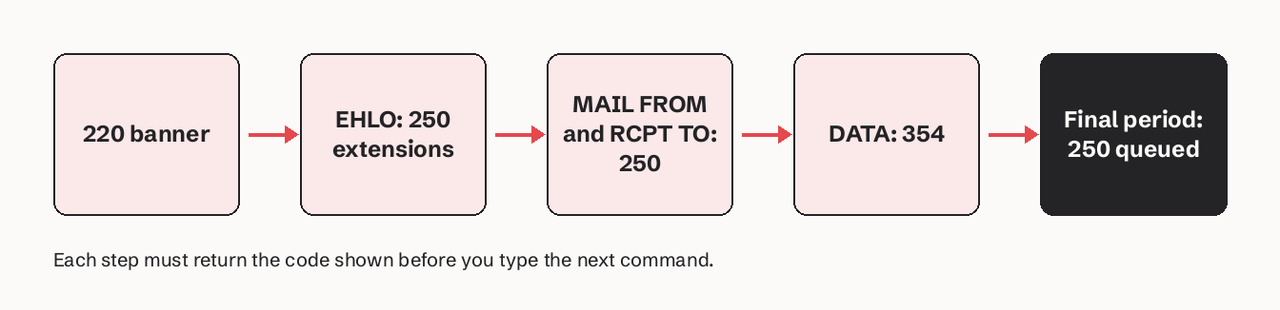
Follow these steps for a plain SMTP test on port 25.
- Find the mail server for the recipient domain with an MX lookup:
   nslookup -type=mx example.com.
   # or
   dig +short MX example.com
The trailing period stops your resolver adding a local DNS suffix.
- Connect on port 25 and wait for the banner:
telnet mx1.example.com 25
220 mx1.example.com ESMTP ready
- Introduce yourself and read the extensions the server offers:
   EHLO test.yourdomain.com
   250-mx1.example.com Hello
   250-SIZE 52428800
   250-STARTTLS
250 8BITMIME- Give the envelope sender and recipient:
   MAIL FROM:<you@yourdomain.com>
   250 2.1.0 Ok
   RCPT TO:<you@example.com>
250 2.1.5 Ok- Send the message.
354means the server is waiting for content; leave a blank line between headers and body, and end with a line holding only a period (RFC 5321):
   DATA
   354 End data with <CR><LF>.<CR><LF>
   From: you@yourdomain.com
   To: you@example.com
   Subject: telnet test

   This is a telnet SMTP test.
   .
250 2.0.0 Ok: queued as 4F2A1C- Close the session:
   QUIT
221 2.0.0 Bye- Verify: check the recipient mailbox (including spam) and the full headers for SPF, DKIM and DMARC results.
Type carefully: backspace does not work once the session is open, and a typo returns an error such as 500 5.3.3 Unrecognized command (Microsoft Learn). Our SMTP commands reference lists every command and its replies.
Why can't I use telnet on port 587 or 465?
Telnet sends plain text and cannot do TLS. Port 587 is the message submission port; it expects you to upgrade with STARTTLS before you authenticate (RFC 6409). Port 465 is implicit TLS: the TLS handshake starts the moment you connect (RFC 8314). Telnet to 587 gets you a banner and an EHLO answer, but most servers refuse AUTH until TLS is on. Telnet to 465 shows nothing readable, because the server is waiting for a TLS ClientHello. Our guide to ports 587 vs 465 vs 25 covers which one to use.
| Port | Mode | Test tool | Command |
|---|---|---|---|
| 25 | Plain, optional STARTTLS | telnet | telnet host 25 |
| 587 | STARTTLS then AUTH | openssl or swaks | openssl s_client -starttls smtp -connect host:587 -crlf |
| 465 | Implicit TLS then AUTH | openssl or swaks | openssl s_client -connect host:465 -crlf |
| 2525 | Provider fallback, usually STARTTLS | openssl | openssl s_client -starttls smtp -connect host:2525 -crlf |
How to test port 587 with openssl s_client
openssl s_client does the TLS part and then gives you the same typing session as telnet (OpenSSL docs).
- Connect with STARTTLS:
openssl s_client -starttls smtp -connect smtp.example.com:587 -crlf -quiet
-crlf turns your line endings into CRLF, which SMTP requires. -quiet also stops s_client treating a line that starts with R or Q as a renegotiate or quit command, so RCPT TO works.
- Send
EHLO test.yourdomain.comagain (the session restarts after TLS) and look for250-AUTH PLAIN LOGIN. - Authenticate (next section), then run
MAIL FROM,RCPT TOandDATAexactly as on port 25. - For port 465, drop
-starttls smtp:openssl s_client -connect smtp.example.com:465 -crlf -quiet.
How do I test SMTP authentication from the command line?
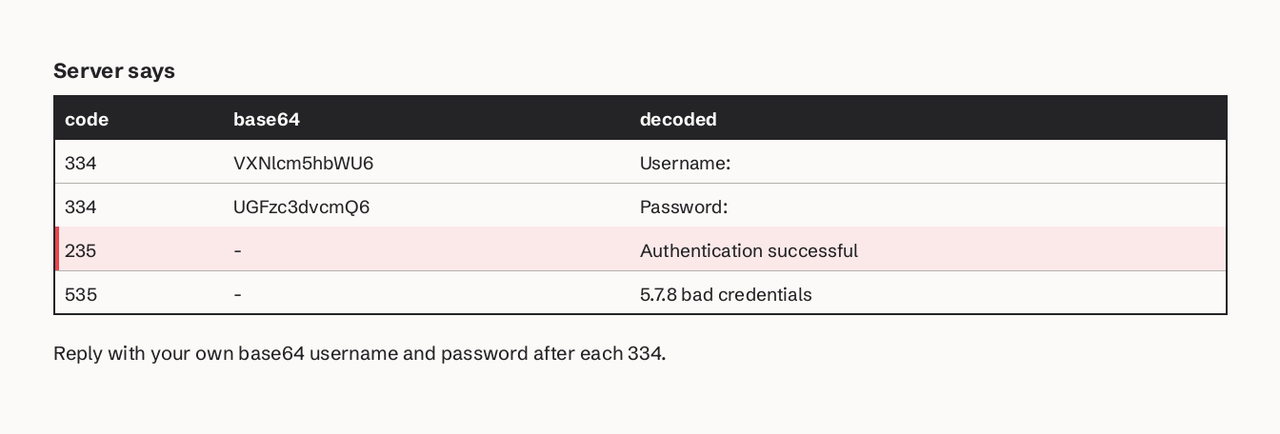
Use AUTH LOGIN or AUTH PLAIN with base64-encoded credentials (RFC 4954, RFC 4616). Encode them first:
printf '%s' 'you@yourdomain.com' | base64      # username for AUTH LOGIN
printf '%s' 'app-password' | base64            # password for AUTH LOGIN
printf '\0%s\0%s' 'you@yourdomain.com' 'app-password' | base64   # one string for AUTH PLAIN
AUTH LOGIN
334 VXNlcm5hbWU6
eW91QHlvdXJkb21haW4uY29t
334 UGFzc3dvcmQ6
YXBwLXBhc3N3b3Jk
235 2.7.0 Authentication successful334 VXNlcm5hbWU6 is base64 for "Username:", and 334 UGFzc3dvcmQ6 is "Password:". 235 means you are in; 535 5.7.8 means the credentials were rejected. Base64 is encoding, not encryption, so only do this inside TLS and use a throwaway or app password. Our SMTP authentication page explains each mechanism.
How do I send a test email from the Linux command line?
Swaks does the whole conversation in one command and prints every line, so it is the fastest repeatable test (Swaks docs):
swaks --to you@example.com --from you@yourdomain.com \
  --server smtp.example.com --port 587 --tls \
  --auth LOGIN --auth-user you@yourdomain.com --auth-password 'app-password'
Use --tls-on-connect instead of --tls for port 465, and --quit-after AUTH to test the login without sending anything. For a comparison with Mailpit, smtp4dev and hosted checkers, see our SMTP testing tools roundup.
Testing an email API instead of SMTP: SendHQ
If your product or AI agent sends through an HTTP email API, there is no SMTP session to type. SendHQ is an email API with a REST interface, an MCP server for agents and a CLI. The test is one authenticated API request from a verified domain, then reading that message's events. Until a plan is active, a new SendHQ workspace runs a controlled integration trial: it delivers only to the account's own email or a mailbox-simulator address such as success@simulator.amazonses.com, so a test cannot reach a customer by mistake (SendHQ quickstart). Accepted is not delivered in SendHQ either: each send shows its delivery, bounce or complaint event, which is the step a telnet test leaves to you.
SendHQ does not replace telnet for diagnosing your own mail server or a recipient's MX; use the steps above for that.
Common errors and what they mean
| What you see | Cause | Fix |
|---|---|---|
Could not open connection to the host, on port 25: Connect failed or a timeout | Port 25 blocked by ISP, cloud or firewall, or wrong host | Test from another network, use 587, check the MX host |
| Blank screen on 465 | Implicit TLS, telnet cannot speak it | openssl s_client -connect host:465 |
530 5.7.0 Must issue a STARTTLS command first | AUTH or MAIL before TLS on 587 | Use openssl s_client -starttls smtp |
535 5.7.8 | Wrong username, password or base64 | Re-encode with printf '%s' (no trailing newline) |
550 5.7.1 Relaying denied | Sending to an outside domain without AUTH | Authenticate, or test with a local recipient |
500 5.3.3 Unrecognized command | Typo or backspace in telnet | Retype the line cleanly |
Our SMTP error codes guide covers every reply code.
What does it mean if telnet to port 25 times out?
A timeout means no TCP connection was made: something between you and the server dropped the packets. Most often your ISP or cloud provider blocks outbound port 25 to stop spam from compromised machines. Less often the host is wrong or the server's firewall only accepts known IPs. A Connection refused reply is different: it reached a host with nothing listening on that port.
FAQ
How do I test SMTP with telnet on Windows?
Enable the Telnet Client with dism /online /Enable-Feature /FeatureName:TelnetClient, then run telnet mail.example.com 25 in Command Prompt and type the commands in the steps above. Microsoft also offers the Remote Connectivity Analyzer at testconnectivity.microsoft.com for an Inbound SMTP Email test.
Can I test STARTTLS with telnet?
You can see 250-STARTTLS in the EHLO reply and send STARTTLS to get 220 Ready to start TLS, but telnet cannot complete the handshake. Use openssl s_client -starttls smtp.
Does a 250 after DATA mean the email was delivered?
No. It means that server accepted the message for delivery. It can still bounce later or land in spam, so check the mailbox or your provider's event log.
Is telnet safe for SMTP testing?
On port 25 without AUTH, yes: nothing secret is sent. Never type a real password over plain telnet; base64 is readable by anyone on the path.
What is the difference between telnet and swaks for SMTP?
Telnet is a raw TCP client with no TLS or SMTP knowledge. Swaks speaks SMTP, handles STARTTLS, implicit TLS and AUTH, and runs the full test in one command.
Want each test message to come back with a clear delivery, bounce or complaint state? Start a SendHQ workspace and send your first email from a verified domain.