
Guides
How to Send Email from n8n (SMTP Node or Email API)
Send email from n8n with the Send Email SMTP node or an HTTP Request to an email API. Steps, retry-safe keys, delivery checks and fixes for SMTP timeouts.
Published · Updated
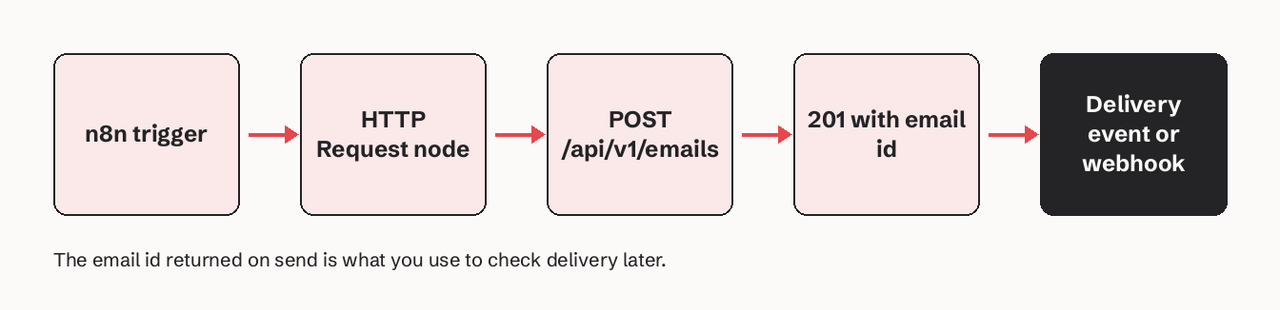
TL;DR: You can send email from n8n two ways: the built-in Send Email node, which talks SMTP, or the HTTP Request node, which calls an email API over HTTPS. With SendHQ you send through the HTTP Request node to POST https://sendhq.cc/api/v1/emails with an Idempotency-Key, then read the delivery result back from the API or a webhook. Use SMTP for a quick internal alert; use an API when the email matters to a customer.
Create a SendHQ workspace and send your first email from n8n
To send email from n8n, add a Send Email node, create an SMTP credential (host, port 465 with SSL/TLS on or 587 with it off, user and password), and map From, To, Subject and the body. That works for any mailbox with SMTP access. It stops working well in three cases: when your host blocks SMTP ports (DigitalOcean blocks 25, 465 and 587 on every Droplet), when you need replies in the same thread (the node cannot set In-Reply-To or References), and when you need to know whether the email was delivered. For those, send with the HTTP Request node to an email API. This guide shows both, with SendHQ as the API example, and was checked against the n8n and SendHQ docs on 2026-11-28.
Should you use SMTP or an email API in n8n?
Use the Send Email (SMTP) node when the email goes to you or your team and a lost message is not a problem. Use an email API through the HTTP Request node when the email goes to customers, when a retry must not send twice, or when the workflow has to react to a bounce.
| Need | Send Email node (SMTP) | HTTP Request to SendHQ API |
|---|---|---|
| Transport | SMTP on 465, 587 or 25 | HTTPS on 443 |
| Works where SMTP ports are blocked | No | Yes |
| Reply in an existing thread | No: no In-Reply-To or References (n8n docs) | Yes: reply_to_email_id sets the thread headers |
| Safe retry without a duplicate | No built-in key | Idempotency-Key header, replay returns the first result |
| Delivery and bounce result | SMTP acceptance only | delivered, bounced, complained events and webhooks |
| Human approval step | Yes: Send and Wait for Response | Not built in; use n8n Wait or Form nodes |
| Cost | Your mailbox or SMTP provider | From $9/month, 50,000 emails (pricing) |
What SendHQ adds to an n8n workflow
SendHQ is an email API with a REST contract that an n8n HTTP Request node can call directly. For this job the parts that matter are:
- One endpoint to send.
POST https://sendhq.cc/api/v1/emailswithAuthorization: Bearer re_...returns201withid,providerMessageIdandthreadId(quickstart). - Retry-safe sends. An
Idempotency-Keyof up to 200 characters makes n8n's Retry on Fail safe: the same key with the same JSON replays the stored response withIdempotent-Replayed: true, and a changed payload under the same key returns409(sending docs). - Real threading. Set
reply_to_email_idand SendHQ derivesMessage-ID,In-Reply-ToandReferences, which the Send Email node cannot set. - Delivery state. Every email moves through
queued,sent,delivered,bounced,complainedorfailed; read it withGET /emails/:id/eventsor receive signed webhooks. - Verified domains only. You can only send from a domain whose DKIM, SPF and DMARC records you published. There is no free allowance: sending needs a paid plan (Starter is $9/month for 50,000 emails and 25 domains).
SendHQ has no dedicated n8n node today, so the setup below uses the core HTTP Request node, which every n8n install has.
What you need
- n8n Cloud or self-hosted n8n, any current 1.x version with the HTTP Request node.
- A SendHQ workspace on a paid plan, with an API key from API keys in the dashboard.
- A sending domain added under Domains and verified (DKIM, SPF with
include:amazonses.commerged into any existing SPF record, DMARC).
Step by step: call the SendHQ API from an HTTP Request node
Six steps take you from an empty workflow to a sent, tracked email.
- Create a Header Auth credential. In n8n, go to Credentials > Add credential > Header Auth. Set Name to
Authorizationand Value to your key with the Bearer prefix:
   Name:  Authorization
   Value: Bearer re_your_key_here
The key stays in n8n's credential store, not in the workflow JSON, so exporting or sharing the workflow does not leak it.
- Add an HTTP Request node after your trigger and set:
   Method:                 POST
   URL:                    https://sendhq.cc/api/v1/emails
   Authentication:         Generic Credential Type > Header Auth
   Send Headers:           on
Send Body: on, Body Content Type: JSON, Specify Body: Using JSON- Add the idempotency header. Under Send Headers, add one header. Build the key from something stable in your data, such as the user ID and the reason for the email, never from the time:
   Name:  Idempotency-Key
Value: welcome-{{ $json.userId }}- Write the JSON body. Switch the JSON field to an expression and map your fields. The
fromaddress must be on your verified domain:
   {
     "from": "Acme <hello@mail.acme.com>",
     "to": ["{{ $json.email }}"],
     "subject": "Welcome to Acme, {{ $json.firstName }}",
     "html": "<p>Hi {{ $json.firstName }}, your account is ready.</p>",
     "text": "Hi {{ $json.firstName }}, your account is ready."
   }
Send both html and text. SendHQ can generate text from HTML, but an authored text part is more reliable.
- Turn on retries. In the node's Settings, enable Retry on Fail, set Max Tries to
3and Wait Between Tries (ms) to5000. Because the idempotency key and body are identical on each try, a retry after a timeout cannot send the email twice. - Run it and keep the ID. Click Execute step. A
201response looks like this:
   {
     "id": "em_…",
     "providerMessageId": "provider-id",
     "threadId": "em_…"
   }
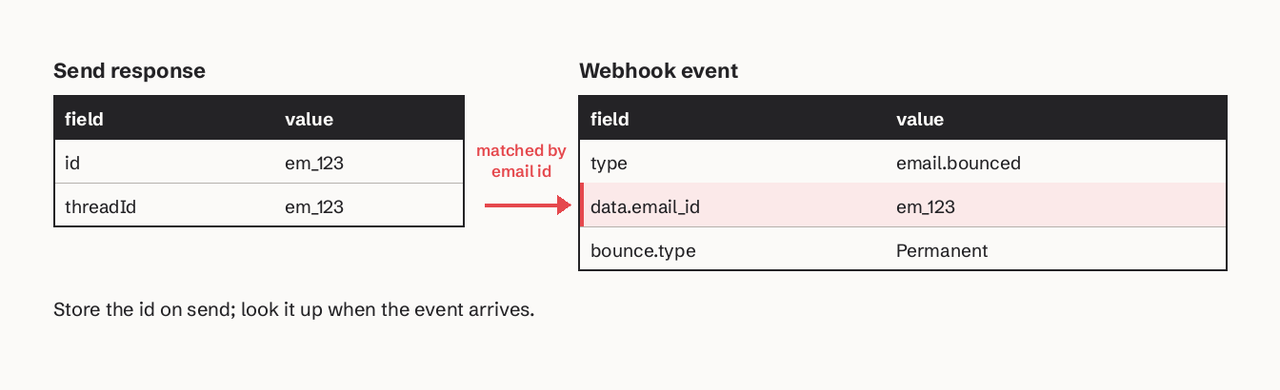
Store id next to the record that caused the email (a Google Sheet row, a database row, a CRM note). You need it to check delivery.
The SMTP route: Send Email node setup and why it times out
The Send Email node is the fastest route when you already have a mailbox with SMTP access.
- Add a Send Email node and create an SMTP account credential with your provider's host, user and password (Gmail and Outlook need an app password).
- Set the port and toggle together:
465with SSL/TLS on, or587with SSL/TLS off so the connection upgrades with STARTTLS (n8n SMTP credential docs). - Fill From Email, To Email and Subject, then pick Email Format: Text, HTML or Both.
- Under Options, turn Append n8n Attribution off, or every message ends with "This email was sent automatically with n8n".
- Add attachments by naming the binary property, for example
data, from a previous node.
Use the Send and Wait for Response operation when a person has to approve something before the workflow continues; it pauses the execution until they click a button or submit a form. That is the one thing this node does that an API call does not do by itself.
Why does the n8n Send Email node fail or time out?
A Send Email node that hangs until it times out is almost always a connection problem, not a message problem. Check these in order:
- Port and SSL/TLS do not match. Port 465 with SSL/TLS off, or 587 with it on, makes the handshake stall. Match them as in step 2 above. Our SMTP port guide explains the difference.
- Your host blocks SMTP. DigitalOcean blocks ports 25, 465 and 587 on all Droplets by default, including traffic through a Reserved IP (DigitalOcean). Other clouds limit port 25. A self-hosted n8n there cannot use SMTP at all; HTTPS on 443 is not affected.
- n8n Cloud. n8n does not document an SMTP block on Cloud, and an n8n team member said in a June 2026 community thread that Cloud should not block outbound SMTP, pointing at the mail service or the SSL/TLS settings instead. If it still hangs, your provider may be refusing n8n Cloud's changing IP addresses. Switching to an HTTPS API removes the question.
- Authentication refused. Gmail and Outlook reject a normal password over SMTP; use an app password.
Which API errors can the HTTP Request node return?
Errors on the HTTP Request route are explicit, each with a status and a code:
| Status and code | Meaning | What to do in n8n |
|---|---|---|
401 | Missing or wrong API key | Fix the Header Auth credential; do not retry |
402 subscription_required | No active plan | Choose a plan, then rerun |
403 | From domain not verified, or policy block | Verify the domain or fix from |
409 | Same Idempotency-Key with a different body | Use a new key for a new email |
422 | Validation error or suppressed recipient | Fix the data; do not retry |
429 daily_limit_reached | Daily sending ladder reached | Wait until midnight UTC (Retry-After) |
502 / 503 | Transient | Retry on Fail with the same key |
Source: SendHQ errors and retries. For bulk sends, the HTTP Request node's Batching option (Items per Batch, Batch Interval) spaces requests out; see our email API rate limits reference.
How do I check the email was delivered?
An accepted request is not a delivered email. The 201 means SendHQ stored and queued it; the recipient's server decides later. You have two ways to find out in n8n.
Option A: poll once. Add a Wait node (for example 2 minutes), then a second HTTP Request node:
Method:          GET
URL:             https://sendhq.cc/api/v1/emails/{{ $json.id }}/events
Authentication:  Header Auth (same credential)
The response is {"data": [...], "count": n} with the delivery, bounce, complaint, open and click events. GET /emails/{{ $json.id }}/delivery returns the timeline with bounce and complaint reasons and a single status you can branch on with an If node.
Option B: receive webhooks. Add a Webhook node in a separate workflow, copy its production URL, and register it with SendHQ:
curl https://sendhq.cc/api/v1/webhooks \
  -H "Authorization: Bearer $SENDHQ_API_KEY" \
  -H "Content-Type: application/json" \
  -d '{"url":"https://your-n8n.example.com/webhook/sendhq","events":["email.delivered","email.bounced","email.complained"]}'
Each event arrives as JSON with type, created_at and data.email_id, the same ID you stored on send. A bounce includes data.bounce.type (Permanent or Transient) and the receiving server's diagnostic, such as 550 5.1.1 user unknown. SendHQ signs deliveries with the Standard Webhooks scheme and retries a failed delivery up to 8 times over about 27 hours (webhooks docs). Verify the webhook-signature header in a Code node before trusting the payload; our webhook reliability patterns cover the rest.
How do I reply in the same thread from n8n?
Pass the SendHQ ID of the email you are answering as reply_to_email_id. SendHQ sets In-Reply-To, References and a new Message-ID, so Gmail and Outlook show the reply in the same conversation:
{
  "from": "Support <support@mail.acme.com>",
  "to": ["{{ $json.customerEmail }}"],
  "subject": "Re: {{ $json.subject }}",
  "text": "{{ $json.replyText }}",
  "reply_to_email_id": "{{ $json.originalEmailId }}"
}
This is the case the n8n docs list as a limitation of the Send Email node. It matters for AI agent workflows in n8n that answer inbound email; see email API for AI agents for the receive side.
FAQ
How do I send email in n8n?
Add a Send Email node with an SMTP credential, or an HTTP Request node that POSTs JSON to an email API such as https://sendhq.cc/api/v1/emails with a Bearer API key. Map From, To, Subject and the body from earlier nodes with expressions.
Should I use SMTP or an email API in n8n?
Use SMTP for internal notifications from a mailbox you already have. Use an API for customer email: it works over HTTPS where SMTP ports are blocked, supports idempotent retries, threads replies and reports delivery and bounces.
Why does the n8n Send Email node fail on Cloud?
Usually a port and SSL/TLS mismatch (465 needs SSL/TLS on, 587 needs it off) or the mail provider refusing the login or the sending IP. n8n does not document an SMTP block on Cloud. Sending through an HTTPS API avoids SMTP entirely.
How do I check the email was delivered?
Keep the id from the send response, then call GET /api/v1/emails/:id/events after a Wait node, or register an n8n Webhook node for email.delivered and email.bounced events. A 201 on send means accepted, not delivered.
Can I send attachments with the HTTP Request node?
Yes. SendHQ accepts attachments on a send; see the sending docs for the attachment fields and size limit. In the Send Email node, name the binary property instead.
Does n8n retry cause duplicate emails?
With SMTP it can: a retry after a timeout may send a second copy. With SendHQ, the same Idempotency-Key and body return the first result, so Retry on Fail is safe.
Start sending from n8n
Create a workspace, verify your domain and paste the HTTP Request settings above into your workflow. Your first email returns an ID you can track to delivery.