
Product engineering
Transactional Email Templates: Every Email a SaaS Sends, With a Free Template for Each
Transactional email templates cover verification, password reset, receipts, failed payments and security alerts. Get a free template for each one.
Published · Updated
TL;DR: A SaaS product needs about a dozen transactional email templates: verification, magic link, password reset, welcome, security alert, receipt, failed payment, trial ending, plan limit and cancellation. SendHQ's template library has a written, previewable HTML template for each of these moments, and any template you pick (SendHQ's, MailPace's, Postmark's or Litmus's) can be published in SendHQ as a versioned hosted template with typed variables and sent by key in one API call.
Create a SendHQ account to publish your templates and send them from a verified domain with delivery events per message.
Transactional email templates are ready-made HTML layouts for the emails your app sends because a user did something: signed up, asked for a reset link, paid, failed to pay, or signed in from a new device. Most lists of transactional email templates show one generic layout. What you actually need is a template for each event, with the content that event requires: an expiry time on a reset link, line items and a reference on a receipt, a next date on a failed payment notice. The free sources below cover every one of those emails. Open source sets from MailPace, Postmark and Mailgun are MIT licensed, so you can use them commercially; MailPace's is the only one of the three updated in 2026 (last commit 2026-11-10, read 2026-11-28).
What does SendHQ give you for transactional email templates?
SendHQ is an email API for products and AI agents, and it covers templates at two levels.
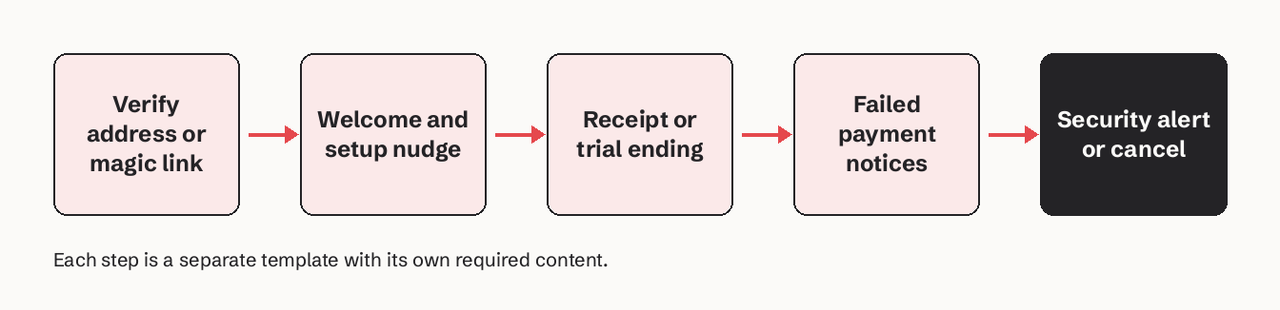
A written template library. The SendHQ template library has six core templates (email verification, password reset, magic link sign-in, SaaS welcome, payment receipt and account security alert) plus a lifecycle set written in the order customers meet them: an onboarding nudge 2 days after sign-up, three onboarding tips over 4 days, trial ends in 3 days, trial ended, checkout not finished (1 hour after), payment failed with a final notice 7 days later, close to a plan limit, after cancellation and a win back 30 days after cancelling. Every template uses explicit {{variable}} placeholders, a hidden preheader, a responsive viewport, presentation-table roles and readable fallback links for security actions. Previews stay in your browser and send no email.
Hosted templates in the API. Per the hosted templates docs:
- Each template has a stable ID and key, one editable draft and immutable published releases.
- Variables are declared with keys, types, required state and defaults. Rendering fails with
422when the data does not match the published contract, and inserted values are escaped by context. - Drafts carry a revision:
PUT /templates/:id/draftreturns409if another editor saved first. - Every send records the template, release, compiler version and rendered-content hash, so an old message can be traced to the exact content that produced it.
Sending a published template by key:
POST /emails
{
  "from": "hello@example.com",
  "to": ["customer@example.net"],
  "template": {
    "key": "account-welcome",
    "data": { "first_name": "Asha" }
  }
}
A personalized template send takes exactly one To recipient and no Cc or Bcc; use the batch endpoint for many individualized recipients. Pricing starts at $9 a month for 50,000 emails on Starter (SendHQ pricing, read 2026-11-28). What SendHQ does not do: it has no drag-and-drop visual editor. You bring HTML (written, from the library, or exported from a tool below) and SendHQ versions, validates and sends it.
What transactional emails does every SaaS need?
Every SaaS needs at least these templates, grouped by the event that triggers them. The "must contain" column is what makes each one work.
| Trigger | Must contain | Free template | |
|---|---|---|---|
| Email verification | Sign-up | One button, fallback URL, expiry time | SendHQ, MailPace "confirm address" |
| Magic link sign-in | Login request | Device context, expiry, "not you?" path | SendHQ |
| Password reset | Reset request | Single-use link, expiry, ignore-if-not-you | SendHQ, MailPace, Postmark |
| Welcome | Account created | One first action, a real support route | SendHQ, MailPace, Postmark |
| Security alert | New sign-in or change | Event, time, device, separate unexpected path | SendHQ, MailPace "new sign-in" |
| Receipt or invoice | Payment | Merchant, line items, total, reference | SendHQ, Postmark, Waypoint |
| Failed payment | Charge declined | What changes and when, update-card link | SendHQ, Postmark "dunning" |
| Trial ending | 3 days before end | End date, what happens, how to keep access | SendHQ |
| Account closed | Cancellation | End date, data retention, way back | SendHQ, MailPace |
Verification, reset, magic link and security alerts are the ones to get right first: a missing one blocks sign-up or sign-in. Our email verification email examples go through eight variants of the first email alone.
Where can I get free transactional email templates?
These sources are free and each one covers a different need.
Ready-written templates per event
- SendHQ template library: free, no account to preview and copy. Best when you want copy as well as layout, written per lifecycle moment with timing.
- MailPace templates: MIT, built with Maizzle and Tailwind CSS, with dark mode and plain-text versions of welcome, confirm address, reset password, receipt, new sign-in and account closed. The most actively maintained open source set.
- Postmark templates: MIT, includes welcome, reset password, receipt, invoice, dunning and comment notification in three layouts. Worth it for the dunning and invoice templates; CSS sits in a style block, so inline it before sending.
- Mailgun transactional email templates: MIT, three templates (action, alert, billing) tested with Email on Acid, with pre-inlined copies in
/templates/inlined. Best as a minimal base you extend. - Waypoint responsive transactional templates: MIT, 24 templates including OTP code, subscription invoice, payout and delivery notices. Worth it for marketplace and commerce events the others skip.
Designed single templates from email tool vendors
- Litmus transactional email template: free download, dark mode ready, fully responsive and Litmus-tested. Best for order confirmations and shipping updates.
- Campaign Monitor transactional templates: free gallery of designed layouts. Useful for visual references before you write your own.
- Mailmodo transactional templates: 8 free templates edited in a no-code drag-and-drop editor. Worth it if non-engineers will own the copy.
Frameworks and base layouts to build your own
- React Email: MIT, write templates as React components and render them to HTML. Best for teams already in TypeScript.
- MJML templates: MJML compiles to responsive table HTML. Worth it when you want to edit readable markup instead of nested tables.
- Cerberus: MIT responsive patterns, last updated 2026-09-14. Best as a tested base layout.
- Lee Munro's responsive HTML email template: MIT, one clean single-column responsive layout, last updated 2024-08-20.
Checking what you send
- Can I email: which HTML and CSS features each email client supports. Check it before using any CSS beyond basics.
- Good Email Code: accessible, client-safe code patterns for buttons, images and layout.
Our open source transactional email templates guide compares the open source sets in depth by license, stack and upkeep.
Which templates are open source and safe to use commercially?
MailPace, Postmark, Mailgun, Waypoint, React Email, Cerberus and Lee Munro's template are all MIT licensed, which allows commercial use, modification and redistribution as long as the license notice stays with the code. Two cautions: the mjmlio/email-templates repo has no license file detected by GitHub, so ask before reusing those layouts, and vendor gallery templates (Litmus, Campaign Monitor, Mailmodo) come under each vendor's own terms, not an open source license. Read those terms before you ship one.
How do I send a template through an API?
Publish the HTML as a hosted template, declare its variables, then send by key with the data. In SendHQ that is four steps:
- Create the template with your HTML and declare variables such as
first_name(string, required) andreset_url(string, required). - Render it with sample data and fix every error finding.
- Send a test snapshot to an address you control.
- Publish the draft as an immutable release, then call
POST /emailswithtemplate.keyandtemplate.dataas shown above.
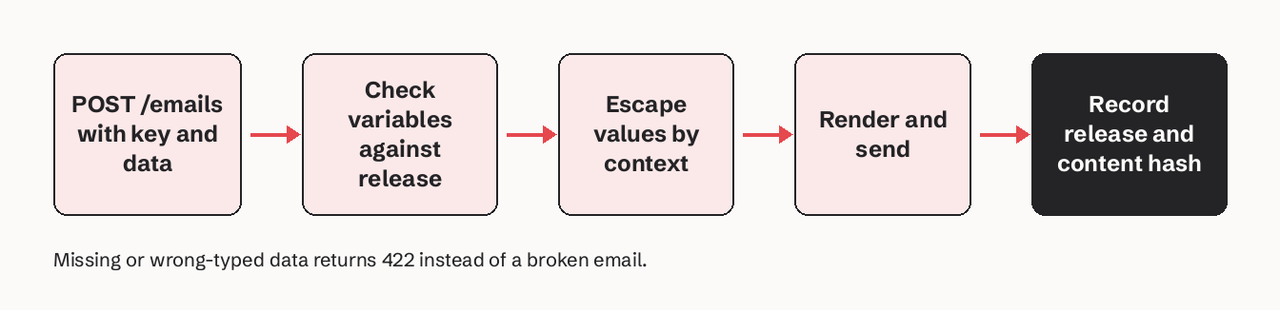
If you keep templates in your own code instead, render them to HTML and plain text in your app and send the result as html and text. You lose the release history and the 422 contract check, but the API call is the same.
Start here
- Copy the verification, password reset and welcome templates from the SendHQ library or MailPace.
- Add your logo and colors, keep one action per email, and write a plain-text version.
- Check rendering against Can I email for any CSS you add, and run the free SendHQ email tools preflight check on the final HTML.
- Publish each as a hosted template and send from a verified domain.
- Add receipt, failed payment and security alert templates before you take your first payment.
FAQ
Where can I get free transactional email templates?
The SendHQ template library, MailPace, Postmark, Mailgun and Waypoint on GitHub, and the Litmus, Campaign Monitor and Mailmodo galleries all offer them at no cost. The GitHub sets are MIT licensed; the vendor galleries use their own terms.
What is the difference between a transactional and a marketing email template?
A transactional template is sent because of one user's action and carries information they need, such as a reset link or receipt. A marketing template goes to a list to promote something and needs an unsubscribe link and marketing consent.
Do I need to inline CSS in transactional email templates?
For older clients, yes. Postmark's set keeps CSS in a style block and tells you to inline it before sending; Mailgun ships inlined copies. Templates built with MJML, Maizzle or React Email handle this at build time.
How many transactional email templates does a SaaS need?
Start with three (verification, password reset, welcome), add receipt, failed payment and security alert before charging, and add trial and cancellation emails as billing grows. That is about nine to twelve templates.
Should transactional emails have a plain-text version?
Yes. A plain-text part helps clients that block HTML and screen readers, and MailPace ships one with every template. Send it as the text field next to html.
Create a SendHQ account and publish your first transactional email template as a versioned release you can send by key.